Sign in with Minecraft
To log into the website, simply start Minecraft with the latest version of LabyMod and click on your head in the Minecraft main menu or in the LabyMod settings.
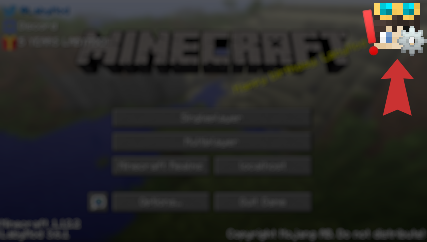
If you have issues starting Minecraft with LabyMod or cannot find the head in your main menu, make sure that you have the latest version of LabyMod.
Please note that you must have purchased Minecraft Java Edition to register.
Upgrade your Minecraft client experience to the next level.
Download LabyMod 4
After installing the LabyMod Launcher, you can start the LabyMod 4 Client with your desired Minecraft version.
Download LabyMod 4 Other
 You need an official Minecraft: Java Edition account to use LabyMod!
LabyMod 4 Client Changelog
We’re excited to introduce the next update for LabyMod, bringing major improvements to core features and enhancing the way you connect and play with others. This update focuses on deeper integration, smoother visuals, and an overall more seamless experience especially when playing together with friends.
New & Improved Features
Worldsharing
Worldsharing is a completely new system that replaces the previous LAN Sharing feature. It has been rebuilt from the ground up and is now fully integrated into LabyMod, offering a more stable, reliable, and synchronized way to share your worlds with friends.
Server List
A new server list has been introduced to improve how you discover and join sessions. You can now:
- View active Worldsharing worlds
- See which servers your friends are currently playing on
This allows you to jump into games faster and stay connected with your friends more easily.
Auto Reconnect
Staying connected is now more convenient. With Auto Reconnect built into LabyMod, you can quickly return to your game after connection interruptions without manual effort.
IP Protection
Your privacy is now better protected. With the new IP Protection feature, your real IP address is no longer sent when pinging servers. This helps prevent unwanted exposure of your network information and improves overall security while playing online.
Rendering & Visual Improvements
Menu Blur
Menu Blur has been fixed and now works reliably across all supported versions. In addition, a new setting called Enhanced Contrast improves the readability of the interface while blur is enabled, making menus clearer and easier to use.
Motion Blur
Motion Blur has been completely overhauled and now uses a per-pixel velocity-based approach. This results in smoother and more accurate visual effects, especially during fast movements.
Please note that Motion Blur is currently not compatible with OptiFine and Iris.
Bug Fixes & Improvements
We have fixed a variety of bugs and improved overall stability across the client. This includes minor UI fixes, performance optimizations, and general quality of life improvements to ensure a smoother experience.
- Improved model loading (Cosmetic, Emotes)
User Interface
- Fixed Items not rendering in UI (IDEA-20167)
- Fixed Entities no longer rendered in UI (IDEA-20166)
- Fixed FancyFont Warning happens when Fancy Font is disabled (IDEA-20144)
- Fixed [26.1-pre-1] crossair is not visible (IDEA-20131)
- Fixed [26.1-pre-1] menu disappear (IDEA-20130)
- Fixed [26.1-pre-1] hud widgets become invisible (IDEA-20127)
- Fixed Menu blur isn't working (IDEA-19365)
Ingame & World
- Fixed Underline/Strikethrough effects render above UI (IDEA-20145)
- Fixed [26-pre-1] black background and stars (IDEA-20129)
- Fixed [26-pre-1] screen freezes when looking at entity (IDEA-20128)
- Fixed Incorrect text tooltip rendering (IDEA-19396)
Mechanics
- Fixed game crashing when uploading skin from computer (IDEA-20133)
Cosmetic & Emote
- Fixed Cosmetics disappear when HDSkins is installed (IDEA-19806)
Crash
- Fixed Game crashes on keybind change and SP join (IDEA-19423)
Rendering
- Fixed Nametags still render bad (IDEA-19314)
- Fixed GUI slots render weird (IDEA-19313)
- Fixed Marker bug (IDEA-20185)
- Fixed Cosmetics in inventory don't sample lightmap correctly (IDEA-20198)
- Added support for Minecraft 26.1-pre-1
- Added support for server-managed features (Servers can now allow fancy fonts while using a server resource pack)
- Added culling for world objects (markers, waypoints, loot boxes)
Improvements
- Internal rendering refactors to prepare for Vulkan support
Bugfixes
Ingame & World
- Fixed Game still blurry (IDEA-20075)
Mechanics
- Fixed Skin Type (IDEA-19971)
Addons
- Fixed waypoint text not being centered on the minimap
- Added support for Minecraft 26.1-snapshot-10
Bugfixes
User Interface
- Fixed Screenshot section is not sorted correctly (IDEA-20068)
Minecraft Chat
- Fixed Unable to input Chinese. (IDEA-20067)
Ingame & World
- Fixed Visual and control bugs post 4.3.54 (IDEA-20026)
Rendering
- Fixed The whole game is a bit blurry (IDEA-19376)
OptiFine related
- Fixed Block outlines are not rendered at all (IDEA-20025)
Bugfixes
Rendering
- Fixed World Icon is no longer being created (IDEA-20019)
Crash
- Fixed Crash when starting labymod (IDEA-20020)
- Added support for Minecraft 26.1-snapshot-9
Bugfixes
User Interface
- Fixed Direct connect pinging animation does not work (IDEA-20010)
- Fixed LabyMod keybindings are not sorted in the Keybinds menu (IDEA-20003)
- Fixed Server list renders widgets out of bounds (IDEA-19954)
Widget Editor
- Fixed Sidebar resize indicator (IDEA-19989)
Mechanics
- Fixed Code Of Conduct ack not saved in server list entry (IDEA-19979)
Addons
- Fixed Laby´s minimap crash (IDEA-19891)
OptiFine related
- Fixed Block Outline renders in adventure mode with OptiFine (IDEA-20012)
- Fixed OptiFine/Iris crashes the game when PaperDoll is placed (IDEA-19951)
- Fixed Zoom button is not replaced correctly (IDEA-19928)
Crash
- Fixed Unable to start 1.16.5, 1.17.1 & 1.18.2 (IDEA-20013)
Forge/Fabric Mods
- Fixed Waila does not reset its state correctly (IDEA-19389)
- Fixed Sodium doesn't work on the snapshot release (IDEA-20014)
Bugfixes
- Fixed Multiplayer server list fps drops (IDEA-19908)
- Fixed Paper Doll "Show name" setting is broken. (IDEA-19909)
- Fixed Object components are not displayed with the fancy font (IDEA-19925)
- Fixed When i press F2 to take a screenshot the game crash (IDEA-19926)
Bugfixes
- Fixed an issue where playing without OptiFine in 1.8.9 & 1.12.2 resulted in a black screen
New Features
- Added support for Minecraft 26.1-snapshot-5
- Added Disable Cosmetics in first person (IDEA-18505)
- Added support for OptiFine 1.21.10 & 1.21.11
Bugfixes
- Fixed an issue where Fancy Font was using incorrect values for rendering
- Fixed an issue where OptiFine was handling textures incorrectly in 1.8.9 & 1.12.2
Improvements
- Improved logging for system-related issues
Bugfixes
- Fixed an issue where OptiFine caused a black screen in versions 1.8.9 and 1.12.2.
- Fixed an issue where some cosmetics/emotes played wrong animations.
Bugfixes
- Fixed Emotes despawn from emote wheel with time (IDEA-19887)
- Fixed LabyMod crashes when a message is deleted from the chat
New Features
- Added support for Minecraft 26.1-snapshot-4
Improvements
- Improved HTTP requests to our services are processed slightly faster
- Improved Global Widgets Disabled Warning
Bugfixes
- Fixed Skin uses linear filtering (IDEA-19852)
- Fixed ghost boss bar (IDEA-19876)
- Fixed an issue where the spectator was not sorted correctly in the table list
- Fixed an issue where the screenshot browser displayed the wrong year
Minecraft versions from 1.8.9 to 1.21.11 will use Java 21 for the time being until server owners stop corrupting their resource packs
- Added support for Minecraft 26.1-snapshot-2
- Java 25 is now required to run LabyMod
Bugfixes
- Fixed cosmetics showing up at the bottom left (IDEA-19743)
- Fixed Fancy Font is no longer activated after a disconnect (IDEA-19768)
- Fixed When not using custom title screen icons are hidden (IDEA-19789)
- Fixed Chat messages are shifted down by 8 pixels (IDEA-19824)
- Fixed Name History lookup does not work (IDEA-19832)
- Fixed Screenshot edit brush applies the wrong color (IDEA-19819)
- Fixed Slider Issue (IDEA-19841)
Bugfixes
- Fixed Book title entry overlaps with the name of the signator (IDEA-19530)
- Fixed images in LabyChat get corrupted when scaled down
- Fixed Wrong server info if you paste the server name (IDEA-18544)
- Fixed wrong spray-cooldown (IDEA-16509)
- Fixed Old creative menu doesn't work properly (IDEA-16308)
- Fixed page button being displayed as a standard button in a book instead of the next/previous sprite
- Fixed Waila is not displaying Itemframe & painting (IDEA-19404)
- Fixed Structure block uses the fancy theme (IDEA-19405)
- Fixed PlayerNameTagRenderEvent not called in 1.21.10 (IDEA-19744)
- Fixed 1.21.11 crashes in rare cases while in singleplayer worlds
- Fixed All display items are shown twice (IDEA-19773)
- Added support for Minecraft 1.21.11
Bugfixes
- Fixed cursor changes won't work (IDEA-19244)
- Fixed cape displayed the wrong way in the ui (IDEA-19669)
- Fixed Recent cursor fix causes crash upon start up (IDEA-19730)
- Added support for Minecraft 1.21.11-rc1
Bugfixes
- Fixed Heart display overlaps with rank in Waila widget (IDEA-19604)
- Fixed Favorited symbols bug (IDEA-19614)
- Fixed Highlighted text appears in a random place in labychat (IDEA-19702)
- Fixed Sometimes you cannot send chat messages (IDEA-14546)
Bugfixes
- Fixed an issue with emotes and cosmetics
Bugfixes
- Fixed several crashes caused by faulty drivers
- Fixed an issue where emote props and custom emote models were not lit correctly.
- Fixed flying minime coloring bug (IDEA-19629)
- Dynamic Background will use the Winter Theme from December 1st to December 31st
- Added support for Minecraft 1.21.11-pre3
Bugfixes
- Fixed Skin customisation menu crashes, cosmetics broken (IDEA-19648)
- Fixed an issue where the Old Damage setting could not be disabled
- Fixed Old slowdown animation canceled sprinting (IDEA-18862)
- Fixed Missing translation for "Unknown Host" (IDEA-19445)
- Fixed Missing translation (IDEA-19633)
- Fixed [1.21.11-pre3] Textures using linear filtering (IDEA-19656)
- Fixed [1.21.11-pre3] cant change settings (IDEA-19657)
- Fixed Sodium prevents text from being rendered (IDEA-19663)
Bugfixes
- Fixed Lightoverlay addon broken (IDEA-19619)
- Fixed BetterFood HUD Addon crashes game (IDEA-19621)
- Fixed Some nametags are not displayed (IDEA-19627)
- Fixed an issue where the shaders for the vanilla rendering path were not loaded correctly when Fabric was loaded.
- Improved Scoreboard HudWidget
Bugfixes
- Fixed an issue where text was not displayed on AMD GPUs (IDEA-19620)
- Fixed a crash when removing Hud Widgets
- Added support for Minecraft 1.21.11-pre1
- Added a feature that allows servers to set custom badges without a resource pack
Improvements
- Improved custom nametag rendering (Subtitles, Groups and Icons)
- Improved performance of the VoiceChat HudWidget
Bugfixes
- Fixed a performance issue
- Fixed a memory leak
- Fixed several native crashes
- Fixed a crash caused by walking pet nametags
- Fixed visual rendering issues with the shared Spotify track nametag
- Fixed Spotify shared track tag has some z-fighting issues (IDEA-18424)
- Fixed Spotify track tag is not visible (IDEA-18702)
- Fixed VoiceChat "private channel" bug (IDEA-19585)
- Fixed Health is not displayed in Waila (IDEA-19401)
- Fixed Tablist breaks when teams are removed (IDEA-19579)
- Fixed VoiceChat cannot be installed through the Addon Store (IDEA-19582)
- Fixed Shader mods cause issues with the new rendering (IDEA-19584)
- Fixed Dialog Notice Button (IDEA-19613)
- Added an experimental feature that allows adjusting the player list limit. This feature is disabled by default. If any UI issues occur, such as the player list extending beyond the screen, there is no need to report them. Simply leave the feature disabled.
Bugfixes
- Fixed an issue where server advertisements were saved under the wrong server address
Bugfixes
- Fixed an issue that could cause the game to crash under certain circumstances
- Fixed a bug that prevented server advertisements from being removed
Bugfixes
- Fixed lss files are not parsed correctly (IDEA-19560)
Bugfixes
- Fixed Value is frozen and cannot be modified [1.21.3-1.21.8] (IDEA-19559)
- Added a new event button to the title screen that appears only when special events are active
Bugfixes
- Fixed an issue where the height of HUD widgets was not calculated correctly
- Fixed Crash when having player/sprite component in chat (IDEA-19533)
- Fixed Settings are reset to default every time you log into (IDEA-19549)
Bugfixes
- Fixed an issue where the Player/Sprite component was not being rendered
- Fixed OpenGL matrix stack is not emulated correctly (IDEA-10597)
- Fixed World creation screen doesn't show options (IDEA-19473)
- Fixed Connect/Disconnect screen behavior differs from Vanilla (IDEA-19515)
- Added support for Minecraft 25w42a
Bugfixes
- Fixed Font rendering causes the game to crash (IDEA-19182)
- Fixed Emotes are not animated correctly (IDEA-19420)
- Fixed Kicked from servers when using player/sprite component (IDEA-19492)
[The issue causing players to be kicked from servers when using the player or sprite component has been resolved. However, these components are currently not being rendered. We’re aware of this and are actively working on a fix.]
- Added support for Minecraft 25w41a
Bugfixes
- Fixed an issue where shaders were not being parsed correctly
- Fixed Vanilla Text effects are not rendered (IDEA-19480)
- Added support for Minecraft 1.21.10
Bugfixes
- Fixed TNT causes wall hack (IDEA-19256)
- Fixed Duplicated Texture Glitch (IDEA-19302)
- Fixed Custom Font UI-Elements rendering too dark (IDEA-19317)
- Fixed Serverside tablist broken with Custom Player-List (IDEA-19318)
- Fixed Chat is not rendering like it did before the update (IDEA-19322)
- Fixed shortcuts no longer work (IDEA-19411)
- Fixed [Laby's Waypoints] Create Waypoint dialog render issue (IDEA-19448)
Bugfixes
- Fixed an issue where the “Blockbuild” feature automatically pressed the left mouse button (1.21.9 & 1.21.10-rc1)
- Added support for Minecraft 1.21.10-rc1
Bugfixes
- Fixed Game is crashing, when mannequin has original mc cape (IDEA-19424)
Bugfixes
- Fixed Nametag Cosmetic is not displayed (IDEA-19408)
Bugfixes
- Fixed Random crash while doing nothing (IDEA-19407)
- Fixed Waila crashes when looking at Ender Dragon (IDEA-19410)
- Fixed Ingame shop does not show names and prices (IDEA-19412)
- Fixed Edit Note in Friend Chat leads to crash (IDEA-19415)
- Fixed Adding chat filter crashes game (IDEA-19417)
- Fixed Game is crashing, when wearing Elytra (IDEA-19418)
- Fixed Addon description is not displayed. (IDEA-19419)
- Added support for Minecraft 1.21.9
Bugfixes
- Fixed Hitboxes prevent widgets from being rendered (IDEA-19391)
- Fixed Wrong menu opens when editing server in server list (IDEA-19397)
- Fixed Game is crashing when (IDEA-19399)
- Fixed Game is crashing when spawning mannequin (IDEA-19403)
- The workaround for blackscreens on Intel GPUs (caused by faulty drivers) is now temporarily applied to all iGPU and dGPU.
- AMD and NVIDIA GPUs are not affected by this workaround.
- A proper system is in development that will automatically switch between normal rendering and the workaround depending on driver stability (expected within the next few weeks) Bugfixes
- Resolved an issue where component events were not working in the UI.
- Corrected a rendering problem with the minimap.
- Fixed cosmetics being rendered in the wrong order on the hand in 1.21.9-rc1.
- Ensured the correct font from the resource pack is used.
Bugfixes
- Fixed an issue where certain server resource packs caused a black screen
- Fixed an issue where the LightOverlay addon did not work properly in 1.21.8 & 1.21.9-rc1
- Fixed Selected text having weird shadow in TextFields (IDEA-19375)
- ItemPhysics now supports 1.21.8
Bugfixes
- Fixed a bug where the wrong textures were used after a resource reload
- Fixed Some letters overlap when OptiFine is installed (IDEA-19368)
- Fixed ItemPhysics crashes the game (IDEA-19370)
- Fixed a crash that occurs on hardware that does not support OpenGL 3.0 or higher (IDEA-19371)
- Added support for Minecraft 1.21.9-rc1
Bugfixes
- Fixed Rainbow cosmetics are not rendered in RETAINED! (IDEA-19364)
- Fixed MiniMap crashes in older versions (IDEA-19366)
- Added cave mode to the Minimap Addon
- Several improvements have been made to the Waypoint Addon
Bugfixes
- Fixed several memory leaks.
- Several crashes have been fixed
- Fixed VoiceChat widget laps over UI in some places (IDEA-19358)
- Fixed Mod Menu causes crash (IDEA-19359)
- Fixed Client takes 100% cpu and crashes (IDEA-19360)
Bugfixes
- Fixed a crash
Bugfixes
- Fixed how the GEO design was rendered in the Direction HUD
- Fixed chat bug (IDEA-19325)
- Fixed Labymod crashed (IDEA-19347)
- Fixed Chat problems (IDEA-19349)
- Fixed Cosmetic rainbow effect doesn't work. (IDEA-19355)
Bugfixes
- Fixed OptiFine crashes when taking a screenshot (1.21.8) (IDEA-19344)
- Fixed Vanilla font ignores the font set in the style (IDEA-19346)
- Added support for Minecraft 1.21.9-pre4
Bugfixes
- Fixed Vanilla font ignores the font set in the style (IDEA-19341)
- Fixed Vanilla Text Effect causes performance issues (IDEA-19342)
Bugfixes
- Fixed a crash in 1.12.2
- Added support for Minecraft 1.21.9-pre3
- Added OptiFine for 1.21.8
- Added Fabric for 1.21.8
Bugfixes
- The shadow offset for the fancy font is now 0.75 instead of 1.0.
- Fixed an issue where chat messages were rendered twice
- Fixed a bug where the colors of text in 1.8.9 & 1.12.2 were incorrect.
- Fixed a crash in 1.21.9-pre3
- Fixed an issue in the shop preview
- Fixed an issue where the fancy font did not look good in some places.
Bugfixes
- Fixed several black screens
- Fixed an issue where the player list was not rendered in some situations
- Fixed Fancy font underline formatting (&n / §n) not displayed (IDEA-19327)
Bugfixes
- Fixed an issue where the last frame looked incorrect when closing the game.
- Fixed an issue where the minimap caused a black screen.
- Fixed FOV changer with zoom is faulty (IDEA-19235)
- Fixed some pixels are missing in some numbers! (IDEA-19310)
- Added support for Minecraft 1.21.9-pre2
A workaround has been implemented to prevent a black screen from appearing on some systems.
Bugfixes
- Fixed Client Crash when chatting (IDEA-19311)
- Fixed Game Crash (IDEA-19315)
- Improvements to rendering stability to prevent occasional visual stacking issues when rendering name tags.
- Reduce unnecessary warnings and improve error handling to avoid rare errors
Bugfixes
- Fixed an issue where the hotbar was displayed incorrectly.
- Fixed issue where nametags had no background in 1.8.9 & 1.12.2
- Fixed an issue where pets' name tags were not displayed correctly (1.8.9 - 1.20.6)
- Fixed Slot highlighting (IDEA-19276)
- Fixed Glass Blocks Appear White when looking at Pets (IDEA-19281)
- Fixed sky weird black thing in middle (IDEA-19287)
- Fixed No Shadows in texts (IDEA-19289)
- Fixed Blury Game Screen (IDEA-19297)
- Fixed Black screen when going to the "Player" section (IDEA-19290)
Bugfixes
- Fixed the black screen in the Shop and Player tab that only occurred on macOS (1.8.9 - 1.16.5)
- Fixed the black screen in the Emote Wheel that only occurred on macOS (1.8.9 - 1.16.5)
- Fixed a bug that prevented data from being transmitted correctly to the GPU on older systems
- Fixed Fullscreen resolution resets with every restart (IDEA-17545)
- Fixed Widgets Block Break Progress doesnt work! (IDEA-19248)
- Fixed Sound waves on voicechat addon doesnt show (IDEA-19260)
- Fixed enabling hitboxes leads to crash (IDEA-19272)
- Fixed Render the Game is Broken in 1.21.3! (IDEA-19285)
- Added support for Minecraft 1.21.9-pre1
Bugfixes
- A workaround for an AMD driver issue has been implemented so that the game no longer crashes when compiling shaders
- Fixed Sodium causes a black screen (IDEA-19240)
- Fixed bubble aura | bug (IDEA-19264)
- Fixed 1.16.5 crashes on startup (IDEA-19255)
- Fixed Emote animations don't play until moving (IDEA-19267)
Bugfixes
- Fixed an issue where OptiFine 1.21.4 caused the game to crash IDEA-19266
Bugfixes
- Fixed performance issues
- Fixed that the skins in the player list are blurred
Bugfixes
- Fixed LabyMod crash caused by Forge Modloader (IDEA-19139)
- Fixed a performance issue
- Fixed an issue where incorrectly compiled shaders caused the game to display a black screen
We're excited to announce the Survival Update, designed to enhance your journey through the wilderness and make your survival experience even more intuitive and immersive! This update provides you with essential information, smarter tools and improved visibility to help you survive in the most challenging environments.
Now with full support for Minecraft 1.21.8 and 25w37a.
New Features
- Waila: No more guessing! With Waila (What Am I Looking At), you simply point the cursor at a block or entity and immediately receive detailed information about it.
- Danger Warner: Stay one step ahead of trouble with the new Danger Warner. This feature provides early alters for potential threats nearby, giving you precious time to react and prepare.
- Improved Torch Placement: Placing torches with your off hand is now only possible if your main hand does not contain consumable items such as food, potions, or bows. This ensures more intentional and less accidental torch placement during crucial moments, allowing for quicker and more precise lighting of your base and explorations.
- Full Bright: Never be caught in the dark again. Toggle Full bright to temporarily illuminate your surroundings to maximum brightness, perfect for navigating through treacherous caves or dense forests at night without having to rely on external light sources.
Addon Enhancements
-
New Addons: Discover a suite of new addons designed to further enrich your survival gameplay.
- BetterFood Hud: Get a clearer understanding of your hunger and saturation with this new addon, similar to the popular Apple Skin mod, providing visual feedback on how much hunger and saturation a food item will restore.
- Light Overlay: Take the guesswork out of mob spawning! This essential tool displays light levels on blocks, helping you easily identify areas where hostile mobs can spawn, allowing you to light up your builds effectively and safely.
- Dynamic Sounds: Immerse yourself fully in the world with enhanced audio. This addon provides realistic sound attenuation, reverberation, and absorption through blocks, making environments sound more dynamic and lifelike.
-
Addon Improvements: We've listened to your feedback! Several existing addons have received significant updates, including performance enhancements, bug fixes, and exciting new features to deepen their integration into your survival experience.
- Waypoints: Your navigation just got a major upgrade!
- Custom Icons: Personalize your waypoints with support for custom icons, making it easier to distinguish important locations at a glance.
- Distance Formatting: More control over how distances are displayed, allowing for clearer readability.
- Improved Scaling: Waypoint markers now scale better with distance, maintaining visibility without clutter.
- Fade Out Setting: A new setting allows you to adjust when waypoints begin to fade out, reducing visual noise when they are far away.
- UI & UX Improvements: The user interface and experience for managing waypoints have been streamlined for more intuitive use.
- Keystrokes: Enhance your visual display of key presses with these refinements:
- Reset Button: Quickly reset your keystroke display settings to default.
- Fancy & Big Space: Enjoy new options for a more aesthetically pleasing and larger space key visualization.
- Separate Outline Color: Customize your keystroke outlines with an independent color setting.
- Rounded Radius Setting: Fine-tune the roundness of your keystroke display for a softer look.
- CPS Tracking Fix: Corrected an issue where CPS (Clicks Per Second) was incorrectly tracked on newly pressed keys.
- Improved Rounded Outline: The outline appearance has been enhanced for a smoother look when rounded.
- Minimap (Available Later This Week!): Prepare for a vastly improved world exploration experience!
- Improved Colors: Experience a more vibrant and accurate visual representation of your surroundings.
- Improved Performance: Say goodbye to exploration lags! The minimap has been optimized for a much smoother experience while traversing your world.
- Better Waypoints Integration: Seamlessly interact with your Waypoints directly from the minimap for even easier navigation.
- Waypoints: Your navigation just got a major upgrade!
-
General Bug Fixes: In addition to the specific improvements listed, we've squashed numerous bugs across the board to provide a more stable and polished experience.
Bugfixes
- Fixed edge case where the LabyMod badge was not displayed
Bugfixes
- Fixed Mods Using Fabric Language Kotlin Crash (IDEA-18681)
- Fixed Dogs tag | Tag Distance Display (IDEA-18684)
- Fixed [Fabric] Crash when a Ghast's fireball hits blocks (IDEA-18714)
Bugfixes
- Fixed cant change skin (IDEA-18648)
- Fixed Several caps are rendered (IDEA-18662),
- Fixed Crash by sending a screenshot (IDEA-18669),
Bugfixes
- Fixed Spray are black (IDEA-18633),
- Fixed Game Screen Turns Black When Taking a Screenshot (IDEA-18635),
- Fixed Wrong texture filtering is applied (IDEA-18638),
- Fixed Icon renderer does not render image colors correctly (IDEA-18415)
Bugfixes
- Fixed Cannot disconnect without being auto reconnected (IDEA-14414),
- Fixed Wrong prefix color (IDEA-18307),
- Fixed Pet Cosmetic nametag bug (IDEA-18631)
Bugfixes
- Fixed an issue where the Overwolf compatibility warning page would not open
Bugfixes
- Fixed some cosmetics issues
Bugfixes
- We now show an Overwolf compatibility warning page when Overwolf is detected
- Fixed LabyMod 3 players being displayed with a gray wolf instead of a white one
- Added a system that recognizes Overwolf and tells the user (through a crash) to close Overwolf so that LabyMod no longer freezes [1.20.5-1.21.5]
Bugfixes
- Fixed an issue that caused the multiplayer screen to not display correctly in some cases
Bugfixes
- Fixed STATUS_APPLICATION_HANG (0xCFFFFFFF) (IDEA-18577)
Bugfixes
- Fixed Cannot click the Start/Stop button in ReplayMod (IDEA-18308)
- Fixed FabricAPI crashes LabyMod on startup in 1.21.5 (IDEA-18344)
- Fixed Sprays & Emotes cannot be disabled (IDEA-18556)
- Fixed AsynchronousTextureTask is null (IDEA-18557)
- Added a hint for the map overview below the player list
- Fixed error when adding place-overlay with a custom scale
- Fixed "Air" block in overlay
- Added block picking with mouse wheel for the r/place event
- Added /place-overlay clear
- Added server support for the upcoming r/place event on GommeHD
- Added support for multiple Walking Pets to be activated at the same time
- Added support for Minecraft 1.21.5
Bugfixes
- Fixed Sodium Renderer - Unsupported LWJGL version (IDEA-18244)
- Fixed a crash that was caused by fabric mods (e.g. Lithium)
- Fixed [1.21.5] Black Background in Direct Connection (IDEA-18329)
- Fixed [1.21.5] CustomBlockOverlay Bug (IDEA-18331)
- Added notification if the configuration cannot be saved because there is not enough disk space available
Bugfixes
- Fixed Player models are sometimes not rendered correctly (IDEA-18235)
- Fixed Cosmetic Drafts are visible to all players. (IDEA-18262)
- Fixed ChatFilters don't Work on Messages with Item Hover Event (IDEA-17274)
- Fixed [BUG] Pet movement buggy on high coordinates (IDEA-18140)
Bugfixes
- Fixed Multiple focused TextFields blocking each other (IDEA-18185)
- Fixed Server Permissions not working
- Added support for Minecraft 25w06a
Bugfixes
- Fixed Keystrokes crash (IDEA-18067)
- Fixed Cape particles are not rendered correctly (IDEA-18119)
- Fixed [Vanilla Feature broken] High Block Contrast Outlines (IDEA-18124)
- Fixed I can't reload my cape of Optifine (IDEA-18164)
- Fixed HeadlessException in ResourcePack & WorldEdit Screen (IDEA-18176)
- Added support for Minecraft 25w04a
Bugfixes
- Fixed Iris Shader don't work properly (IDEA-17433)
- Fixed Crash when using Fabric API v0.110.0+1.21.1 (IDEA-17808)
- Fixed Friend is now offline message (IDEA-18083)
- Fixed F3 flickers with OptiFine (IDEA-18103)
Bugfixes
- Fixed crash when starting up (IDEA-18081)
- Added support for Minecraft 25w03a
Bugfixes
- Fixed older servers could not be pinged
- Fixed GameMode button doesn't update (IDEA-14934)
- Fixed Potions icons are not displayed (IDEA-18071)
- Fixed DamageIndicator is displayed above the armor stand (IDEA-17041)
- Added support for Minecraft 25w02a
- Added support for OptiFine 1.21.3 & 1.21.4
Bugfixes
- Fixed Geometry effects misapplied in Immediate Renderer (IDEA-18036)
Bugfixes
- Fixed OptiFine cape button not working (IDEA-17216)
- Fixed Cloak priority (IDEA-17381)
- Fixed Original cape particles not showing (IDEA-17915)
- Fixed Switching capes randomly causes change of player model (IDEA-17941)
- Fixed Spray menu doesn't close upon click when searching (IDEA-17995)
Bugfixes
- Fixed LabyMod crashes without singleplayer world (IDEA-17867)
- Fixed broken value in the addon api (IDEA-17888)
Bugfixes
- Fixed Wrong mouse axis is used in screens (legacy versions) (IDEA-17869)
Bugfixes
- Fixed Widgets are rendered on the stencil buffer (IDEA-17864)
Bugfixes
- Fixed 1.21.3 will not start without OptiFine (IDEA-17862)
- Added support for Minecraft 1.21.4
- Added refresh button to the account manager
Bugfixes
- Fixed a rare case where the configurations were not saved correctly
- Fixed an issue where the UI elements disappeared when the window was resized
- Fixed Iris causes a crash (IDEA-17790)
- Fixed ComponentSplitter causes the game to crash (IDEA-17802)
- Fixed Screenshot timestamp shows future years (IDEA-17654)
- Fixed Sodium is not compatible with Flux (IDEA-17812)
- Fixed NativeBuffer is freed too early (IDEA-17813)
- Fixed some UI rendering issues (1.21.3-*)
- Minor performance optimization
- Added support for Minecraft 24w44a
- Improved style of pause menu buttons
Bugfixes
- Fixed XP text is displayed behind the XP bar (IDEA-17644)
- Fixed Custom NameTags are rendered on the Scoreboard Tag (IDEA-17663)
- Fixed Player list is not sorted correctly (IDEA-17665)
- Fixed RTL languages not supported (IDEA-12904)
- Fixed Automatic Unknown Session Status after a few minutes (IDEA-17357)
- Fixed one malformed server media entry breaking everything
- Added support for Minecraft 1.21.3
Bugfixes
- Fixed Tooltip doesn't look good with the Fancy Font (IDEA-17624)
- Fixed Main Menu buttons invisible (IDEA-17625)
- Fixed Background is displayed in front of the fancy font (IDEA-17626)
- Fixed Vanilla Font uses a different framebuffer (IDEA-17627)
- Fixed Blur is not rendered for some UI Elements (IDEA-17634)
- Fixed an issue where loot boxes had no textures.
Bugfixes
- Fixed an issue related to the lootboxes
- Added support for Minecraft 1.21.2-pre5
Bugfixes
- Fixed Debug feature causes memory leak (IDEA-17612)
- Added support for Minecraft 24w39a
Bugfixes
- Fixed Unload and load texturepack leading to crash. (IDEA-17531)
- Fixed HudWidgetEditor sidebar breaks on rescale (IDEA-17549)
- Fixed Bossbar renders on wrong Z-Index (IDEA-17554)
- Fixed Actionbar renders on wrong Z-Index (IDEA-17555)
- Fixed Titles render on wrong Z-Indexes (IDEA-17556)
- Fixed an issue that caused configurations to be loaded/saved incorrectly in rare cases.
Bugfixes
- Fixed Fancy Font notification is displayed each time the resources pack is changed (IDEA-17507)
- Added support for Minecraft 24w37a
- Added support for OptiFine 1.21 & 1.21.1
Improvements
- Improved Faster screenshot UX response (IDEA-17365)
- Improved Fancy Font auto disable information (IDEA-17366)
Bugfixes
- Fixed an issue that caused some animations of walking pets to not play correctly
- Fixed support for GSON 2.11.+ (IDEA-17356)
- Added support for Minecraft 1.21.1
Bugfixes
- Fixed StackOverflowException by Self-Referencing @import (IDEA-17276)
- Fixed Dot from the switch widget is not on the switch (IDEA-17337)
- Added Disable Addons via Server API (IDEA-17215)
Bugfixes
- Fixed paper doll widget show name setting is inverted (IDEA-17282)
- Updated Server API to fix an issue with Minecraft 1.8 & 1.12
Bugfixes
- Fixed an issue where some texts were not rendered correctly
- Fixed an issue with web requests that could crash the game
Bugfixes
- Fixed Vertex attributes are not disabled correctly (IDEA-17167)
- Fixed LabyMod keys aren't shown in the keybinding screen (1.20.5) (IDEA-17176)
Bugfixes
- Fixed Damage when using emotes (Singleplayer 1.8.9/1.12.2) (IDEA-15181)
- Fixed Legacy OpenGL don't use the global index buffer (IDEA-17168)
- Added Sort incompatible AddOns to the end of the AddOn list (IDEA-17073)
Improvements
- Improved cosmetics that use the extrude effect
- Improved support for Intel's integrated graphics (1.8.9-1.16.5)
Bugfixes
- Fixed an issue regarding the ingame store
- Fixed Addon search filter always opening while typing (IDEA-14721)
- Fixed RenderAttributesStack has no more elements (IDEA-15247)
- Fixed Axiom Overlay doesn't work anymore (IDEA-16752)
- Fixed MOTD is not correctly centered in Direct Connect (IDEA-17042)
- Fixed Button in bed screen doesn't adapt to the theme (IDEA-17037)
- Fixed World preview crash (IDEA-17087)
- Fixed Tooltip for the online players doesn't match vanilla (IDEA-17117)
- Fixed Tooltip for the online players larger than its content (IDEA-17132)
- Fixed Translation missing (IDEA-17144)
Bugfixes
- Fixed Hearts in tablist aren't spaced correctly (IDEA-17032)
- Fixed Custom name tags are not rendered [1.20.1] (IDEA-17036)
Bugfixes
- Fixed an issue that caused the loading screen to load indefinitely (1.19.3)
Bugfixes
- Fixed Nametags not visible (IDEA-17024)
- Fixed Version range is not parsed correctly (IDEA-17029)
Bugfixes
- Fixed Shader cannot be compiled (Macos only) (IDEA-17020)
- Added support for Minecraft 1.21
Bugfixes
- Fixed Debug folder is shown in the screenshot browser (IDEA-13117)
Bugfixes
- Fixed some settings are not displayed in some versions
- Fixed escape menu is invisible
Bugfixes
- Fixed Continuity doesn't work with Labymod (IDEA-14444)
- Added Better emotes in first person (IDEA-15347)
- Added vanilla theme settings
Bugfixes
- Fixed It is not possible to enter origin realms (IDEA-16926)
- Fixed Fast World Loading doesn't work properly (IDEA-16940)
- Fixed "Set/Remove custom server background" doesn't update (IDEA-16945)
- Fixed an issue where you had to reload the world for the EUROCUP addon
- Fixed Forge crash
- Fixed OptiGUI
- Fixed support for Forge 1.8.9
- Added support for Minecraft 1.21-rc1
- Added Serverlist search (IDEA-16712)
Bugfixes
- Fixed cant edit anything in mods config menu (IDEA-16937)
- Fixed a crash that could be caused by a wrong formatted chat message
- Added support for Minecraft 1.21-pre4
- Added support for Minecraft 1.21-pre3
Improvements
- Improved Gui Scale in Legacy Versions [1.8.9,1.12.2] (IDEA-16876)
Bugfixes
- Fixed Jade not working in 1.20.5/6 (but working in 1.20.4) (IDEA-16673)
- Fixed Vanilla components don't support LabyMod translations [1.12.2] (IDEA-16872)
- Fixed 1.16.5 crashes on startup (IDEA-16886)
- Fixed Blockbreak indicator stays displayed (IDEA-16884)
- Fixed Fix Fabric Mixins with local variables (IDEA-16906)
- Fixed compatibility with OptiFine 1.20.6
- Improved Block Break indicator (IDEA-16599)
- Fixed Fix moving current server info (IDEA-16601)
- Fixed Original Cape Particles are not rendered correctly (IDEA-16741)
- Fixed When blending images, the colors are inverted (IDEA-16781)
- Added support for Minecraft 24w20a
- Added Per-face UV Mapping Support (IDEA-16395)
- Added Borderless Window for Linux (IDEA-16463)
Bugfixes
- Fixed Options icon low resolution (IDEA-16621)
- Fixed an issue where skins were not loading
- Fixed Hide Menu Background doesn't affect inventories anymore (IDEA-15991)
- Fixed Wrong view matrix appiled to HUD elements (IDEA-16104)
- Fixed Wrong score number in player list (IDEA-16501)
- Fixed Coordinates Biome (IDEA-16529)
- Fixed Chat will be emptied after subserver switch (IDEA-16615)
- Fixed Iris 1.7.0 (IDEA-16660)
- Fixed Network Protocol Error when receiving Chat Messages (IDEA-16674)
- Fixed Show your hand in first person causes several issues (IDEA-16680)
- Fixed MixinExtras support (IDEA-16707)
- Fixed Game lags when many entities are loaded or unloaded (IDEA-16724)
- Fixed HudWidgets are displayed although F1 is enabled (IDEA-16693)
- Fixed Player cosmetics move while sneaking [Old Animation] (IDEA-16710)
- Fixed Trash Can oversized (IDEA-16730)
- Added support for Minecraft 1.20.6
- Added Give emotes more control to cancel MC animations (IDEA-16189)
- Added Modify Player Model in Emotes (IDEA-16412)
Bugfixes
- Fixed Server info does not change 1.20.5+ (IDEA-16563)
- Fixed Fabric Addon is incompatible although it is compatible. (IDEA-16565)
Bugfixes
- Fixed an issue that caused Flux to always install itself again
Bugfixes
- Fixed an issue that prevented some settings to display correctly
Bugfixes
- Fixed TitleHudWidget causes 1.20.5 to crash (IDEA-16532)
- Added support for Minecraft 1.20.5
- Added Bring back Economy Display (IDEA-9782)
Bugfixes
- Fixed Flux crashing (IDEA-16420)
- Fixed Addons are listed twice in the list (IDEA-16421)
- Fixed Emotes are not played when out of render distance (IDEA-16187)
- Fixed trigger emotes in the emote wheel and for players out of range
- Added support for Minecraft version 24w14a
- All versions now run on Java21
- Added Time until block break (IDEA-16114)
- Added Restart Later Button for Addon installations (IDEA-16397)
- Added No View Bobbing (IDEA-6304)
- Added Canceling outgoing friend requests (IDEA-15793)
- Added all hotkeys to the Hotkeys category (IDEA-16332)
Bugfixes
- Fixed an issue with LAN world sharing
- Fixed Bossbar widget doesn't behave like the vanilla bossbar (IDEA-14585)
- Fixed Text overlapping in Actionbar (IDEA-15514)
- Fixed Minimap Bug (Water/Lava) (IDEA-16216)
- Fixed Crash with ItemStackTooltipEvent registered (IDEA-16343)
- Fixed Chat NPE when the menu button is disabled (IDEA-16351)
- Fixed Rainbow color is broken (IDEA-16363)
- Fixed Mouse icons disappear in emote/spray wheel (IDEA-16074)
- Fixed 404 Website is displayed in the log (IDEA-16367)
- Fixed Canvas Identifier is not handled correctly (IDEA-16400)
- Fixed Some settings are duplicated when searching (IDEA-16403)
- Fixed Wrong damage color for entities (IDEA-16274)
- Added support for Minecraft version 24w13a
- Added setting to deactivate game mode switch notifications
- Fixed RPC branding disappears after switiching bungee server (IDEA-16079)
- Fixed Inverted Color with Edit Function (IDEA-16228)
- Fixed Wrong time on offline messages (IDEA-16233)
- Fixed Addons not downloadable if dependency is installed (IDEA-16239)
- Fixed ServerSwitch Notification does not contain the GameMode (IDEA-16251)
- Fixed invisible in-game menu (IDEA-16212)
- Fixed issue that the loot box button is not visible
- Fixed sound and lighting issues for easter event
Fixed java.lang.NoClassDefFoundError [1.16.5/1.17.1] (IDEA-16199)

- Added fullscreen image viewer when clicking on an image sent in the LabyMod chat
- Added confirmation popup when sending images in the LabyMod chat
- Added notification sound for screenshots
- Added Sprays (IDEA-2479)
- Added Server folder (IDEA-15538)
- Added option to colorize the server folder
- Servers in the server list can now be reordered by dragging them around
- Added the possibility to draw on screenshots
- Added ability to send pictures in LabyChat
- The screenshot viewer now opens when you click on the message in the chat or notification
- Added support for Minecraft version 24w12a
Bugfixes
- Fixed Minecraft cape is only half displayed (IDEA-15783)
- Fixed SprayWheel cannot be used by non-team members (IDEA-16050)
- Fixed Extreme Graphic Bug (IDEA-16017)
- Fixed The last server in a folder cannot be moved to ... (IDEA-16051)
- Fixed [OptiFine] Same Spray all the time (IDEA-16059)
- Fixed Sprays invalid texture after cosmetic refresh (IDEA-16061)
- Fixed @2x screenshots cannot be shared in LabyChat (IDEA-16064)
- Fixed Could not initialize class com.luciad.imageio.webp.WebP (IDEA-16067)
- Fixed Sometimes I can't use my first hotbar (IDEA-16063)
- Fixed Screenshots have the wrong color scheme (IDEA-16073)
- Fixed Screenshots in chat are not visible (IDEA-16077)
- Fixed Server folders gone after restart (IDEA-16095)
- Fixed Forge Loader not working with 4.2.0 1131 (IDEA-16165)
- Fixed scoreboard doesnt match corresponding to the configurat (IDEA-15552)
- Fixed Privat Messages On GrieferGames In Wrong Color (IDEA-16138)
- Fixed Hide Tooltip item component crash (IDEA-16157)
- Fixed Item widget does not show durability (IDEA-16162)
+ Added Advanced Zoom (IDEA-15945)
Bugfixes
- Fixed java.lang.NoSuchMethodError: 'JsonArray.isEmpty()' (IDEA-16037)
+ Added Hide only the day tracker, not the whole world time (IDEA-15943)
- Added support for Minecraft version 24w10a
- Added Day tracker (IDEA-13949)
- Added LabyMod hotkeys integration in Minecraft controls (IDEA-15894)
Bugfixes
- Fixed chat time x advance chat Combine equal messages (IDEA-14467)
- Fixed Laby's Waypoints Waypoints being dark in Nether (IDEA-15397)
- Fixed ReplayMod Fancy Theme Pause Menu Bug (IDEA-15808)
- Fixed Error when reading the custom payload (IDEA-15875)
- Fixed When a player glows, the screen changes to the color (IDEA-15885)
- Fixed Werewolf Walk Emote (IDEA-14237)
- Fixed "Game Menu" text is misplaced (IDEA-15965)
- Fixed New UI broken on sides in "Chat" tab (IDEA-15966)
- Fixed The Minecraft vanilla blur is applied to chat (IDEA-15969)
- Fixed Emote search ignores first character (IDEA-15977)
- Fixed Weird Singleplayer UI (IDEA-15987)
- Fixed Clicking "Create New World" crashes the game (IDEA-15989)
- Fixed Nether Portal ignores the fog (IDEA-16002)
- Fixed Dirt background is displayed when you are ingame (IDEA-16007)
Bugfixes
- Fixed Blackscreen (IDEA-15873)
- Added support for Minecraft version 24w07a
- Added Clearly Communicate Addon Dependencies (IDEA-15830)
Bugfixes
- Fixed Execute of quick join commands only after RP is loaded (IDEA-15630)
- Fixed Cannot connect to pvpgym (IDEA-14042)
- Fixed Labymod Blackscreen (IDEA-15824)
- Fixed Waypoints crashes when creating a permanent waypoint (IDEA-15872)
- Fixed Direct connect connects you to the last server (IDEA-15649)
- Fixed lwjgl freetype library is missing (IDEA-15826)
Bugfixes
- Fixed Sodium 0.5.6+ crash (IDEA-15532)
- Fixed Walking pet upside down in all menus (IDEA-15706)
- Fixed Walking pets are visible when the player is invisible (IDEA-15707)
- Fixed Screenshots change color when copied (IDEA-15710)
- Fixed Emote wheel does not close (IDEA-15713)
- Fixed Walking pets go into the ground when you are crouching (IDEA-15724)
- Fixed Shield not hidden with "Old sword" animation (IDEA-15725)
- Fixed Player tab is broken if you have selected a walking pet (IDEA-15739)
Bugfixes
- Fixed Cosmetics are sometimes invisible (IDEA-15695)
- Fixed Walking mini me is a bit bugged (IDEA-15696)
- Added Walking Pets
- Dynamic background now has a Valentine's theme
- Added Copy Screenshot Option (IDEA-14909)
- Reworked the appearance of notifications
Bugfixes
- Fixed Rendering of item displays with flux enabled is broken (IDEA-14161)
- Fixed inventory tracker bug (IDEA-14447)
- Fixed Flux vanilla rendergraph misbehave in inventory (IDEA-15563)
- Fixed Crash with enchanted armor/Elytra (IDEA-15593)
- Fixed Blur of the popups looks broken (IDEA-15624)
- Fixed Shaderpack vertex compile error (IDEA-15648)
- Fixed Item Counter widget doesn't save sub ids (IDEA-15651)
- Fixed Invisible Minecraft Chat (IDEA-15690)
- Fixed LabyMod emote menu cannot be used (IDEA-15692)
Bugfixes
- Fixed Scoreboard: Score Visibility in 1.20.4 (IDEA-15054)
- Fixed Scoreboard Title Buggy With Timer (IDEA-15132)
- Fixed Scoreboard Title Still Shown without any entries (IDEA-15133)
- Fixed selection box is not in the correct position (IDEA-15291)
- Fixed Chat messages are rendered in the wrong order (IDEA-15512)
- Fixed Crash when copying an item with nbt values (IDEA-15516)
Bugfixes
- Fixed 1.7 crouching animation [1.20.2-1.20.5] (IDEA-15495)
Bugfixes
- Fixed AbstractMethodError in VersionedTextureRepository [1.19.4] (IDEA-15498)
Bugfixes
- Fixed Refreshing the Cosmetics (ingame) (IDEA-14608)
- Fixed Incorrect player model (IDEA-15437)
- Fixed MiniMe Skin Change (IDEA-15464)
Bugfixes
- Fixed an issue regarding the settings
- Fixed an issue where some UI elements has no textures [OptiFine 1.20.2&1.20.4] (IDEA-15421)
- Added support for Minecraft version 23w51b
- Added Nametag hiding (IDEA-3053)
Improvements
- Improved texture loading for Minecraft heads
Bugfixes
- Fixed Executing "/test" command on GommeHD.net changes skin (IDEA-15114)
- Fixed Color codes order wrong (IDEA-12852)
- Fixed OptiFine Chunk Cache (IDEA-14115)
- Fixed Changed chat colour (IDEA-14897)
- Fixed Crash on Snapshot with Potion Effects (IDEA-15205)
- Fixed Tablist colors bug (IDEA-15294)
- Fixed Name History is broken (IDEA-15297)
- Fixed some issues with the advanced chat
- Fixed Viewport is not updated correctly (IDEA-15000)
- Fixed Be able to use non-existent server addresses. (IDEA-15227)
- Fixed Version Selection not working (IDEA-15341)
- Added Second layer skin transparency [1.8.9] (IDEA-798)
- Added Modern Keybind Handling [1.8.9] (IDEA-9704)
Bugfixes
- Fixed Spectators are above players (IDEA-11245)
- Fixed UI Blur is broken (IDEA-14165)
- Fixed PostProcessor caused the Dynamic Background to crash (IDEA-14970)
- Fixed Font inconsistency in optifine menus (IDEA-14999)
+ Added support for Minecraft version 1.20.4 - Removed support for Minecraft version 1.20.3
Bugfixes
- Fixed Wrong coordinates [HudWidget] (IDEA-14581)
- Fixed Disabling splash texts doesn't work (IDEA-14920)
- Fixed Scoreboard inverted (IDEA-14921)
- Fixed Clickevent sometimes broken (IDEA-14926)
- Fixed Bug on minecraft settings (IDEA-14930)
- Fixed Incorrect calculation of unicode characters. (IDEA-13082)
- Fixed Sometimes a wrong text is displayed (IDEA-14848)
- Fixed Custom Nametag Background no longer works (IDEA-14951)
- Added support for Minecraft version 1.20.3
Bugfixes
- Fixed Fancy Theme: GlowingText doesn't change (IDEA-10324)
- Fixed Text with glow has a shadow (Fancy Font) (IDEA-14836)
- Fixed Nothing happends when clicking any text (IDEA-14862)
- Fixed Empty Space is removed from tablist header (IDEA-14868)
- Fixed Glowing Signs not rendering correctly (IDEA-14878)
- Fixed Font rendering in tab list slightly broken (IDEA-14889)
- Fixed Bugged Selection ( CTRL+A ) (IDEA-14785)
- Fixed crash when clicking on any text (IDEA-14847)
Bugfixes
- Fixed Expired Labymod Account (IDEA-14815)
- Fixed Broken vanilla text fields (IDEA-14797)
- Fixed Wrong color codes (IDEA-14784)
- Added support for Minecraft version 1.20.3-rc1
- Added "»" to widget formatting (IDEA-14158)
- Dynamic background now has a winter theme
Bugfixes
- Fixed GPU overloaded (90-100%) in menu with Blur Quality (IDEA-10718)
- Fixed LabyMod cosmetic renderer fails with shaders [Iris] (IDEA-14354)
- Fixed Shader makes cosmetics transparent [Iris] (IDEA-14685)
- Fixed Many widgets are missing (IDEA-14762)
- Fixed Font inconsistency in singleplayer menu (IDEA-14704)
- Fixed Tooltip box wrong boundings (IDEA-14705)
- Fixed Fancy Font doesn't always work properly (IDEA-14709)
- Fixed Name appears twice (IDEA-14711)
- Fixed Hover effect not disappearing when clicking (IDEA-14035)
- Fixed mojangTokenService dialog on every start (IDEA-14759)
- Fixed Glow effect crashes the game (IDEA-14770)
- Fixed play button on hover wrong placed in public serverlist (IDEA-14781)
- Fixed X-Ray with Old Sneaking Animation (IDEA-14783)
- Added 1.20.3-pre2
- Added display incompatible addons in addon store (IDEA-14189)
Bugfixes
- Fixed a bug that was introduced in 23w44a (MC-26687)
- Fixed [Vanilla Bug] Moving in menus (IDEA-13671)
- Fixed Egg not on the ground (IDEA-13958)
- Fixed SocialInteractionService isn't refreshing (IDEA-14062)
- Fixed laby 4 1.8.9 GUI freaks out when changing GUI size (IDEA-14321)
- Fixed Font is rendered over mojang loading screen (IDEA-14379)
- Fixed Client crash on widget editor: UnsupportedTemporalType (IDEA-14392)
- Fixed Snoxh eyes left/right eye option does not work (IDEA-11669)
- Fixed Eyelids blink (laby+) not working (IDEA-12648)
- Fixed Emote props are not rendered with shaders (IDEA-14476)
- Fixed Game crashes if you cannot connect to a server [Legacy] (IDEA-14492)
- Fixed Render distance resets on restart (IDEA-13969)
- Fixed ActionBar, BossBar & Titles are not visible in F3 Mode (IDEA-14171)
- Fixed Forge Loader bugs the zoom keybind. [OptiFine] (IDEA-14305)
- Fixed Font doesn't change back to Fancy after changing tp (IDEA-13838)
- Fixed prod release addons not compatible with newer snapshots (IDEA-13247)
- Fixed Borderless Window disabled (IDEA-13806)
- Fixed Scrollable content jumps up in setting categories (IDEA-14459)
- Fixed Permissions toast bug (IDEA-14469)
- Fixed Server info does not change 1.20.2+ (IDEA-14220)
- Fixed Date Module broken since fix for Time Module (IDEA-14419)
- Fixed Font rendered over deletion animation (IDEA-14364)
- Fixed Server Disconnect (IDEA-14497)
- Fixed Widget editor wrong font (IDEA-13721)
- Fixed Settings design (IDEA-14374)
- Fixed AutoText still being displayed in red (IDEA-14413)
- Fixed Forge With NotEnoughUpdates crashes in dungeons (IDEA-14495)
- Fixed LabyMod 4 Tablist does not update during server switch (IDEA-14506)
- Fixed Permanent sleep animation of eyelids (IDEA-11741)
- Fixed msg is website link (IDEA-13262)
- Fixed Black background at hearts and saturation. (IDEA-11111)
- Fixed Background rescaling while joining server (IDEA-9630)
- Fixed Missing key binding to toggle the HitBox (IDEA-12302)
- Fixed Uppercase letters dont work in Widget search (IDEA-13815)
- Fixed Addon uses wrong translation file when installed (IDEA-14230)
- Fixed "Join server" not greyed out if address box empty (IDEA-14540)
- Fixed Widget search not working sometimes (IDEA-14162)
- Fixed Speed Widget can't display 0 digits after comma (IDEA-14558)
- Fixed Wrong translations are loaded when switching versions (IDEA-13867)
- Fixed Date widget text overlapping after next day (IDEA-10169)
- Fixed Overlapping name tag in fancy theme (IDEA-11237)
- Fixed Addon name not shown in settings (1.19.4+) (IDEA-12973)
- Fixed Widgets glitch (IDEA-13418)
- Fixed "Done" button in screenshots has no sound when clicked (IDEA-14129)
- Fixed Overlapping letters (IDEA-14145)
- Fixed Shop model infront of buttons and font (IDEA-14197)
- Fixed Search bar in ingame shop not working properly (IDEA-14209)
- Fixed Widgets breaking when using the Widget Editor (IDEA-14221)
- Fixed Crash (Laby's Minimap) (IDEA-14570)
- Fixed Incorrect scoreboard layout. (IDEA-14582)
- Fixed Server MOTD text overlap in center (IDEA-14583)
- Fixed Waypoint addon beak the entity rendering (IDEA-14406)
- Fixed Create New World screen has some text disappeared (IDEA-14667)
- Fixed Language selection rendering issues (IDEA-14668)
- Fixed Crash when joining a server (IDEA-14674)
- Fixed Chat shows weird gray blur like the pause menu (IDEA-14677)
- Added 23w43a
Improvements
- Improved Popups (IDEA-11938)
- Improved the way Flux is downloaded (IDEA-13933)
Bugfixes
- Fixed IDEA-12703 still buggy (IDEA-12880)
- Fixed paper doll hide setting doesn't detect movement (IDEA-13821)
- Fixed Item Counter doesn't count modified items (IDEA-13873)
- Fixed [BUG] item counter default position overlap with others (IDEA-13947)
- Fixed Item Counter Widget, no custom item saved when reopen (IDEA-14000)
- Fixed Weird looking numbers (IDEA-12502)
- Fixed Classic PvP Backwads walking (IDEA-12699)
- Fixed Gapple Hold Location Off in 1.8.9 (IDEA-12753)
- Fixed clean window title still does not work (IDEA-13982)
- Fixed Colors gone in multiplayer menu (IDEA-14117)
- Fixed several memory leaks
- Fixed Filters not working as intended/like Laby3 (IDEA-11668)
- Fixed NBTTagTypeAdapter NoSuchMethodError (IDEA-14213)
- Fixed LabyMod Protocol not working in 1.20.2 (IDEA-14249)
- Fixed Game crashes when NPC switches between new emotes (IDEA-14254)
- Fixed Not registering the E /ESC (IDEA-14255)
- Fixed Motion Blur not compatible with shaders (IDEA-13853)
- Added cosmetic zoom to new in-game shop (IDEA-13897)
- Added icons to the InGame shop
- Fixed Dynamic Background bug (IDEA-13258)
- Fixed p warp bug (IDEA-13393)
- Fixed Dropdown Textures are scuffed (IDEA-13570)
- Fixed AutoText long Display Names causes lag (IDEA-13574)
- Fixed Server Right-Click hidden (IDEA-13646)
- Fixed crash after clicking the "store" (IDEA-13941)
- Fixed Cosmetic preview in in-game shop does not work properly (IDEA-13946)
- Fixed Missing Character Limit for Edit Note (IDEA-13959)
- Fixed Missing Line Spacing when no items displayed (IDEA-14007)
- Fixed CustomCrosshair | Attack indicator is not shown (IDEA-14034)
- Fixed Cant click any buttons (IDEA-14048)
- Fixed Custom Bossbar does not show custom name of mob (IDEA-13977)
- Fixed Bossbar HudWidget not visible in 1.16.5
- Fixed Cosmetics disappearing after refresh (IDEA-13935)
- Fixed clean window title does not work (IDEA-13948)
- Fixed bugged full screen (IDEA-13961)

- Added 1.20.2
- Added Actionbar HudWidget (IDEA-10386)
- Added BossBar HudWidget (IDEA-13133)
- Added Title HudWidget (IDEA-10386)
- Added Yaw/Pitch HudWidget (IDEA-6722)
- Added Item Counter HudWidget (IDEA-1444)
- Added Direction HUD HudWidget (IDEA-1796)
- Added Inventory Tracker Widget (IDEA-7761)
- Added Day Counter HudWidget
- Added Player Model HudWidget (like Bedrock)
- Added PC Temperatur HudWidget
- Added Light Level HudWidget (IDEA-2492)
- Added Motion Blur (IDEA-7533)
- Added Ingame Time HudWidget (IDEA-2176)
- Added Playtime HudWidget (IDEA-11621)
- Added Marker (IDEA-12987)
- Added new badge to new settings & widgets (IDEA-13737)
- Added LabyMod Shop
- Added Changelog Popup
- Added the possiblity to change the colors of buttons
- Added Multiple emote animations via trigger types (IDEA-13566)
- Added context menu for resetting cosmetic settings (IDEA-13932)
- Added Option to add Promocode in InGame Shop (IDEA-13903)
Improvements
- Improved performance when opening UI
- Improved invalid session handling (LabyConnect)
Bugfixes
- Fixed Native crash during chunk rendering (IDEA-13669)
- Fixed Don't blur on Option Exit (IDEA-11335)
- Fixed All "Blur Quality" presets have the same effect (IDEA-13295)
- Fixed Playerlist crash (IDEA-13645)
- Fixed UI is buggy after disconnect from server with quick joi (IDEA-13683)
- Fixed Immediate renderer renders cosmetics transparently (IDEA-13747)
- Fixed uwu chair invisible (IDEA-13641)
- Fixed uwu chair too big (IDEA-13668)
- Fixed Native crash during chunk rendering (IDEA-13669)
- Fixed Missing blurOption translations! (IDEA-13801)
- Fixed Block bench modal could not be loaded. (IDEA-13803)
- Fixed Egg hide: weird arm movement (IDEA-13124)
- Fixed Can't join a private server with the 1.20.2-pre2 (IDEA-13662)
- Fixed Quick Join Buttons in server list ouf of box (IDEA-13816)
- Fixed Inventory Activity tracks world entry despite disabled (IDEA-13830)
- Fixed Cannot open recipe book (IDEA-13883)
- Fixed Blue Blur in new Ingame Shop (IDEA-13895)
- Fixed Menus become invisible (IDEA-13911)
- Fixed Emote has cosmetic artwork as preview (IDEA-13917)
- Fixed Labymod does not handle the Delete Messages packet (IDEA-13885)
- Fixed Weird coloring in the InGame Shop (IDEA-13922)
- Fixed Color picker button gone (IDEA-13925)
- Fixed LabyMod+ emotes are not visible ingame (IDEA-13927)
- Added 1.20.2-pre2
- Fixed Cannot type anything in server address [1.8.9-1.19.2] (IDEA-13615)
- Fixed Config is corrupted when the game crashes early (IDEA-13618)
- Added 1.20.2-pre1
- Added restart button (IDEA-13286)
- Added Remember server switch combination (IDEA-13334)
- Added Ability to open user stats webpage in server list (IDEA-13533)
- Added quickJoinCommand argument for launchers (IDEA-13534)
Performance & Flux
- Fixed 1.8.9 Performance issues (IDEA-10276)
Cosmetic & Emote
- Fixed Ukulele bug when sneaking (IDEA-13076)
- Fixed Halo moving with head while Sunbed Emote (IDEA-13299)
Crash
- Fixed Crash when spamming on/off on cosmetics (IDEA-12988)
Friends & Chat
- Fixed AutoText does not recognize first key (IDEA-11105)
Ingame & World
- Fixed Props Invisible (IDEA-11348)
- Fixed Old account remains in the player list (IDEA-13529)
Mechanics
- Fixed Speed (b/s) (IDEA-13464)
Minecraft Chat
- Fixed Chat warp incorrect (IDEA-13452)
Rendering
- Fixed Scoreboard wrong z value Ref. IDEA-12323 (IDEA-13573)
- Fixed Custom Resourcepack above Scoreboard (IDEA-13594)
- Fixed Render Problems with ScoreBoard (IDEA-13595)
User Interface
- Fixed Button are not highlighted while navigating with tab (IDEA-9297)
- Fixed Double cursor in edit serverinformation (IDEA-12927)
- Fixed Cosmetics tab issue (IDEA-13521)
- Added Display a how to stop Surfboard Emote Message (IDEA-13074)
Cosmetic & Emote
- Fixed Cosmetics are not displayed through glass (IDEA-10330)
- Fixed Cosmetics are see through water. (IDEA-12719)
- Fixed Cape + Water = Bug (IDEA-10241)
Forge/Fabric Mods
- Fixed Replaymod and chat (IDEA-13110)
- Friends & Chat
- Fixed LabyMod friends "Achievement" pop-up showing up in F1 (IDEA-13040)
Ingame & World
- Fixed Black screen when playing an emote (IDEA-13424)
Minecraft Chat
- Fixed rendertype_text overwritten using advanced chat (IDEA-13428)
OptiFine related
- Fixed Cape Editor error's (IDEA-11528)
Performance & Flux
- Fixed [Flux] text_display is hidden behind blocks (IDEA-10303)
- Fixed Glow effect has wrong color (OptiFine & Flux) (IDEA-10786)
Rendering
- Fixed [BUG] Broken colours in ESC menu (IDEA-9895)
- Fixed Fancy Theme: text_display visible from behind (IDEA-10319)
- Fixed Strikethrough displayed behind text (IDEA-11078)
- Fixed Minecraft core shader uses wrong z value for scoreboard (IDEA-12323)
- Fixed tab & chat not showing animations (IDEA-13401)
User Interface
- Fixed Animated fonts do not work in the player list (IDEA-10700)
- Fixed Flashing GUI Elements (IDEA-10707)
Addons
- Fixed The last entry in the stack could not be popped normal (IDEA-13480)
- Fixed something wrong with language (IDEA-13255)
- Fixed String.format uses wrong language (IDEA-13365)
- Fixed last online time not wit English (IDEA-13301)
- Fixed Crash with invalid options.txt (IDEA-13412)
- Fixed Incorrect handling of the OpenGL stack [1.8.9-1.12.2] (IDEA-13408)
- Fixed IllegalStateException: Asking for biomes (MC-261997) (IDEA-13250)
- Fixed Issues with non-latin letters (IDEA-13417)
- Fixed Tab list does not show score (IDEA-13405)
- Fixed Labymod4 crash (IDEA-12830)
- Fixed Some Binding keys shows the other language keyboard (IDEA-11251)
-
Added 23w33a (IDEA-13290)
-
Added Optifine Cape Change button (IDEA-10861)
-
Added Input Prompt Server API feature missing (IDEA-12782)
-
Added Favorite chat symbols idea (IDEA-12919)
-
Improved "Performance" Section in LabyMod Settings (IDEA-13358)
- Fixed Spotify Addon Animation (IDEA-10796)
- Fixed Incorrect handling of the OpenGL stack (IDEA-10615)
- Fixed Server list crash (IDEA-11575)
- Fixed Crash when clicking on "Chat" in GUI (IDEA-12899)
- Fixed Parameter 'directory' is not a directory (IDEA-13025)
- Fixed In Xaero minimap it is impossible to put Waypoint (IDEA-12335)
- Fixed Show-me-your-Skin GUI crashes Labymod (IDEA-13052)
- Fixed Cant disable the recipe book (IDEA-12468)
- Fixed Armor trim isn't showing up at some times (IDEA-12562)
- Fixed u can make ur skin nearly invisible in laby mod 4 (IDEA-12863)
- Fixed Chat Input get deleted if you delete in LabyMod Field (IDEA-10441)
- Fixed Labymod 4 Advanced damage bug (IDEA-11048)
- Fixed Linking Bug - SinglePlayer -> DataPacks -> Options (IDEA-9578)
- Fixed Vanilla Bug: Titles won't be removed upon disconnecting (IDEA-10836)
- Fixed Smaller MOTD with the fancy design (IDEA-10994)
- Fixed lava not flowing correctly (IDEA-11338)
- Fixed Screenshot Entries duplicated (IDEA-11456)
- Fixed Mouse goes to 2nd screen when changing GUI size. (IDEA-11606)
- Fixed live server list not working (IDEA-12106)
- Fixed Server Switch Packet not working (IDEA-12213)
- Fixed Notification limit ignored (IDEA-12445)
- Fixed Interactions menu commands are not server-bound (IDEA-12491)
- Fixed Account-Switcher won't open Microsoft Login-Page (IDEA-12538)
- Fixed Fancy Font Bug (IDEA-12706)
- Fixed Highlighting single player world in 1.18 removes text (IDEA-13053)
- Fixed Deleted screenshots are not removed when deleted (IDEA-13165)
- Fixed Addon search bar x button not working when switching (IDEA-13248)
- Fixed Widget Label and Value overlapping (IDEA-10253)
- Fixed Coordinate widget bug (IDEA-12920)
- Fixed Updater crashes in 3rd party client (Prism) (IDEA-12223)
- Fixed Fancy Font (IDEA-12647)
- Fixed LabyMod doesnt register plugin channel correctly (IDEA-12999)
- Fixed Crash when using quickPlayMultiplayer argument (IDEA-13118)
- Fixed Widgets stack on top on reset (IDEA-13254)
- Fixed Texture packs do not work since the new update (IDEA-13318)
- Fixed Tablist Lagging (IDEA-12088)
- Fixed Emote sit Xray glitch (IDEA-13045)
- Fixed Disabling "Custom Title Screen" causes blackscreen (IDEA-13268)
- Fixed Changing "Damage Color" resets "Speed" (IDEA-13319)
- Fixed Addons not loaded (IDEA-13353)
- Fixed Skin type for the fire hand always changes to "Alex" (IDEA-12091)
- Fixed AutoText option "Server bound" is case sensitive (IDEA-13374)
- Fixed Search field has no character limit (IDEA-13377)
- Fixed Player heads are only Steve and Alex heads! (IDEA-13379)
- Fixed Notifications are not using Steve Skin (IDEA-13380)
- Fixed Players not getting removed from Tab (IDEA-13385)
- Fixed Problem with Tab. (IDEA-13392)
- Fixed Random crash (IDEA-13395)
- Fixed BIG Tablist BUG! (IDEA-13373)
- Fixed AMD native crash when compiling shaders
- Fixed Minime Pet floating (IDEA-12971)
- Fixed Addon Description replaces / by / (IDEA-12964)
- Fixed AutoText works on Hypixel, although it is forbidden (IDEA-12932)
- Fixed Middle-clicking on some UI elements opens the browser (IDEA-12918)
- Fixed User is able to connect to their own running LAN server (IDEA-12911)
- Fixed Option "Disable Narrator Hotkey" broken (IDEA-12905)
- Fixed shortcut (IDEA-12898)
- Fixed F3 flickering (IDEA-12038)
- Fixed Labymod 4 Crash 1.20 (IDEA-11970)
- Fixed Cosmetic Glowing Effect not working properly (IDEA-11631)
- Fixed Unable to input Chinese (IDEA-11390)
- Fixed unreadable text in minecraft settings (IDEA-9956)
- Fixed 1.7 Sneak Animation Option Not Working (IDEA-9569)
- Fixed crash when using OptiFine in 1.20.1 (IDEA-13030)
- Fixed Labywolf through wall visible (IDEA-10908)
- Fixed chat only shows %s (IDEA-12875)
- Fixed Launcher Crashing on Mac Silicon for 1.12 (IDEA-12419)
- Fixed Error if u have connection lost (IDEA-12380)
- Fixed LabyMod 4 Scroll Zoom (IDEA-11434)
- Fixed Component Copy-Click Action not working (IDEA-12791)
- Fixed Classic PVP | Opening a chest looks like a blockhit (IDEA-12769)
- Fixed The case of the "None" label differs (IDEA-12768)
- Fixed Classic PVP | Blocking After Many World Switches (IDEA-12767)
- Fixed Commandblocks (IDEA-12766)
- Fixed Server still selected after deletion in server list (IDEA-12742)
- Fixed Cant hold left click & place blocks (IDEA-12703)
- Fixed You cant hold left click on the ground & then eat gap (IDEA-12702)
- Fixed BetterPerspective bug (IDEA-12596)
- Fixed Sword blocking in recent versions (IDEA-12564)
- Fixed Random crash (IDEA-12410)
- Fixed book&quill buttons blinking (IDEA-10963)
- Fixed Achievement GUI Bug when Transparent Menu enabled (IDEA-9575)
- Fixed Labymod 4 Instant Crash by joining a Server (IDEA-12857)
- Fixed Permissions tab on server join not laby.net (IDEA-12868)
- Fixed Skintexture in Emote UI broken (IDEA-12851)
- Fixed "Advanced Chat" does not support fallback localizations (IDEA-12870)
- Fixed Spotify breaks after a few songs (IDEA-12710)
- Fixed Spotify Addon isn't working (IDEA-12740)
- Fixed translation issues (1.8.9 & 1.12.2)
- Fixed a crash caused by potion effects (1.16.5+)
- Fixed an issue where the configuration of LabyMod would sometimes reset
- Improved error handling for IDEA-12410
- Fixed Widget editor text (IDEA-12577)
- Fixed Sword blocking in recent versions (IDEA-12564)
Complete Recode including a completely new UI (Fancy & Vanilla Theme), LabyMod Launcher, better Performance, Dynamic Background, Cosmetic/Emote Dashboard, Skin Browser, new Widget Editor, Screenshot Browser, Invite Friends to Singleplayer, Support for all new Minecraft versions and a lot more.
LabyMod Launcher Changelog
- Added more detailed progress visualization during modpack installs
- Added a feature to directly import .mrpack modpacks
- Added a slider setting to configure the amount of concurrent download processes
- Added a feature to toggle between slim/wide skins in the textures library
- Adjusted some modpack loading logic to prevent long-blocking operations with high amount of mods
- Fixed newer cosmetics preventing the player model from loading (IDEA-19756)
- Fixed an issue with libraries not updating in the update process when the game is still open (IDEA-19099)
- Fixed an issue with specific modpacks (structures) failing to install (IDEA-18864)
- Fixed an issue that caused the skin renderer to crash when changing the Mojang cape in certain scenarios
- Fixed the missing app icon for RPM builds (IDEA-17272)
- Fixed an error when trying to duplicate the default modpack (IDEA-18885)
- Fixed cosmetics not loading in the launcher
- (Cached) modloaders are now usable even if FlintMC is unreachable
- Added a new image, title and description for the Minecraft 26.1 release
- Added offline server connection handling and cached meta indicator
- Enhanced error handling for HTML responses in file operations and add caching fallback
- Fixed Launcher process still running after closing the game (IDEA-18860)
- Fixed an issue where the version parsing code wrongly ordered the new 26.1 release
- Fixed enabling & disabling cape in textures library
- Add liquid glass icon for macOS version
- Fixed player renderer within textures library
- Fixed blocking port 25565 in some cases (IDEA-17394)
- Improved news un/read state
- Modpacks not Selectable in Default Modpack (IDEA-18130)
- Hotfixed an Issue that prevented the Launcher from loading
- Hotfixed issue when not logged in
-
Added Modpack Duplication (IDEA-17154)
-
Added Button to Clear the Log of Currently Running Sessions (IDEA-17086)
-
Improved News Container on Home Screen
-
Improved Web Request Handling
-
Improved Handling of Disabled Mod Loaders
-
Backend changes for future LabyMod updates
-
Made important changes for a future LabyMod update
-
Fixed update button not hoverable while downloading
-
Added Save Selected Patch Setting (IDEA-17072)
-
Added Stop Button to Logs
-
Improved Default Modpack UX when Modloader is selected
-
Fixed Launcher uses the wrong key for the loading addons string (IDEA-17096)
-
Fixed Can't install Fabric loader (IDEA-17097)
-
Fixed Incorrect error notification displayed (IDEA-17119)
-
Fixed News always collapsing after restart
- Added fallback DNS resolving if initially resolved to localhost
- Removed Recommended Options Popup after Initial Setup
- Fixed QuickPlay can be spammed (IDEA-15214)
- Fixed Inconsistent On/Off toggles (IDEA-15404)
- Fixed Enabling "Advanced Mode" sets "Language" to default (IDEA-16435)
- Fixed Pressing down Space starting multiple instances (IDEA-16594)
- Fixed Username in the Log is not censored everywhere (IDEA-16719)
- Fixed Ratelimit on login (IDEA-16943)
- Fixed Deleting selected mod pack removes the main menu button (IDEA-16944)
- Add 1.21 assets
- Fix default version if newest release is snapshot version
-
Added Update Mods in Launcher (IDEA-16404)
-
Added Toggle Cosmetics Hotkey (CTRL + SHIFT + C) (IDEA-15026)
-
Fixed No search option for modpacks (IDEA-16255)
-
Fixed Download Mod for correct version (IDEA-16257)
-
Fixed Modpacks not loading when using an invalid/old addon (IDEA-16270)
-
Fixed installing Modrinth Modpacks not applying config overrides
-
Fixed some forge mods not being displayed in the modpack overview
-
Languages with less than 60% translated strings are no longer available for selection
-
Added Modpacks & Mod management
-
Fixed Accounts Expiring Way too Fast (IDEA-15315)
-
Fixed malformed strings in various languages
- Fixed several issues with network connectivity
- Fixed some issues with an experimental Feature
- Fixed several issues with an experimental Feature
- Added Option to reset LabyMod Settings (IDEA-15662)
- Added Titlebar - the Launcher itself is no longer draggable
- Reworked Language Selection
- Reworked Web Request backend
- Fixed Walking MiniMe is on your head in the launcher (IDEA-15890)
- Fixed Broken Language Auto-Detection (IDEA-15403)
- Fixed Changelog "Launcher" and "LabyMod" flipped (IDEA-15502)
- Fixed "Maximum call stack size exceeded" error (IDEA-14438)
- Fixed selected account not unsetting when deleting the current account (frontend only)
- Fixed possible account related race condition when starting the game
- Rate limited accounts now have the state "unknown" and the launcher still tries to refresh them
- Fixed an issue that always opened the login window when clicking on the account manager
- Improved account manager & session handling
- Fixed several errors when accessing the launcher while not connected to the internet
- Fixed error that canceled the startup
- Fixed starting LabyMod not possible when update available and automatic updates disabled
- Fixed LabyMod startup loading indefinitely when an error occurred
- Added ✨ Animations ✨
- Improved frontend
- Improved error handling
- Fixed empty and/or duplicated popups
- Fixed friends not refreshing after refreshing selected account
- FIx exception from addon-info ipc channel
- Add dynamic button for events
- Improve authentication (all microsoft accounts should now be able to login to their Minecraft account, regardless of age)
- Improve account refreshing
- Improve discord rich presence (state matching current page)
- Add error handling for textures / changes pages (fixes erros when labymod website is unresponsive)
- Fixed an issue with non-existing Minecraft versions in other release channels
- Fixed uninstalled website not always opening (Windows)
- Fixed working directory not deleting on uninstall (Windows)
- Fixed Failed to load friends (IDEA-14609)
- Fixed Shortcut always recreating itself on update (IDEA-13018)
- Fixed time having no leading zeroes
- Added CTRL + SHIFT + O Hotkey
- Added more errors to malformed JVM argument parsing
- Added more details in crash reports
- Added Textures Page
- Improved featured ideas style
- Fixed local time format being used
- Fixed IPCError (IDEA-14670)
- Fixed IPCError No token received (IDEA-14689)
- Fixed reset malformed JVM arguments button not working if the settings page wasn't opened before
- Added ability to rotate the player (IDEA-14594)
- Added changes page
- Fixed launcher.loader.accountRefresh locale key (IDEA-14640)
- Invalid initial heap size is now catched with the invalid jvm arguments popup
- Improved style of version switcher
- Redesigned Launcher
- Improved Backend
- Added Delete accounts in AccountManager (IDEA-13656)
- Added Post Launch Action Setting (IDEA-12360)
- Fixed launcher crashes mid start (IDEA-13473)
- Fixed Launcher isn't loading (IDEA-13504)
- Fixed allocated memory slider flips sides (IDEA-12507)
- Fixed cursor stops scrolling left under JVM arguments (IDEA-12508)
- Fixed web requests retrying with IPv6
- Added server icons in quick join windows task bar
- Added status text to loading animation
- Added quick joining into game modes by opening the context menu on the quick join server icons
- Added better retry mechanism to network requests to tackle timeouts or other network quality issues
- Optimized error handling
- Fixed installed state on modrinth browser / fix visibility of pagination
- Fixed "Cannot read properties of undefined (reading 'name')" error (IDEA-14063)
- Fixed Environment Variables Can Break The Game (IDEA-14113)
- Fixed some cached files redownloading every time
- Fixed runtime manifests not updating at all
- Fix launcher error on certain servers for quick launch buttons
- Improvements for mod management (order addons by name, check if mod is installed, fix IDEA-13391, fix IDEA-13387)
- Enable Quick Join buttons for quickly joining servers
- Fixed flickering head (IDEA-13562)
- Fixed long version names overflow (IDEA-13625)
- Improve startup speed
- Fixed Process recognition translations not displayed (IDEA-13505)
- Added setting to disable the process recognition of LabyMod
- Added wrong hosts notice (IDEA-13314)
- Added network debug
- Added Discord RPC
- Added Popup when a driver issue is detected
- Fixed LabyMod Feature Display error (IDEA-13253)
- Fixed Flux not removable via Launcher
- Fixed uploading a crash report or log that is too log returns undefined hastebin key
- Fixed versions not up to date after switching release channel
- Fixed several unhandled errors
hotfix crash upon launch
- fixed IDEA-13160
- fixed issues with the version selector when introducing Minecraft snapshot versions
- fixed issues on mod management pages
- updated language files
- Implement retry machanisms to tackle timeout issues on bad internet connections
- fixed IDEA-12918
- fixed IDEA-12843
- fixed IDEA-12800
- fixed native crashes not being recognized
- Fix malformed JSON error
- Added some secret features
- Hotfix: JSON parse error on game startup
- Fix translation loading
- Change popup style
- Add custom error handling to authentication
- Production Release
- Added theme selector on new installs
- Added launch confirmation toast when multiple instances is activated
- Added expired state to account manager
- Force ipv4 if ipv6 not available for network requests
- Added some keyboard shortcuts (F1 to hide links)
- Fixed some bugs