Sign in with Minecraft
To log into the website, simply start Minecraft with the latest version of LabyMod and click on your head in the Minecraft main menu or in the LabyMod settings.
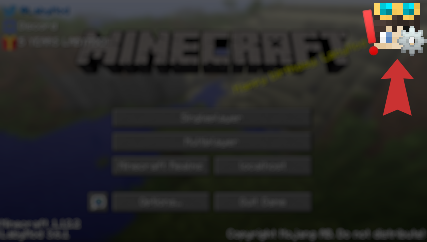
If you have issues starting Minecraft with LabyMod or cannot find the head in your main menu, make sure that you have the latest version of LabyMod.
Please note that you must have purchased Minecraft Java Edition to register.
Upgrade your Minecraft client experience to the next level.
Download LabyMod 4
After installing the LabyMod Launcher, you can start the LabyMod 4 Client with your desired Minecraft version.
Download LabyMod 4 Other
 You need an official Minecraft: Java Edition account to use LabyMod!
LabyMod 4 Client Changelog
Bugfixes
Chat
- Fixed the settings for showing emoji and emoji suggestions missing from the Ingame Chat settings
- Fixed emoji with very long names staying as plain text in chat and never showing up in the suggestions
- Fixed emoji in the emoji picker sometimes not being drawn and their names not showing on hover
- Fixed the chat preview in the settings not showing emoji
- Fixed typing emoticons like ":3" or ":D" in the chat opening the emoji suggestions, which made the Enter key pick an emoji instead of sending the message
Bugfixes
Crash
- Fixed the game crashing on launch with OptiFine
Bugfixes
Crash
- Fixed the game crashing on startup when Fabric mods such as YetAnotherConfigLib are installed (IDEA-21967)
LabyConnect
- Fixed an issue where users couldn't connect to LabyConnect in some versions of Minecraft
Changes
- Reverted the fix for the game crashing on startup when Fabric mods such as YetAnotherConfigLib are installed. The crash can happen again until a new fix is ready (IDEA-21967)
Bugfixes
Crash
- Fixed the game crashing on startup when Fabric mods such as YetAnotherConfigLib are installed (IDEA-21967)
Other
- Fixed new messages not appearing in a friend chat while it is open
New Features
LabyConnect
- Added group chats, with a reworked group management screen to view members, add people and leave or delete a group
- Added replies to chat messages and emoji reactions on them, matching the app and the website
- Added emoji to the chat: type them by shortcode such as :joy: or pick them from the new smiley button next to the send arrow. Messages and reactions now show the full emoji set instead of a placeholder box
- Added emotes to the chat: send your own emotes from the picker, and emotes sent from the app or the website now appear as animated stickers
- Added emoji suggestions to the Minecraft chat while typing a shortcode. The new "Emoji Suggestions" switch under Chat Input turns them off
- Added a typing indicator and message states, so you can see whether a message is still sending, failed or has been read
- Added an icon next to online friends showing whether they are on the app, the launcher or the website
- Added a right-click menu on images in the chat to copy the image or its link
- Added copying and deleting your own messages in the chat
Screenshot Browser
- Redesigned the screenshot browser to fit the rest of the LabyMod menus, with search, zoom and a timeline on the side to jump to any month
- Added a Photos and an Albums view. Albums are created from a screenshot's right-click menu, and groups detected from servers, players and accounts can be saved as albums
- Added multi-select with Ctrl-click, Shift-click and Ctrl+A, plus dragging screenshots onto an album
- Redesigned the screenshot viewer as a fullscreen view with floating controls that hide while the mouse rests
- Improved screenshot loading: images appear faster, scrolling is smoother and the viewer preloads the neighbouring screenshots
Other
- Added a dedicated session refresh screen when a server kicks you because your session is invalid, so your account is renewed right there instead of only offering a rejoin button
- Added support for servers that show banner images in the world and for servers that remove a player's chat messages
Bugfixes
Crash
- Fixed a crash when a spray was placed while you were not in a world, for example with the same account signed in on a second client
- Fixed the game crashing after the motion blur effect failed to render on the Vulkan backend in Minecraft 26.3 (IDEA-21920)
- Fixed the game crashing when lines are drawn in menus on the Vulkan backend in Minecraft 26.3 (IDEA-21919)
Rendering
- Fixed name tags, icons and speech bubbles being invisible while a shader pack is active
- Fixed the enchantment shimmer on shields and tridents flickering while the faster signs and skulls option is enabled (IDEA-21852)
- Fixed cosmetics missing from the picture in picture view in Minecraft 26.3 (IDEA-21882)
- Fixed parts of the LabyMod interface not drawing on the Vulkan backend in Minecraft 26.2 and 26.3
- Fixed the screenshot browser showing black tiles while scrolling on macOS
- Fixed hard color steps in gradients smearing into each other instead of staying sharp
- Fixed text being measured with a different font than it is drawn with, which cut the last character off some labels and let headings run into the line next to them
- Fixed the rightmost pixel column and the top row being cut off widgets inside scrollable lists
LabyConnect
- Fixed scrolling up through a long chat stuttering while older messages were loading
- Fixed the cancel button of a reply sitting outside the input bar where it could not be clicked
- Fixed empty brackets showing next to a friend's server when no game mode is known
- Fixed friends disappearing from your friend list
- Fixed the order of the friend list, so online friends and chats with recent messages are on top again
- Fixed chats no longer updating after your session changed, for example after switching accounts
- Fixed a flood of notifications, several events are now bundled into one notification
- Fixed already answered friend requests showing up as notifications again after a server restart
- Fixed a shared world losing its state after reconnecting, so friends could no longer see it
- Fixed the device icon in the friend list hanging out of its row, so the highlight looked like it cut the icon off
Other
- Fixed the Speech Bubbles setting sitting in the wrong category; it is now under Multiplayer & Combat, which replaces the PvP & Combat category
- Fixed your saved accounts getting lost on a fresh installation because the client could not read the encryption key written by the LabyLauncher
- Fixed dropdowns opening their list above the dropdown instead of below it
- Fixed the client keeping a theme that no longer exists instead of falling back to the default theme
- Fixed parts of the interface being styled wrongly when a theme groups several selectors in a nested style rule
- Fixed the addon store offering Install again after you cancelled an installation and reinstalled the addon, although it only needed a restart
Bugfixes
Server Discovery
- Fixed the server list lagging while scrolling, freezing for a moment when clicking a server, and jumping or trembling when selecting or expanding a server (IDEA-21889)
Other
- Fixed server icons and banners sometimes staying empty or not showing after a failed download
New Features
- Added a "Copy message" option when right-clicking a message in the chat, which copies the message without color codes (IDEA-1053)
- Added copying the LabyMod version by double-clicking it in the bottom left corner of the pause menu (IDEA-21825)
- Added the Minecraft sound volumes to the settings that External Devices can control
Bugfixes
Crash
- Fixed the game crashing on startup when a monitor's display settings could not be read, for example while a display driver is restarting
- Fixed a crash on startup when a built-in debug library could not be loaded on the system
Rendering
- Fixed a shader error that filled the log with thousands of messages and cost performance (IDEA-21883)
Other
- Fixed the game freezing on Linux after clicking Report Bug or another link until the opened browser was closed again (IDEA-21787)
New Features
- Added support for Minecraft 26.3
- Added speech bubbles above players that show their chat messages and a live waveform while they talk in the voice chat, with a choice of font and message duration. They are turned off by default and can be enabled in the settings (IDEA-1990)
- Added Server Discovery tab to the multiplayer screen, replacing the Public Server List. It lists all servers from laby.net sorted by how popular they are with LabyMod players, with search, filters for language and game mode, ratings, live player counts, rising servers, a prime time chart and quick join buttons for game modes
- Added a pipette to the color picker that picks any color on your screen, and a row with the colors your other cosmetics use so several cosmetics can share a color with one click (IDEA-10697)
- Added an option for External Devices to copy a screenshot image straight to the clipboard without uploading it
- Added a new look for toggle switches in the Fancy theme, with a smoothly sliding knob
- Improved the cosmetics tab: worn cosmetics are now shown in light gray, the selected cosmetic gets a blue border, and its preview no longer fades when you hover over it
Bugfixes
Crash
- Fixed errors when an addon was switched on or off while the game was still starting
Rendering
- Fixed hand cosmetics not showing in first person in Minecraft 26.2 and 26.3
- Fixed wrong block colors for water and blocks without a tint in Minecraft 26.x
- Fixed text staying invisible on Minecraft 26.3 on some graphics cards
Chat
- Fixed scrolling up through a long friend chat stuttering while older messages were loading
- Fixed a friend chat jumping by a whole page when it was opened
Watch Party
- Fixed videos not loading or staying stuck while syncing, especially on Windows
- Fixed streams that already ended not playing
External Devices
- Fixed the pairing popup never opening in Minecraft 1.8.9
- Fixed the settings list on a device showing hidden settings and settings named after their internal key
- Fixed device lists showing untranslated names when the device connected while the game was still starting
- Fixed the suggest command action doing nothing when the chat was closed
Other
- Fixed long cosmetic variant names in dropdowns drawing over the arrow and out of the button (IDEA-21814)
- Fixed the scrollbar flickering when switching between cosmetics in the player tab
- Fixed disabled settings still showing a hover cursor
- Fixed many addon downloads not being counted
- Fixed addon widgets not showing up when searching in the Mods tab. They now appear in their own Addon Widgets section, even when the addon is disabled, and use the addon's icon if the widget has none
- Fixed the first typed letter going missing when searching in wheel menus in Minecraft 26.3
- Fixed sounds and non-English translations not loading in Minecraft 26.3 (IDEA-21230)
- Improved Watch Party video playback for YouTube, Twitch, and TikTok, including livestream support, better stability, and clearer error messages.
- Fixed various YouTube playback issues in the media feature
- The media feature now prefers the original audio track for YouTube videos
New Features
- Added support for Minecraft 26.3 pre-release 2
- Completely redesigned the cosmetics browser: search and filter your cosmetics, sort them by newest or name, switch between your outfits and see every change instantly on your player model
- Added an option to open the chat with both enter keys (IDEA-13706)
- The mods search now also matches English names when the client runs in another language
Bugfixes
Crash
- Fixed the game crashing on startup when Sodium is installed on Minecraft 1.21.8 (IDEA-21754)
- Fixed a crash while loading a server resource pack on Vulkan in Minecraft 26.2 (IDEA-21703)
- Fixed the game not launching on the Minecraft 26.3 snapshot (IDEA-21758)
- Fixed the game sometimes crashing on Minecraft 26.3 when opening the player activity while skins, cosmetics or icons were still loading (IDEA-21757)
Rendering
- Fixed players and entities being drawn completely black inside the Waila widget (IDEA-20621)
- Fixed emotes and other models looking darker in the paper doll and in menus than they do in the game on Minecraft 1.21.10 and 1.21.11 (IDEA-20544)
- Fixed the font disappearing after the game had been minimized for a while in Minecraft 1.21.11 (IDEA-21729)
- Fixed cosmetics and emotes ignoring fog, so they stayed visible under blindness (IDEA-18492)
- Fixed the first person camera shaking while a looping emote like Chibi is playing (IDEA-21095)
- Fixed signs, chests and skulls turning invisible with "Faster Chests, Signs & Skulls" while using Iris shaders (IDEA-21733)
- Fixed the Classic PvP damage option not tinting the armor red (IDEA-21490)
- Fixed the player model on the player screen wearing your skin as a cape
- Fixed some cosmetics losing their animations because of an unrecognized animation condition
- Fixed cosmetics briefly turning invisible on account refreshes and keeping the old texture after changing a texture option
Widgets
- Fixed the Waila widget staying empty for blocks that cannot be picked up as an item, such as ice (IDEA-21565)
- Fixed the Health widget growing out of its background with more than 12 hearts, it now shows the health as a number next to a single heart
Addons
- Fixed Toggle Sprint starting the sprint one tick too late when you close the inventory while jumping, which broke tick precise parkour jumps (IDEA-21704)
- Fixed badges such as All Emotes and Gamescom 2025 missing in the Badges addon (IDEA-20790)
- Fixed addons behaving incorrectly until the next restart when they are switched on while the game is running
Other
- Fixed being kicked with "Network Protocol Error" when joining a world or a server on Minecraft 26.1.2 and 26.2 (IDEA-21499, IDEA-21434)
- Fixed YouTube videos played by servers on media screens having no audio (IDEA-21706)
- Fixed YouTube videos failing to load in Watch Parties after YouTube stopped accepting the previous playback method
- Fixed only the top half of the event button on the main menu being clickable (IDEA-21120)
- Fixed pressing another mouse button while dragging ending the drag (IDEA-19990)
- Fixed the clear and submit buttons of text fields not showing the pointer cursor when hovered
New Features
Performance
- Much higher FPS in lobbies where many players wear cosmetics, in some cases more than double. This works in every Minecraft version
- Much higher FPS around chests, signs, skulls, furnaces and hoppers, for example in a shop, a storage room or in front of a wall of signs. - New setting: Faster Chests, Signs & Skulls
- Higher FPS and fewer stutters while moving through the world. This one is switched off automatically if you use Sodium or OptiFine, since those already replace the same part of the game. It can be worth giving our own world rendering a try and comparing the two. New setting: Faster World Rendering
- Higher FPS in general because the game waits for your graphics card less often. New setting: Optimized Graphics Calls
- Higher FPS when a lot of water or glass is on screen
- Faster in-game interface, including the Scoreboard widget and text rendering, which means fewer stutters with many widgets on screen Minecraft no longer loads your Vulkan drivers at startup while rendering with OpenGL, which slowed OpenGL down for the rest of the session
- The new settings are on by default and can be found under Settings, Performance. Turn one off if you notice graphical issues. Apart from the cosmetics improvements, they need Minecraft 1.21.8 or newer
Other
- Added the option for servers to disable individual LabyMod features. A feature turned off by the server shows as disabled and grayed out in the Mods menu, with the reason shown when you hover it
- Added support for Minecraft 26.3-snapshot-10
- Improved the background blur behind menus: it now looks smoother and costs noticeably less performance
- Improved the Addon API
Bugfixes
Crash
- Fixed the game crashing on startup when an addon fails to load (IDEA-21661)
- Fixed a crash while rendering the world in Minecraft 1.21.1
- Fixed a crash when the client tried to use a texture that failed to load
- Fixed a crash on startup when Minecraft runs on a renderer other than OpenGL
Rendering
- Fixed the frame rate dropping continuously the longer you stay in a lobby in Minecraft 1.21.11 (IDEA-21580)
- Fixed player heads not being shown in inventories in Minecraft 1.21.8 (IDEA-21584)
- Fixed the text on the main menu buttons missing right after starting the game in Minecraft 1.16.5 through 1.20.6 (IDEA-21662)
- Fixed LabyMod failing to load large server resource packs in Minecraft 26.2 (IDEA-21620)
- Fixed some server resource packs covering the whole screen with an opaque overlay. LabyMod's own interface text is now drawn with the game's built-in text shader, while widgets that replace a vanilla element keep the resource pack's styling
- Fixed the warning about resource packs replacing the text shader never showing up in Minecraft 26.2 and newer
- Fixed the log filling up with shader errors while Vulkan is in use in Minecraft 26.2 (IDEA-21591)
- Fixed memory use growing without limit and block entities such as signs and chests rendering incorrectly while Iris shaders are on
- Fixed graphical glitches and crashes caused by already discarded graphics memory still being drawn in Minecraft 26.2 and 26.3
- Fixed rare rendering glitches on some graphics drivers in Minecraft 1.21.8 and newer
- Fixed the edit panel being partially hidden behind the cosmetics list when editing a cosmetic in the player cosmetics menu (IDEA-20549)
- Fixed several accent colors, mostly the darker and lighter ones, being displayed incorrectly in the theme (IDEA-14174)
- Fixed interface elements being cut off incorrectly in some places because an old clipping area was still active
Other
- Fixed the game freezing when joining a multiplayer server in Minecraft 1.8.9 (IDEA-21180)
- Fixed the server list hanging when a server is slow to answer or unreachable
- Fixed videos not loading in Watch Party (IDEA-21630)
- Fixed the name history search showing a technical error message instead of "Not found!" when the searched name does not exist, and added a hint to search again when the server did not respond (IDEA-21552)
- Fixed sliders staying attached to the cursor when the mouse button is released outside the slider (IDEA-21663)
- Fixed the equipment widgets crashing and disabling themselves while the equipment slot is empty when playing with Forge in Minecraft 1.8.9 (IDEA-14322)
- Fixed the client keeping data of previously visited worlds in memory after leaving them, which made long sessions run worse over time
- Fixed the screenshot browser using more and more memory the longer you scroll through your screenshots, which could lead to freezes and crashes
- Fixed text staying in the old language, or losing its translation entirely, after the game reloads its translations
- Fixed the Invite Friends button appearing outside of singleplayer worlds
- Fixed notifications of the same type only stacking up to two times instead of counting further
- Fixed bundled addons not being restored when their files were missing, and they can no longer be uninstalled
- Fixed the Discord integration leaving files behind in the system temp folder every time the game starts
Bugfixes
Crash
- Fixed a crash when text was rendered in the world, for example by addons showing a TNT timer, in Minecraft 26.2 and 26.3 (IDEA-21525)
- Fixed a crash when entering the cinema on LabyWorld shortly after a video had been interrupted (IDEA-21494)
Video Player
- Fixed the video player continuing to play in the background after leaving a server while the video was still loading, with no way to stop the sound (IDEA-21530)
- Fixed videos not starting because the bundled video player could not find its own components
- Fixed the status text on video screens being displayed too dark, and it now says Forward and Rewind instead of Seeking
World Sharing
- Fixed world sharing in the newest Minecraft versions, so the world sharing button shows up in the pause menu again and stopping a shared world works
- Fixed the world sharing status being shown in the wrong color while a world is shared over LAN
Other
- Fixed screenshots not being saved and not appearing in the screenshot browser when certain mods were installed (IDEA-21512)
- Fixed the player list keeping outdated entries after switching between servers on a network whose player list is built from the scoreboard
- Fixed scoreboard teams are cleared on Join Game packet (IDEA-21492)
- Several improvements for the new Watch Party feature
- Added an option to servers to adjust the Watch Party media volume
Bugfixes
Crash
- Fixed the game crashing on startup before the main menu appears while textures are loading (IDEA-21466)
- Fixed the game crashing when the mod Sodium is installed (IDEA-21465)
- Restricted media urls for the Watch Party feature
- Fixed an issue where OptiFine would crash in newer versions
New Features
- Added Watch Party, letting you watch YouTube, Twitch and TikTok videos together with others on a shared screen in the world
Bugfixes
Rendering
- Fixed your cape not updating right away after you switch to a different one
- Fixed menus and other parts of the interface disappearing in-game while shaders are enabled with Iris and Sodium (IDEA-21452)
New Features
- The Fullbright, Nametags, Discord Rich Presence and Advanced Chat mods now show a live preview of what they do while you adjust their settings
- Added a chat message when a spray you placed is rejected by the server, the spray cooldown is reset so you can spray again right away
Bugfixes
Other
- Fixed the NEW badge only appearing on a new setting itself and not on the row that leads to it, so new options inside sub-pages were easy to miss (IDEA-21389)
New Features
- Added the ability to create and edit AutoTexts directly in the AutoText settings (IDEA-21329)
Bugfixes
Addons
- Fixed addon descriptions overflowing outside their box in the addon store (IDEA-21337)
- Fixed addon recommendation popups appearing for addons that are not available in the addon store or that are already included in LabyMod
Other
- Fixed long descriptions in confirmation popups running outside the popup instead of wrapping, for example when deleting a resource pack (IDEA-20923)
- Fixed the hotkey setting missing from the settings of some mods, such as Markers (IDEA-21330)
- Fixed deeply nested mod settings being flattened into a single page, they now open on separate sub-pages with a back button that returns to the previous page
- Fixed loot boxes not being displayed in Minecraft 26.2 (IDEA-21373)
- Updated the Syrian flag to the current official design (IDEA-21370)
- Fixed the game stalling or freezing on macOS after it was in the background for a while
New Features
- Added hardcore hearts to the Health widget (IDEA-21364)
- Added an option for black outlines on the hearts of the Health widget (IDEA-21363)
Bugfixes
Crash
- Fixed random freezes and crashes while sounds are loading in Minecraft 1.8.9 (IDEA-21367)
Widget Editor
- Fixed the line height setting looking different in the preview than in the game (IDEA-21365)
- Fixed hearts in the Health widget overlapping (IDEA-21355)
- Fixed placeholder hearts still showing in the widget editor while the Health widget is placed
Rendering
- Fixed the font breaking after disconnecting from a server with a custom resource pack (IDEA-21339)
Other
- Fixed the mod search not finding results when spaces were typed differently; addons are now also found by their store name
- Fixed addons showing a different name than in the store
- Fixed the Edit Widgets button overflowing the search bar in narrow windows
New Features
- Added new Health widget
- Redesigned the "Edit Widgets" button; clicking empty space now highlights it with a hint
- Improved Fancy theme scrollbars, background tint and pin icons
Bugfixes
- Fixed unreadable menus ingame when background blur is unavailable
- Fixed tab list health display not matching vanilla above ten hearts
- Fixed clicks next to the sidebar being swallowed
- Fixed world sharing on newer Minecraft versions
A crash has been fixed when opening the Settings menu with the Vanilla theme
Features
- Configurable background colors for the fancy theme (main + menu background)
- Setting element icons are now shown in mods panel rows
- Pointing hand cursor on the widget editor back button
Improvements
- Mods panel polish: fancy slider knob inset, tile action overlay alpha derived from background, LSS sizing/blur tweaks
- Blur renderer now draws a fallback scrim after the blur pass
Bugfixes
- Buttons are no longer blurred by the mods panel blur
A Completely New Settings Experience
We've rebuilt the LabyMod settings from the ground up. The old menus grew over the years and honestly, things ended up scattered all over the place. That's fixed now. Everything lives in one menu. Settings, mods, addons, widgets, all in one central place. Even the Addon Store is built in, so you can browse, install, and configure addons without leaving the menu once. The Widget Editor moved in too. Your HUD widgets and client settings now sit side by side. No more jumping between screens. And interacting with it all feels different:
-
Place widgets straight from the settings. Drag a widget right out of its settings panel and drop it anywhere on your HUD. Works for addon widgets too.
-
Live previews. Many settings now show you what a change does before you apply it. Widgets get a preview right inside their settings panel, you can even put a game scene behind it to see how things will actually look. More previews are coming over time.
-
Search that actually finds things. Start typing and you'll get results across all settings, mods, addons, and widgets, no matter how deep they're buried. One click takes you straight there. A few smaller things worth mentioning:
-
The NEW badge got smarter. When something new lands inside a mod or category, the parent gets marked too, so nothing slips past you after an update.
-
Global widget settings are gone. Shared widget settings now have an "apply to all" button instead, set it once, apply it everywhere.
-
The Fancy theme got a new font and a round of design improvements.
-
Smoother animations, subtle click sounds, and a general polish across the whole menu.
-
There's a new Minecraft Fixes section that bundles our quality-of-life fixes for the base game. And as usual: plenty of bug fixes and performance improvements on top.
New Features
- Added new options for how the LabyMod tab badge is shown (IDEA-21282)
- Added new Mob Size mod to scale yourself, other players and mobs individually
- Added the ability to switch between old and new fonts (IDEA-21297)
- Improved performance of rounded rectangle rendering, schematic particles and LSS styling
- Moved the shop button to the player profile header
- Show a native error dialog with a plain-language driver diagnosis when the game window fails to open
- The LabyMod logo in the inventory and the Settings Menu is now displayed in better quality
Bugfixes
Rendering
- Fixed Custom Resourcepack Crash 26.2 with Vulkan (IDEA-21258)
- Fixed Chat messages don't render and FPS drops to 10 (IDEA-21252)
- Fixed entities and items in menus rendering out of order or in the wrong position (IDEA-21262)
- Fixed rendering errors on the new rendering backend
- Fixed custom fonts being applied even though the fancy font setting was disabled
- Fixed Motion Blur (MIX and MAX) turning the screen white (IDEA-21287)
- Fixed broken text rendering when playing with Vulkan (IDEA-21285)
- Fixed text not displaying correctly when the Sodium is installed
- Fixed TTF font not working in 26.2+ (IDEA-21309)
- Fixed white textures on custom rendering (e.g. shop items) in 26.1+
- Fixed custom rendering not working with the Vulkan backend in 26.1+
- Fixed icons of some buttons added by other mods showing as missing textures
- Fixed dropdown menus in the settings being cut off when their content was too wide
- Fixed Mojang Cape Bug (IDEA-21324)
User Interface
- Fixed Preview image is too large in mod settings (IDEA-21254)
- Fixed pinned sticky header stretching over the scrollbar
- Fixed feature setting not updating immediately in some menus
- Fixed X button misplaced to screen corner (IDEA-21276)
- Fixed an empty gap above the player list preview
- Fixed duplicate buttons appearing in text fields
- Fixed clicks going through the navigation bar in the fullscreen widget editor
- Fixed section headers not sticking correctly when jumping to a category in the Settings Menu
- Fixed server list entries briefly flying to the top left corner
- Fixed inconsistent sizes of settings controls in the Settings Menu
- Fixed the size of the shop button icon in the player profile
- Fixed Player Ping Number in Playerlist is aligned to the Top (IDEA-21284)
- Improved performance of the user interface (fancy theme)
Addon
- Fixed Black areas in Laby's Minimap Addon (IDEA-20528)
Widget Editor
- Fixed Label/Value formatting ignored on right screen side (IDEA-21280)
- Fixed Arrow Widget is crashing on 26.1.2 (IDEA-20516)
Forge/Fabric Mods
- Fixed Mod Menu mod button texture broken (IDEA-21011)
Minecraft Chat
- Fixed LabyMod AutoText key can't be "MMB" (IDEA-21288)
Mechanics
- Fixed Original Cape Particles (IDEA-19675)
Other
- Fixed the game not starting on certain monitor setups (IDEA-21292)
- Fixed the launcher losing its connection to the game
- Fixed copy-to-clipboard button in screenshot notifications only showing on Windows
New Features
- Added support for Minecraft 26.3-snapshot-3
- LabyMod now also runs with Vulkan
Bugfixes
Rendering
- The font is no longer trying to enchant you. Removed accidental Level 30 legibility curse
- Fixed Motion Blur stops the world from rendering (IDEA-21216)
- Fixed Game spams GL_INVALID_ENUM errors every frame (IDEA-21207)
- Fixed Invalid cosmetics render in player's inventory model. (IDEA-21212)
Performance & Flux
- Fixed a performance issue in version 26.2 with OpenGL
- Fixed Memory leak, RAM climbs to 19GB during normal play (IDEA-21217)
Crash
- Fixed Crash: LabyMod texture is null while rendering (IDEA-21218)
Fabric/Forge Mods
- Fixed an issue where Axiom was not automatically enabled upon joining a server
Bugfixes
User Interface
- Fixed LabyMod Logo disappearing and reappearing in Inventory (IDEA-21164)
Rendering
- Fixed Custom colors dont work (IDEA-21131)
Friends & Chat
- Fixed server hosting failure (IDEA-21122)
Mechanics
- Fixed Attack cooldown animation does not play (IDEA-21119)
Crash
- Fixed Crashes when match overview renders after a match ends (IDEA-21106)
Bugfixes
Other
- Various behind-the-scenes fixes for a smoother experience
New Features
- Added a new feature that requires confirmation during the process of deleting auto-text entries (IDEA-13484)
Bugfixes
Rendering
- Fixed Custom name tags not rendering on 26.2 (IDEA-21055)
- Fixed Font flag DISPLAY_MODE_SEE_THROUGH not working. (IDEA-21096)
- Fixed Persistent screen blurring/flickering while moving (IDEA-21084)
Performance & Flux
- Fixed FPS drops with repeated spaces in search (IDEA-21050)
User Interface
- Fixed Screenshot delete has no confirmation dialog (IDEA-21049)
- Fixed Scrollable List for Pending Friend Requests (IDEA-17225)
- Fixed Lootbox shows as opened but keeps shaking (IDEA-21112)
- Fixed Football Hunt button overlaps Main Menu options (IDEA-21079)
Friends & Chat
- Fixed Send to not a friend (IDEA-11095)
Cosmetic & Emote
- Fixed Very detailed cosmetics don't appear when worn (IDEA-21113)
Addon
- Fixed CustomBlockOverlay fails to render (IDEA-21092)
Crash
- Fixed Crash: Invalid atlas id minecraft:gui on game close (IDEA-21081)
Forge/Fabric Mods
- Fixed ModMenu crashes on startup: bundled MixinExtras too old (IDEA-21101)
Bugfixes
User Interface
- Fixed Screenshots not visible: NPE in ScreenshotBrowser (IDEA-21043)
- Fixed Confirm Disconnect applied to Options button (IDEA-21039)
Minecraft Chat
- Fixed Hover events don't work when Advanced Chat is on (IDEA-21040)
Mechanics
- Fixed macOS scrolling issues still on 1.8 with LabyMod 4 (IDEA-18905)
Forge/Fabric Mods
- Fixed Simple Voicechat and LabyMod Voicechat conflict (IDEA-16026)
Features
- Added support for Minecraft 26.2
- Your own cosmetics are no longer affected by the cosmetics limit, it now applies only to other players. You can still set a separate limit for yourself using the new toggle.
Improvements
HUD
- The CPU Usage widget no longer causes brief stutters when it updates, the value is now measured in the background
Bugfixes
- Fixed player markers being placed incorrectly on shared screenshots, they could drift to the wrong spot, stick to the edges, or tag players who weren't in the shot
Ingame & World
- Fixed the experience bar showing black blotches instead of being see-through while the debug screen (F3) is open (LabyForge) (IDEA-21009)
- Fixed pet name tags appearing tilted, mirrored, or with missing text (IDEA-20584)
LabyForge
- More mods now load correctly. Fixed an issue where some mods would load but not work properly.
Bugfixes
- Fixed a crash that could occur when downloading cosmetic textures.
LabyFabric
- Some mods need to run setup steps before the game starts. These steps now happen at the right moment, fixing crashes and broken behavior with certain mods. (Architecture, error-notifier)
- Mods that already come fully prepared for the game no longer go through an extra processing step that could cause errors.
Performance Improvements
- Improved FPS, especially on servers with many players wearing cosmetics
- Cosmetics, pets and nametags now render more efficiently
- Fewer short freezes and stutters while playing
Bugfixes
- Fixed an issue where screenshots were occasionally not displayed in the Screenshot Browser
Ingame & World
- Fixed Mouse Delay Fix is already built into Optifine (IDEA-21008)
OptiFine related
- Fixed Connected Textures are bugged with glass panes (IDEA-20938)
LabyForge
- OptiFine placed in the mods folder is now automatically skipped. Please use the OptiFine addon from the LabyMod addon store instead. A note appears in the log when it's skipped.
- More reliable startup: damaged or unreadable mod files no longer break the loading process, they're simply skipped.
- Fixed a crash on startup when using certain older mods (e.g. FoamFix)
- Older mods that rely on outdated internals are now automatically made compatible when they are loaded
- Fixed a startup crash that prevented some mods from loading.
LabyFabric:
- Fixed a crash on game start when the Fabric servers couldn't be reached (e.g. bad internet connection)
- Fabric mods now keep working without internet, as long as everything was downloaded on a previous launch
- If Fabric couldn't be set up due to connection problems, the mod status in the settings now shows a clear message instead of nothing
- Added support for Minecraft 26.2-pre-5
Faster startup times! We reworked the startup process. The gains scale with the game version: 1.8.9 starts ~21% faster, while 26.1.2 sees a massive ~72% reduction in startup time (roughly 3.7× faster).
The shop has moved: clicking the Shop tab now takes you to our shop website instead of opening the old ingame shop.
Bugfixes
User Interface
- Fixed Custom Server name should not be overwritten by group (IDEA-20990)
- Fixed No cosmetic preview in ingame shop (IDEA-20998)
- Fixed Ingame Shop (IDEA-19858)
- Fixed Elitecloak not in, ingame shop store (IDEA-15208)
- Fixed summoning circle not aligned right in ingame shop (IDEA-14200)
- Fixed Buggy Ingame LabyMod Shop (IDEA-14188)
- Fixed LabyMod+ Shop Emote Selection Bug (IDEA-13985)
- Fixed Labymod Shop Shoes Bug (IDEA-13957)
Cosmetic & Emote
- Fixed "Only Friends" cosmetics option has side effects (IDEA-20961)
- Fixed Cloak Overlays are not visible in the in-game shop (IDEA-20740)
- Fixed in game shop doesnt show "Snoxh Eyes" (IDEA-13900)
Crash
- Fixed Game crashes when Iris is used (IDEA-20930)
- Fixed Lithium crash (IDEA-20925)
- Fixed FerriteCore crashing game (IDEA-20912)
- Fixed Xaero's World Map/Minimap crash (IDEA-20911)
- Fixed Crash when trying to use Iris (IDEA-20868)
- Fixed an issue where fullscreen mode caused the game to crash (1.8.9–1.12.2)
Forge/Fabric Mods
- Fixed Remapping cache doesn't delete old mod versions (IDEA-20949)
- Fixed LabyMod crashes together with owo-lib (IDEA-20948)
- Fixed an issue where some Forge mods were not loading properly
- Fixed an issue where some Fabric mods were causing a black screen
Rendering
- Fixed Component fails to render obfuscated with missing glyph (IDEA-20939)
- Fixed Name tags and icons are hidden in the tab list (IDEA-20894)
Mechanics
- Fixed Strange hand placement when FOV Changer is enabled (IDEA-20947)
Ingame & World
- Fixed Cosmetic-Skin does not load correctly in Store Page (IDEA-14095)
Other
- Fixed Client Data and Files not loading on launch (IDEA-20959)
- Fixed an issue where the WorldCup addon wasn't working properly with OptiFine
- Fixed the canvas flickering of the World Cup addon
- Compatibility update for the World Cup addon
- Fixed an issue where some Forge mods were not loading properly
- Fixed an issue where ReplayMod would crash when certain buttons were clicked
- Fixed an issue where screenshots were not saved properly (1.8.9 & 1.12.2)
- Fixed a black screen that could appear on startup, mainly on macOS
- Fixed an issue with the Architectury mod
The Compatibility Update makes LabyMod compatible with the vast majority of the most popular Forge and Fabric mods. Just play with the mods you love, and LabyMod runs alongside them.
New & Improved Features
Mod Compatibility
Mod compatibility has been massively improved for both Fabric and Forge. More mods now work out of the box than ever before, reducing the need for manual fixes and workarounds when building your setup.
Faster Version Support
Support for newer Fabric versions now arrives faster, and updates to the Fabric Loader are delivered more quickly as well. This means less waiting after a new release before you can get back to playing with your favorite mods.
Bug Fixes & Improvements
- Fixed Server Resource Packs option being bugged in folders (IDEA-20745)
- Fixed Range HUD module being inaccurate at big coordinates (IDEA-20819)
- Fixed game crashing when taking a screenshot (IDEA-20860)
- Fixed Screenshot doesn't save (IDEA-20886)
- Fixed crash when opening addon settings (IDEA-20873)
- Fixed 4.5 Crash when trying to use Lithium (IDEA-20867)
- Fixed 4.5 Crash when trying to use fabric API (IDEA-20866)
Added support for Minecraft 26.2-snapshot-8
Changelog 4.4.11+2493 snapshot/229dd236
New Features
- Added support for Minecraft 26.2-snapshot-7
- Note: Only the OpenGL renderer is currently supported in 26.2. Vulkan renderer support will be added in a future release.
Improvements
- Various backend improvements and optimizations
Bugfixes
Cosmetic & Emote
- Fixed Capes are no longer rendered with transparency (IDEA-20632)
User Interface
- Fixed Credits button has the wrong design in the title screen (IDEA-20548)
- Fixed Realm menu buttons displaying wrong textures (IDEA-20387)
Bugfixes
Rendering
- Fixed Mojang shaders not being parsed correctly
- Fixed some cosmetics with animated textures using the wrong animation speed
- Fixed the lootbox inventory not rendering correctly
New Features
We've added a new setting called "Server List Text Shadow" that lets you choose how text shadows behave in the server list (affecting the MOTD, server name, and stats). You can pick between three options:
- Vanilla: matches vanilla behavior, meaning shadows are shown on 1.21.4+ and hidden on versions below 1.21.3
- On: shadows are shown on all versions
- Off: shadows are hidden on all versions
Improvements
Cosmetics
- Reworked the entire Cosmetic System for better performance and stability
- Cosmetics, Emotes, Lootboxes and Sprays now load significantly faster on the second game start and after reloading your profile
- Cosmetics closer to you now load first, so the most relevant ones appear sooner
- Improved caching and smarter loading to reduce frame drops while cosmetics are loading in
- Reduced memory usage of cosmetics
- More stable loading of cosmetics thanks to automatic retries and parallel requests
Bugfixes
Friends & Chat
- Fixed Incoming friend requests header is blurred (IDEA-20536)
User Interface
- Fixed Server list text follows the mouse and renders behind (IDEA-19770)
- Fixed Turning off Social Media Links does nothing (IDEA-20517)
- Fixed Text shadow on server MOTDs missing (IDEA-20473)
- Fixed Vanilla Title Screen missing icons (IDEA-20515)
Improvements
- Minor internal improvements
Bugfixes
Crash
- Fixed the game keep crashing mid game (IDEA-20350)
Friends & Chat
- Fixed Unintuitive UX when inviting friends to LAN world (IDEA-20347)
Rendering
- Fixed an issue that the LabyMod logo wasn't displayed inside the Creative Inventory (26.1+)
- Fixed an issue where the hover effect wasn't working in the advanced chat (26.1+)
Addons
- Fixed Flux settings not opening (IDEA-20348)
- Added support for Minecraft 26.1.2
Bugfixes
Rendering
- Fixed Experience bar alpha not working in 4.4 (IDEA-20317)
- Fixed an issue where player heads were sometimes displayed with the default skin
Other
- Fixed a crash that occurred when a message was deleted
- Minor preparations for the Vulkan backend
- Added Targeted Block HUD Widget
Bugfixes
Rendering
- Fixed Paperdoll shows player I am looking at (IDEA-20232)
- Fixed an issues where Minecraft shaders were not being parsed correctly
User Interface
- Fixed Inventory dark when item HUD widget shown (IDEA-20229)
Bugfixes
Rendering
- Fixed an issue where cosmetics were not displayed on macOS (1.8.9–1.16.5).
- Fixed an issue where cosmetic related bugs caused poor performance on macOS (1.8.9–1.16.5).
- Fixed an issue in versions 1.17.1–1.18.2 where enabling item HUD widgets caused the chat to become invisible
- Fixed an issue where overlays such as the Account Manager were not displayed. (1.21.8) IDEA-20219
Bugfixes
Rendering
- Fixed an issue in version 1.21.5 where the menu was not rendered correctly
- Fixed an issue where markers did not properly display the HD skins
Bugfixes
Rendering
- Fixed an issue where the ESC menu did not appear when the "Hide Menu Background" setting was turned off.
Crash
- Fixed Sprays caused the client to crash (IDEA-20213)
We’re excited to introduce the next update for LabyMod, bringing major improvements to core features and enhancing the way you connect and play with others. This update focuses on deeper integration, smoother visuals, and an overall more seamless experience especially when playing together with friends.
New & Improved Features
Worldsharing
Worldsharing is a completely new system that replaces the previous LAN Sharing feature. It has been rebuilt from the ground up and is now fully integrated into LabyMod, offering a more stable, reliable, and synchronized way to share your worlds with friends.
Server List
A new server list has been introduced to improve how you discover and join sessions. You can now:
- View active Worldsharing worlds
- See which servers your friends are currently playing on
This allows you to jump into games faster and stay connected with your friends more easily.
Auto Reconnect
Staying connected is now more convenient. With Auto Reconnect built into LabyMod, you can quickly return to your game after connection interruptions without manual effort.
IP Protection
Your privacy is now better protected. With the new IP Protection feature, your real IP address is no longer sent when pinging servers. This helps prevent unwanted exposure of your network information and improves overall security while playing online.
Rendering & Visual Improvements
Menu Blur
Menu Blur has been fixed and now works reliably across all supported versions. In addition, a new setting called Enhanced Contrast improves the readability of the interface while blur is enabled, making menus clearer and easier to use.
Motion Blur
Motion Blur has been completely overhauled and now uses a per-pixel velocity-based approach. This results in smoother and more accurate visual effects, especially during fast movements.
Please note that Motion Blur is currently not compatible with OptiFine and Iris.
Bug Fixes & Improvements
We have fixed a variety of bugs and improved overall stability across the client. This includes minor UI fixes, performance optimizations, and general quality of life improvements to ensure a smoother experience.
- Improved model loading (Cosmetic, Emotes)
User Interface
- Fixed Items not rendering in UI (IDEA-20167)
- Fixed Entities no longer rendered in UI (IDEA-20166)
- Fixed FancyFont Warning happens when Fancy Font is disabled (IDEA-20144)
- Fixed [26.1-pre-1] crossair is not visible (IDEA-20131)
- Fixed [26.1-pre-1] menu disappear (IDEA-20130)
- Fixed [26.1-pre-1] hud widgets become invisible (IDEA-20127)
- Fixed Menu blur isn't working (IDEA-19365)
Ingame & World
- Fixed Underline/Strikethrough effects render above UI (IDEA-20145)
- Fixed [26-pre-1] black background and stars (IDEA-20129)
- Fixed [26-pre-1] screen freezes when looking at entity (IDEA-20128)
- Fixed Incorrect text tooltip rendering (IDEA-19396)
Mechanics
- Fixed game crashing when uploading skin from computer (IDEA-20133)
Cosmetic & Emote
- Fixed Cosmetics disappear when HDSkins is installed (IDEA-19806)
Crash
- Fixed Game crashes on keybind change and SP join (IDEA-19423)
Rendering
- Fixed Nametags still render bad (IDEA-19314)
- Fixed GUI slots render weird (IDEA-19313)
- Fixed Marker bug (IDEA-20185)
- Fixed Cosmetics in inventory don't sample lightmap correctly (IDEA-20198)
- Added support for Minecraft 26.1-pre-1
- Added support for server-managed features (Servers can now allow fancy fonts while using a server resource pack)
- Added culling for world objects (markers, waypoints, loot boxes)
Improvements
- Internal rendering refactors to prepare for Vulkan support
Bugfixes
Ingame & World
- Fixed Game still blurry (IDEA-20075)
Mechanics
- Fixed Skin Type (IDEA-19971)
Addons
- Fixed waypoint text not being centered on the minimap
- Added support for Minecraft 26.1-snapshot-10
Bugfixes
User Interface
- Fixed Screenshot section is not sorted correctly (IDEA-20068)
Minecraft Chat
- Fixed Unable to input Chinese. (IDEA-20067)
Ingame & World
- Fixed Visual and control bugs post 4.3.54 (IDEA-20026)
Rendering
- Fixed The whole game is a bit blurry (IDEA-19376)
OptiFine related
- Fixed Block outlines are not rendered at all (IDEA-20025)
Bugfixes
Rendering
- Fixed World Icon is no longer being created (IDEA-20019)
Crash
- Fixed Crash when starting labymod (IDEA-20020)
- Added support for Minecraft 26.1-snapshot-9
Bugfixes
User Interface
- Fixed Direct connect pinging animation does not work (IDEA-20010)
- Fixed LabyMod keybindings are not sorted in the Keybinds menu (IDEA-20003)
- Fixed Server list renders widgets out of bounds (IDEA-19954)
Widget Editor
- Fixed Sidebar resize indicator (IDEA-19989)
Mechanics
- Fixed Code Of Conduct ack not saved in server list entry (IDEA-19979)
Addons
- Fixed Laby´s minimap crash (IDEA-19891)
OptiFine related
- Fixed Block Outline renders in adventure mode with OptiFine (IDEA-20012)
- Fixed OptiFine/Iris crashes the game when PaperDoll is placed (IDEA-19951)
- Fixed Zoom button is not replaced correctly (IDEA-19928)
Crash
- Fixed Unable to start 1.16.5, 1.17.1 & 1.18.2 (IDEA-20013)
Forge/Fabric Mods
- Fixed Waila does not reset its state correctly (IDEA-19389)
- Fixed Sodium doesn't work on the snapshot release (IDEA-20014)
Bugfixes
- Fixed Multiplayer server list fps drops (IDEA-19908)
- Fixed Paper Doll "Show name" setting is broken. (IDEA-19909)
- Fixed Object components are not displayed with the fancy font (IDEA-19925)
- Fixed When i press F2 to take a screenshot the game crash (IDEA-19926)
Bugfixes
- Fixed an issue where playing without OptiFine in 1.8.9 & 1.12.2 resulted in a black screen
New Features
- Added support for Minecraft 26.1-snapshot-5
- Added Disable Cosmetics in first person (IDEA-18505)
- Added support for OptiFine 1.21.10 & 1.21.11
Bugfixes
- Fixed an issue where Fancy Font was using incorrect values for rendering
- Fixed an issue where OptiFine was handling textures incorrectly in 1.8.9 & 1.12.2
Improvements
- Improved logging for system-related issues
Bugfixes
- Fixed an issue where OptiFine caused a black screen in versions 1.8.9 and 1.12.2.
- Fixed an issue where some cosmetics/emotes played wrong animations.
Bugfixes
- Fixed Emotes despawn from emote wheel with time (IDEA-19887)
- Fixed LabyMod crashes when a message is deleted from the chat
New Features
- Added support for Minecraft 26.1-snapshot-4
Improvements
- Improved HTTP requests to our services are processed slightly faster
- Improved Global Widgets Disabled Warning
Bugfixes
- Fixed Skin uses linear filtering (IDEA-19852)
- Fixed ghost boss bar (IDEA-19876)
- Fixed an issue where the spectator was not sorted correctly in the table list
- Fixed an issue where the screenshot browser displayed the wrong year
Minecraft versions from 1.8.9 to 1.21.11 will use Java 21 for the time being until server owners stop corrupting their resource packs
- Added support for Minecraft 26.1-snapshot-2
- Java 25 is now required to run LabyMod
Bugfixes
- Fixed cosmetics showing up at the bottom left (IDEA-19743)
- Fixed Fancy Font is no longer activated after a disconnect (IDEA-19768)
- Fixed When not using custom title screen icons are hidden (IDEA-19789)
- Fixed Chat messages are shifted down by 8 pixels (IDEA-19824)
- Fixed Name History lookup does not work (IDEA-19832)
- Fixed Screenshot edit brush applies the wrong color (IDEA-19819)
- Fixed Slider Issue (IDEA-19841)
Bugfixes
- Fixed Book title entry overlaps with the name of the signator (IDEA-19530)
- Fixed images in LabyChat get corrupted when scaled down
- Fixed Wrong server info if you paste the server name (IDEA-18544)
- Fixed wrong spray-cooldown (IDEA-16509)
- Fixed Old creative menu doesn't work properly (IDEA-16308)
- Fixed page button being displayed as a standard button in a book instead of the next/previous sprite
- Fixed Waila is not displaying Itemframe & painting (IDEA-19404)
- Fixed Structure block uses the fancy theme (IDEA-19405)
- Fixed PlayerNameTagRenderEvent not called in 1.21.10 (IDEA-19744)
- Fixed 1.21.11 crashes in rare cases while in singleplayer worlds
- Fixed All display items are shown twice (IDEA-19773)
- Added support for Minecraft 1.21.11
Bugfixes
- Fixed cursor changes won't work (IDEA-19244)
- Fixed cape displayed the wrong way in the ui (IDEA-19669)
- Fixed Recent cursor fix causes crash upon start up (IDEA-19730)
- Added support for Minecraft 1.21.11-rc1
Bugfixes
- Fixed Heart display overlaps with rank in Waila widget (IDEA-19604)
- Fixed Favorited symbols bug (IDEA-19614)
- Fixed Highlighted text appears in a random place in labychat (IDEA-19702)
- Fixed Sometimes you cannot send chat messages (IDEA-14546)
Bugfixes
- Fixed an issue with emotes and cosmetics
Bugfixes
- Fixed several crashes caused by faulty drivers
- Fixed an issue where emote props and custom emote models were not lit correctly.
- Fixed flying minime coloring bug (IDEA-19629)
- Dynamic Background will use the Winter Theme from December 1st to December 31st
- Added support for Minecraft 1.21.11-pre3
Bugfixes
- Fixed Skin customisation menu crashes, cosmetics broken (IDEA-19648)
- Fixed an issue where the Old Damage setting could not be disabled
- Fixed Old slowdown animation canceled sprinting (IDEA-18862)
- Fixed Missing translation for "Unknown Host" (IDEA-19445)
- Fixed Missing translation (IDEA-19633)
- Fixed [1.21.11-pre3] Textures using linear filtering (IDEA-19656)
- Fixed [1.21.11-pre3] cant change settings (IDEA-19657)
- Fixed Sodium prevents text from being rendered (IDEA-19663)
Bugfixes
- Fixed Lightoverlay addon broken (IDEA-19619)
- Fixed BetterFood HUD Addon crashes game (IDEA-19621)
- Fixed Some nametags are not displayed (IDEA-19627)
- Fixed an issue where the shaders for the vanilla rendering path were not loaded correctly when Fabric was loaded.
- Improved Scoreboard HudWidget
Bugfixes
- Fixed an issue where text was not displayed on AMD GPUs (IDEA-19620)
- Fixed a crash when removing Hud Widgets
- Added support for Minecraft 1.21.11-pre1
- Added a feature that allows servers to set custom badges without a resource pack
Improvements
- Improved custom nametag rendering (Subtitles, Groups and Icons)
- Improved performance of the VoiceChat HudWidget
Bugfixes
- Fixed a performance issue
- Fixed a memory leak
- Fixed several native crashes
- Fixed a crash caused by walking pet nametags
- Fixed visual rendering issues with the shared Spotify track nametag
- Fixed Spotify shared track tag has some z-fighting issues (IDEA-18424)
- Fixed Spotify track tag is not visible (IDEA-18702)
- Fixed VoiceChat "private channel" bug (IDEA-19585)
- Fixed Health is not displayed in Waila (IDEA-19401)
- Fixed Tablist breaks when teams are removed (IDEA-19579)
- Fixed VoiceChat cannot be installed through the Addon Store (IDEA-19582)
- Fixed Shader mods cause issues with the new rendering (IDEA-19584)
- Fixed Dialog Notice Button (IDEA-19613)
- Added an experimental feature that allows adjusting the player list limit. This feature is disabled by default. If any UI issues occur, such as the player list extending beyond the screen, there is no need to report them. Simply leave the feature disabled.
Bugfixes
- Fixed an issue where server advertisements were saved under the wrong server address
Bugfixes
- Fixed an issue that could cause the game to crash under certain circumstances
- Fixed a bug that prevented server advertisements from being removed
Bugfixes
- Fixed lss files are not parsed correctly (IDEA-19560)
Bugfixes
- Fixed Value is frozen and cannot be modified [1.21.3-1.21.8] (IDEA-19559)
- Added a new event button to the title screen that appears only when special events are active
Bugfixes
- Fixed an issue where the height of HUD widgets was not calculated correctly
- Fixed Crash when having player/sprite component in chat (IDEA-19533)
- Fixed Settings are reset to default every time you log into (IDEA-19549)
Bugfixes
- Fixed an issue where the Player/Sprite component was not being rendered
- Fixed OpenGL matrix stack is not emulated correctly (IDEA-10597)
- Fixed World creation screen doesn't show options (IDEA-19473)
- Fixed Connect/Disconnect screen behavior differs from Vanilla (IDEA-19515)
- Added support for Minecraft 25w42a
Bugfixes
- Fixed Font rendering causes the game to crash (IDEA-19182)
- Fixed Emotes are not animated correctly (IDEA-19420)
- Fixed Kicked from servers when using player/sprite component (IDEA-19492)
[The issue causing players to be kicked from servers when using the player or sprite component has been resolved. However, these components are currently not being rendered. We’re aware of this and are actively working on a fix.]
- Added support for Minecraft 25w41a
Bugfixes
- Fixed an issue where shaders were not being parsed correctly
- Fixed Vanilla Text effects are not rendered (IDEA-19480)
- Added support for Minecraft 1.21.10
Bugfixes
- Fixed TNT causes wall hack (IDEA-19256)
- Fixed Duplicated Texture Glitch (IDEA-19302)
- Fixed Custom Font UI-Elements rendering too dark (IDEA-19317)
- Fixed Serverside tablist broken with Custom Player-List (IDEA-19318)
- Fixed Chat is not rendering like it did before the update (IDEA-19322)
- Fixed shortcuts no longer work (IDEA-19411)
- Fixed [Laby's Waypoints] Create Waypoint dialog render issue (IDEA-19448)
Bugfixes
- Fixed an issue where the “Blockbuild” feature automatically pressed the left mouse button (1.21.9 & 1.21.10-rc1)
- Added support for Minecraft 1.21.10-rc1
Bugfixes
- Fixed Game is crashing, when mannequin has original mc cape (IDEA-19424)
Bugfixes
- Fixed Nametag Cosmetic is not displayed (IDEA-19408)
Bugfixes
- Fixed Random crash while doing nothing (IDEA-19407)
- Fixed Waila crashes when looking at Ender Dragon (IDEA-19410)
- Fixed Ingame shop does not show names and prices (IDEA-19412)
- Fixed Edit Note in Friend Chat leads to crash (IDEA-19415)
- Fixed Adding chat filter crashes game (IDEA-19417)
- Fixed Game is crashing, when wearing Elytra (IDEA-19418)
- Fixed Addon description is not displayed. (IDEA-19419)
- Added support for Minecraft 1.21.9
Bugfixes
- Fixed Hitboxes prevent widgets from being rendered (IDEA-19391)
- Fixed Wrong menu opens when editing server in server list (IDEA-19397)
- Fixed Game is crashing when (IDEA-19399)
- Fixed Game is crashing when spawning mannequin (IDEA-19403)
- The workaround for blackscreens on Intel GPUs (caused by faulty drivers) is now temporarily applied to all iGPU and dGPU.
- AMD and NVIDIA GPUs are not affected by this workaround.
- A proper system is in development that will automatically switch between normal rendering and the workaround depending on driver stability (expected within the next few weeks) Bugfixes
- Resolved an issue where component events were not working in the UI.
- Corrected a rendering problem with the minimap.
- Fixed cosmetics being rendered in the wrong order on the hand in 1.21.9-rc1.
- Ensured the correct font from the resource pack is used.
Bugfixes
- Fixed an issue where certain server resource packs caused a black screen
- Fixed an issue where the LightOverlay addon did not work properly in 1.21.8 & 1.21.9-rc1
- Fixed Selected text having weird shadow in TextFields (IDEA-19375)
- ItemPhysics now supports 1.21.8
Bugfixes
- Fixed a bug where the wrong textures were used after a resource reload
- Fixed Some letters overlap when OptiFine is installed (IDEA-19368)
- Fixed ItemPhysics crashes the game (IDEA-19370)
- Fixed a crash that occurs on hardware that does not support OpenGL 3.0 or higher (IDEA-19371)
- Added support for Minecraft 1.21.9-rc1
Bugfixes
- Fixed Rainbow cosmetics are not rendered in RETAINED! (IDEA-19364)
- Fixed MiniMap crashes in older versions (IDEA-19366)
- Added cave mode to the Minimap Addon
- Several improvements have been made to the Waypoint Addon
Bugfixes
- Fixed several memory leaks.
- Several crashes have been fixed
- Fixed VoiceChat widget laps over UI in some places (IDEA-19358)
- Fixed Mod Menu causes crash (IDEA-19359)
- Fixed Client takes 100% cpu and crashes (IDEA-19360)
Bugfixes
- Fixed a crash
Bugfixes
- Fixed how the GEO design was rendered in the Direction HUD
- Fixed chat bug (IDEA-19325)
- Fixed Labymod crashed (IDEA-19347)
- Fixed Chat problems (IDEA-19349)
- Fixed Cosmetic rainbow effect doesn't work. (IDEA-19355)
Bugfixes
- Fixed OptiFine crashes when taking a screenshot (1.21.8) (IDEA-19344)
- Fixed Vanilla font ignores the font set in the style (IDEA-19346)
- Added support for Minecraft 1.21.9-pre4
Bugfixes
- Fixed Vanilla font ignores the font set in the style (IDEA-19341)
- Fixed Vanilla Text Effect causes performance issues (IDEA-19342)
Bugfixes
- Fixed a crash in 1.12.2
- Added support for Minecraft 1.21.9-pre3
- Added OptiFine for 1.21.8
- Added Fabric for 1.21.8
Bugfixes
- The shadow offset for the fancy font is now 0.75 instead of 1.0.
- Fixed an issue where chat messages were rendered twice
- Fixed a bug where the colors of text in 1.8.9 & 1.12.2 were incorrect.
- Fixed a crash in 1.21.9-pre3
- Fixed an issue in the shop preview
- Fixed an issue where the fancy font did not look good in some places.
Bugfixes
- Fixed several black screens
- Fixed an issue where the player list was not rendered in some situations
- Fixed Fancy font underline formatting (&n / §n) not displayed (IDEA-19327)
Bugfixes
- Fixed an issue where the last frame looked incorrect when closing the game.
- Fixed an issue where the minimap caused a black screen.
- Fixed FOV changer with zoom is faulty (IDEA-19235)
- Fixed some pixels are missing in some numbers! (IDEA-19310)
- Added support for Minecraft 1.21.9-pre2
A workaround has been implemented to prevent a black screen from appearing on some systems.
Bugfixes
- Fixed Client Crash when chatting (IDEA-19311)
- Fixed Game Crash (IDEA-19315)
- Improvements to rendering stability to prevent occasional visual stacking issues when rendering name tags.
- Reduce unnecessary warnings and improve error handling to avoid rare errors
Bugfixes
- Fixed an issue where the hotbar was displayed incorrectly.
- Fixed issue where nametags had no background in 1.8.9 & 1.12.2
- Fixed an issue where pets' name tags were not displayed correctly (1.8.9 - 1.20.6)
- Fixed Slot highlighting (IDEA-19276)
- Fixed Glass Blocks Appear White when looking at Pets (IDEA-19281)
- Fixed sky weird black thing in middle (IDEA-19287)
- Fixed No Shadows in texts (IDEA-19289)
- Fixed Blury Game Screen (IDEA-19297)
- Fixed Black screen when going to the "Player" section (IDEA-19290)
Bugfixes
- Fixed the black screen in the Shop and Player tab that only occurred on macOS (1.8.9 - 1.16.5)
- Fixed the black screen in the Emote Wheel that only occurred on macOS (1.8.9 - 1.16.5)
- Fixed a bug that prevented data from being transmitted correctly to the GPU on older systems
- Fixed Fullscreen resolution resets with every restart (IDEA-17545)
- Fixed Widgets Block Break Progress doesnt work! (IDEA-19248)
- Fixed Sound waves on voicechat addon doesnt show (IDEA-19260)
- Fixed enabling hitboxes leads to crash (IDEA-19272)
- Fixed Render the Game is Broken in 1.21.3! (IDEA-19285)
- Added support for Minecraft 1.21.9-pre1
Bugfixes
- A workaround for an AMD driver issue has been implemented so that the game no longer crashes when compiling shaders
- Fixed Sodium causes a black screen (IDEA-19240)
- Fixed bubble aura | bug (IDEA-19264)
- Fixed 1.16.5 crashes on startup (IDEA-19255)
- Fixed Emote animations don't play until moving (IDEA-19267)
Bugfixes
- Fixed an issue where OptiFine 1.21.4 caused the game to crash IDEA-19266
Bugfixes
- Fixed performance issues
- Fixed that the skins in the player list are blurred
Bugfixes
- Fixed LabyMod crash caused by Forge Modloader (IDEA-19139)
- Fixed a performance issue
- Fixed an issue where incorrectly compiled shaders caused the game to display a black screen
We're excited to announce the Survival Update, designed to enhance your journey through the wilderness and make your survival experience even more intuitive and immersive! This update provides you with essential information, smarter tools and improved visibility to help you survive in the most challenging environments.
Now with full support for Minecraft 1.21.8 and 25w37a.
New Features
- Waila: No more guessing! With Waila (What Am I Looking At), you simply point the cursor at a block or entity and immediately receive detailed information about it.
- Danger Warner: Stay one step ahead of trouble with the new Danger Warner. This feature provides early alters for potential threats nearby, giving you precious time to react and prepare.
- Improved Torch Placement: Placing torches with your off hand is now only possible if your main hand does not contain consumable items such as food, potions, or bows. This ensures more intentional and less accidental torch placement during crucial moments, allowing for quicker and more precise lighting of your base and explorations.
- Full Bright: Never be caught in the dark again. Toggle Full bright to temporarily illuminate your surroundings to maximum brightness, perfect for navigating through treacherous caves or dense forests at night without having to rely on external light sources.
Addon Enhancements
-
New Addons: Discover a suite of new addons designed to further enrich your survival gameplay.
- BetterFood Hud: Get a clearer understanding of your hunger and saturation with this new addon, similar to the popular Apple Skin mod, providing visual feedback on how much hunger and saturation a food item will restore.
- Light Overlay: Take the guesswork out of mob spawning! This essential tool displays light levels on blocks, helping you easily identify areas where hostile mobs can spawn, allowing you to light up your builds effectively and safely.
- Dynamic Sounds: Immerse yourself fully in the world with enhanced audio. This addon provides realistic sound attenuation, reverberation, and absorption through blocks, making environments sound more dynamic and lifelike.
-
Addon Improvements: We've listened to your feedback! Several existing addons have received significant updates, including performance enhancements, bug fixes, and exciting new features to deepen their integration into your survival experience.
- Waypoints: Your navigation just got a major upgrade!
- Custom Icons: Personalize your waypoints with support for custom icons, making it easier to distinguish important locations at a glance.
- Distance Formatting: More control over how distances are displayed, allowing for clearer readability.
- Improved Scaling: Waypoint markers now scale better with distance, maintaining visibility without clutter.
- Fade Out Setting: A new setting allows you to adjust when waypoints begin to fade out, reducing visual noise when they are far away.
- UI & UX Improvements: The user interface and experience for managing waypoints have been streamlined for more intuitive use.
- Keystrokes: Enhance your visual display of key presses with these refinements:
- Reset Button: Quickly reset your keystroke display settings to default.
- Fancy & Big Space: Enjoy new options for a more aesthetically pleasing and larger space key visualization.
- Separate Outline Color: Customize your keystroke outlines with an independent color setting.
- Rounded Radius Setting: Fine-tune the roundness of your keystroke display for a softer look.
- CPS Tracking Fix: Corrected an issue where CPS (Clicks Per Second) was incorrectly tracked on newly pressed keys.
- Improved Rounded Outline: The outline appearance has been enhanced for a smoother look when rounded.
- Minimap (Available Later This Week!): Prepare for a vastly improved world exploration experience!
- Improved Colors: Experience a more vibrant and accurate visual representation of your surroundings.
- Improved Performance: Say goodbye to exploration lags! The minimap has been optimized for a much smoother experience while traversing your world.
- Better Waypoints Integration: Seamlessly interact with your Waypoints directly from the minimap for even easier navigation.
- Waypoints: Your navigation just got a major upgrade!
-
General Bug Fixes: In addition to the specific improvements listed, we've squashed numerous bugs across the board to provide a more stable and polished experience.
Bugfixes
- Fixed edge case where the LabyMod badge was not displayed
Bugfixes
- Fixed Mods Using Fabric Language Kotlin Crash (IDEA-18681)
- Fixed Dogs tag | Tag Distance Display (IDEA-18684)
- Fixed [Fabric] Crash when a Ghast's fireball hits blocks (IDEA-18714)
Bugfixes
- Fixed cant change skin (IDEA-18648)
- Fixed Several caps are rendered (IDEA-18662),
- Fixed Crash by sending a screenshot (IDEA-18669),
Bugfixes
- Fixed Spray are black (IDEA-18633),
- Fixed Game Screen Turns Black When Taking a Screenshot (IDEA-18635),
- Fixed Wrong texture filtering is applied (IDEA-18638),
- Fixed Icon renderer does not render image colors correctly (IDEA-18415)
Bugfixes
- Fixed Cannot disconnect without being auto reconnected (IDEA-14414),
- Fixed Wrong prefix color (IDEA-18307),
- Fixed Pet Cosmetic nametag bug (IDEA-18631)
Bugfixes
- Fixed an issue where the Overwolf compatibility warning page would not open
Bugfixes
- Fixed some cosmetics issues
Bugfixes
- We now show an Overwolf compatibility warning page when Overwolf is detected
- Fixed LabyMod 3 players being displayed with a gray wolf instead of a white one
- Added a system that recognizes Overwolf and tells the user (through a crash) to close Overwolf so that LabyMod no longer freezes [1.20.5-1.21.5]
Bugfixes
- Fixed an issue that caused the multiplayer screen to not display correctly in some cases
Bugfixes
- Fixed STATUS_APPLICATION_HANG (0xCFFFFFFF) (IDEA-18577)
Bugfixes
- Fixed Cannot click the Start/Stop button in ReplayMod (IDEA-18308)
- Fixed FabricAPI crashes LabyMod on startup in 1.21.5 (IDEA-18344)
- Fixed Sprays & Emotes cannot be disabled (IDEA-18556)
- Fixed AsynchronousTextureTask is null (IDEA-18557)
- Added a hint for the map overview below the player list
- Fixed error when adding place-overlay with a custom scale
- Fixed "Air" block in overlay
- Added block picking with mouse wheel for the r/place event
- Added /place-overlay clear
- Added server support for the upcoming r/place event on GommeHD
- Added support for multiple Walking Pets to be activated at the same time
- Added support for Minecraft 1.21.5
Bugfixes
- Fixed Sodium Renderer - Unsupported LWJGL version (IDEA-18244)
- Fixed a crash that was caused by fabric mods (e.g. Lithium)
- Fixed [1.21.5] Black Background in Direct Connection (IDEA-18329)
- Fixed [1.21.5] CustomBlockOverlay Bug (IDEA-18331)
- Added notification if the configuration cannot be saved because there is not enough disk space available
Bugfixes
- Fixed Player models are sometimes not rendered correctly (IDEA-18235)
- Fixed Cosmetic Drafts are visible to all players. (IDEA-18262)
- Fixed ChatFilters don't Work on Messages with Item Hover Event (IDEA-17274)
- Fixed [BUG] Pet movement buggy on high coordinates (IDEA-18140)
Bugfixes
- Fixed Multiple focused TextFields blocking each other (IDEA-18185)
- Fixed Server Permissions not working
- Added support for Minecraft 25w06a
Bugfixes
- Fixed Keystrokes crash (IDEA-18067)
- Fixed Cape particles are not rendered correctly (IDEA-18119)
- Fixed [Vanilla Feature broken] High Block Contrast Outlines (IDEA-18124)
- Fixed I can't reload my cape of Optifine (IDEA-18164)
- Fixed HeadlessException in ResourcePack & WorldEdit Screen (IDEA-18176)
- Added support for Minecraft 25w04a
Bugfixes
- Fixed Iris Shader don't work properly (IDEA-17433)
- Fixed Crash when using Fabric API v0.110.0+1.21.1 (IDEA-17808)
- Fixed Friend is now offline message (IDEA-18083)
- Fixed F3 flickers with OptiFine (IDEA-18103)
Bugfixes
- Fixed crash when starting up (IDEA-18081)
- Added support for Minecraft 25w03a
Bugfixes
- Fixed older servers could not be pinged
- Fixed GameMode button doesn't update (IDEA-14934)
- Fixed Potions icons are not displayed (IDEA-18071)
- Fixed DamageIndicator is displayed above the armor stand (IDEA-17041)
- Added support for Minecraft 25w02a
- Added support for OptiFine 1.21.3 & 1.21.4
Bugfixes
- Fixed Geometry effects misapplied in Immediate Renderer (IDEA-18036)
Bugfixes
- Fixed OptiFine cape button not working (IDEA-17216)
- Fixed Cloak priority (IDEA-17381)
- Fixed Original cape particles not showing (IDEA-17915)
- Fixed Switching capes randomly causes change of player model (IDEA-17941)
- Fixed Spray menu doesn't close upon click when searching (IDEA-17995)
Bugfixes
- Fixed LabyMod crashes without singleplayer world (IDEA-17867)
- Fixed broken value in the addon api (IDEA-17888)
Bugfixes
- Fixed Wrong mouse axis is used in screens (legacy versions) (IDEA-17869)
Bugfixes
- Fixed Widgets are rendered on the stencil buffer (IDEA-17864)
Bugfixes
- Fixed 1.21.3 will not start without OptiFine (IDEA-17862)
- Added support for Minecraft 1.21.4
- Added refresh button to the account manager
Bugfixes
- Fixed a rare case where the configurations were not saved correctly
- Fixed an issue where the UI elements disappeared when the window was resized
- Fixed Iris causes a crash (IDEA-17790)
- Fixed ComponentSplitter causes the game to crash (IDEA-17802)
- Fixed Screenshot timestamp shows future years (IDEA-17654)
- Fixed Sodium is not compatible with Flux (IDEA-17812)
- Fixed NativeBuffer is freed too early (IDEA-17813)
- Fixed some UI rendering issues (1.21.3-*)
- Minor performance optimization
- Added support for Minecraft 24w44a
- Improved style of pause menu buttons
Bugfixes
- Fixed XP text is displayed behind the XP bar (IDEA-17644)
- Fixed Custom NameTags are rendered on the Scoreboard Tag (IDEA-17663)
- Fixed Player list is not sorted correctly (IDEA-17665)
- Fixed RTL languages not supported (IDEA-12904)
- Fixed Automatic Unknown Session Status after a few minutes (IDEA-17357)
- Fixed one malformed server media entry breaking everything
- Added support for Minecraft 1.21.3
Bugfixes
- Fixed Tooltip doesn't look good with the Fancy Font (IDEA-17624)
- Fixed Main Menu buttons invisible (IDEA-17625)
- Fixed Background is displayed in front of the fancy font (IDEA-17626)
- Fixed Vanilla Font uses a different framebuffer (IDEA-17627)
- Fixed Blur is not rendered for some UI Elements (IDEA-17634)
- Fixed an issue where loot boxes had no textures.
Bugfixes
- Fixed an issue related to the lootboxes
- Added support for Minecraft 1.21.2-pre5
Bugfixes
- Fixed Debug feature causes memory leak (IDEA-17612)
- Added support for Minecraft 24w39a
Bugfixes
- Fixed Unload and load texturepack leading to crash. (IDEA-17531)
- Fixed HudWidgetEditor sidebar breaks on rescale (IDEA-17549)
- Fixed Bossbar renders on wrong Z-Index (IDEA-17554)
- Fixed Actionbar renders on wrong Z-Index (IDEA-17555)
- Fixed Titles render on wrong Z-Indexes (IDEA-17556)
- Fixed an issue that caused configurations to be loaded/saved incorrectly in rare cases.
Bugfixes
- Fixed Fancy Font notification is displayed each time the resources pack is changed (IDEA-17507)
- Added support for Minecraft 24w37a
- Added support for OptiFine 1.21 & 1.21.1
Improvements
- Improved Faster screenshot UX response (IDEA-17365)
- Improved Fancy Font auto disable information (IDEA-17366)
Bugfixes
- Fixed an issue that caused some animations of walking pets to not play correctly
- Fixed support for GSON 2.11.+ (IDEA-17356)
- Added support for Minecraft 1.21.1
Bugfixes
- Fixed StackOverflowException by Self-Referencing @import (IDEA-17276)
- Fixed Dot from the switch widget is not on the switch (IDEA-17337)
- Added Disable Addons via Server API (IDEA-17215)
Bugfixes
- Fixed paper doll widget show name setting is inverted (IDEA-17282)
- Updated Server API to fix an issue with Minecraft 1.8 & 1.12
Bugfixes
- Fixed an issue where some texts were not rendered correctly
- Fixed an issue with web requests that could crash the game
Bugfixes
- Fixed Vertex attributes are not disabled correctly (IDEA-17167)
- Fixed LabyMod keys aren't shown in the keybinding screen (1.20.5) (IDEA-17176)
Bugfixes
- Fixed Damage when using emotes (Singleplayer 1.8.9/1.12.2) (IDEA-15181)
- Fixed Legacy OpenGL don't use the global index buffer (IDEA-17168)
- Added Sort incompatible AddOns to the end of the AddOn list (IDEA-17073)
Improvements
- Improved cosmetics that use the extrude effect
- Improved support for Intel's integrated graphics (1.8.9-1.16.5)
Bugfixes
- Fixed an issue regarding the ingame store
- Fixed Addon search filter always opening while typing (IDEA-14721)
- Fixed RenderAttributesStack has no more elements (IDEA-15247)
- Fixed Axiom Overlay doesn't work anymore (IDEA-16752)
- Fixed MOTD is not correctly centered in Direct Connect (IDEA-17042)
- Fixed Button in bed screen doesn't adapt to the theme (IDEA-17037)
- Fixed World preview crash (IDEA-17087)
- Fixed Tooltip for the online players doesn't match vanilla (IDEA-17117)
- Fixed Tooltip for the online players larger than its content (IDEA-17132)
- Fixed Translation missing (IDEA-17144)
Bugfixes
- Fixed Hearts in tablist aren't spaced correctly (IDEA-17032)
- Fixed Custom name tags are not rendered [1.20.1] (IDEA-17036)
Bugfixes
- Fixed an issue that caused the loading screen to load indefinitely (1.19.3)
Bugfixes
- Fixed Nametags not visible (IDEA-17024)
- Fixed Version range is not parsed correctly (IDEA-17029)
Bugfixes
- Fixed Shader cannot be compiled (Macos only) (IDEA-17020)
- Added support for Minecraft 1.21
Bugfixes
- Fixed Debug folder is shown in the screenshot browser (IDEA-13117)
Bugfixes
- Fixed some settings are not displayed in some versions
- Fixed escape menu is invisible
Bugfixes
- Fixed Continuity doesn't work with Labymod (IDEA-14444)
- Added Better emotes in first person (IDEA-15347)
- Added vanilla theme settings
Bugfixes
- Fixed It is not possible to enter origin realms (IDEA-16926)
- Fixed Fast World Loading doesn't work properly (IDEA-16940)
- Fixed "Set/Remove custom server background" doesn't update (IDEA-16945)
- Fixed an issue where you had to reload the world for the EUROCUP addon
- Fixed Forge crash
- Fixed OptiGUI
- Fixed support for Forge 1.8.9
- Added support for Minecraft 1.21-rc1
- Added Serverlist search (IDEA-16712)
Bugfixes
- Fixed cant edit anything in mods config menu (IDEA-16937)
- Fixed a crash that could be caused by a wrong formatted chat message
- Added support for Minecraft 1.21-pre4
- Added support for Minecraft 1.21-pre3
Improvements
- Improved Gui Scale in Legacy Versions [1.8.9,1.12.2] (IDEA-16876)
Bugfixes
- Fixed Jade not working in 1.20.5/6 (but working in 1.20.4) (IDEA-16673)
- Fixed Vanilla components don't support LabyMod translations [1.12.2] (IDEA-16872)
- Fixed 1.16.5 crashes on startup (IDEA-16886)
- Fixed Blockbreak indicator stays displayed (IDEA-16884)
- Fixed Fix Fabric Mixins with local variables (IDEA-16906)
- Fixed compatibility with OptiFine 1.20.6
- Improved Block Break indicator (IDEA-16599)
- Fixed Fix moving current server info (IDEA-16601)
- Fixed Original Cape Particles are not rendered correctly (IDEA-16741)
- Fixed When blending images, the colors are inverted (IDEA-16781)
- Added support for Minecraft 24w20a
- Added Per-face UV Mapping Support (IDEA-16395)
- Added Borderless Window for Linux (IDEA-16463)
Bugfixes
- Fixed Options icon low resolution (IDEA-16621)
- Fixed an issue where skins were not loading
- Fixed Hide Menu Background doesn't affect inventories anymore (IDEA-15991)
- Fixed Wrong view matrix appiled to HUD elements (IDEA-16104)
- Fixed Wrong score number in player list (IDEA-16501)
- Fixed Coordinates Biome (IDEA-16529)
- Fixed Chat will be emptied after subserver switch (IDEA-16615)
- Fixed Iris 1.7.0 (IDEA-16660)
- Fixed Network Protocol Error when receiving Chat Messages (IDEA-16674)
- Fixed Show your hand in first person causes several issues (IDEA-16680)
- Fixed MixinExtras support (IDEA-16707)
- Fixed Game lags when many entities are loaded or unloaded (IDEA-16724)
- Fixed HudWidgets are displayed although F1 is enabled (IDEA-16693)
- Fixed Player cosmetics move while sneaking [Old Animation] (IDEA-16710)
- Fixed Trash Can oversized (IDEA-16730)
- Added support for Minecraft 1.20.6
- Added Give emotes more control to cancel MC animations (IDEA-16189)
- Added Modify Player Model in Emotes (IDEA-16412)
Bugfixes
- Fixed Server info does not change 1.20.5+ (IDEA-16563)
- Fixed Fabric Addon is incompatible although it is compatible. (IDEA-16565)
Bugfixes
- Fixed an issue that caused Flux to always install itself again
Bugfixes
- Fixed an issue that prevented some settings to display correctly
Bugfixes
- Fixed TitleHudWidget causes 1.20.5 to crash (IDEA-16532)
- Added support for Minecraft 1.20.5
- Added Bring back Economy Display (IDEA-9782)
Bugfixes
- Fixed Flux crashing (IDEA-16420)
- Fixed Addons are listed twice in the list (IDEA-16421)
- Fixed Emotes are not played when out of render distance (IDEA-16187)
- Fixed trigger emotes in the emote wheel and for players out of range
- Added support for Minecraft version 24w14a
- All versions now run on Java21
- Added Time until block break (IDEA-16114)
- Added Restart Later Button for Addon installations (IDEA-16397)
- Added No View Bobbing (IDEA-6304)
- Added Canceling outgoing friend requests (IDEA-15793)
- Added all hotkeys to the Hotkeys category (IDEA-16332)
Bugfixes
- Fixed an issue with LAN world sharing
- Fixed Bossbar widget doesn't behave like the vanilla bossbar (IDEA-14585)
- Fixed Text overlapping in Actionbar (IDEA-15514)
- Fixed Minimap Bug (Water/Lava) (IDEA-16216)
- Fixed Crash with ItemStackTooltipEvent registered (IDEA-16343)
- Fixed Chat NPE when the menu button is disabled (IDEA-16351)
- Fixed Rainbow color is broken (IDEA-16363)
- Fixed Mouse icons disappear in emote/spray wheel (IDEA-16074)
- Fixed 404 Website is displayed in the log (IDEA-16367)
- Fixed Canvas Identifier is not handled correctly (IDEA-16400)
- Fixed Some settings are duplicated when searching (IDEA-16403)
- Fixed Wrong damage color for entities (IDEA-16274)
- Added support for Minecraft version 24w13a
- Added setting to deactivate game mode switch notifications
- Fixed RPC branding disappears after switiching bungee server (IDEA-16079)
- Fixed Inverted Color with Edit Function (IDEA-16228)
- Fixed Wrong time on offline messages (IDEA-16233)
- Fixed Addons not downloadable if dependency is installed (IDEA-16239)
- Fixed ServerSwitch Notification does not contain the GameMode (IDEA-16251)
- Fixed invisible in-game menu (IDEA-16212)
- Fixed issue that the loot box button is not visible
- Fixed sound and lighting issues for easter event
Fixed java.lang.NoClassDefFoundError [1.16.5/1.17.1] (IDEA-16199)

- Added fullscreen image viewer when clicking on an image sent in the LabyMod chat
- Added confirmation popup when sending images in the LabyMod chat
- Added notification sound for screenshots
- Added Sprays (IDEA-2479)
- Added Server folder (IDEA-15538)
- Added option to colorize the server folder
- Servers in the server list can now be reordered by dragging them around
- Added the possibility to draw on screenshots
- Added ability to send pictures in LabyChat
- The screenshot viewer now opens when you click on the message in the chat or notification
- Added support for Minecraft version 24w12a
Bugfixes
- Fixed Minecraft cape is only half displayed (IDEA-15783)
- Fixed SprayWheel cannot be used by non-team members (IDEA-16050)
- Fixed Extreme Graphic Bug (IDEA-16017)
- Fixed The last server in a folder cannot be moved to ... (IDEA-16051)
- Fixed [OptiFine] Same Spray all the time (IDEA-16059)
- Fixed Sprays invalid texture after cosmetic refresh (IDEA-16061)
- Fixed @2x screenshots cannot be shared in LabyChat (IDEA-16064)
- Fixed Could not initialize class com.luciad.imageio.webp.WebP (IDEA-16067)
- Fixed Sometimes I can't use my first hotbar (IDEA-16063)
- Fixed Screenshots have the wrong color scheme (IDEA-16073)
- Fixed Screenshots in chat are not visible (IDEA-16077)
- Fixed Server folders gone after restart (IDEA-16095)
- Fixed Forge Loader not working with 4.2.0 1131 (IDEA-16165)
- Fixed scoreboard doesnt match corresponding to the configurat (IDEA-15552)
- Fixed Privat Messages On GrieferGames In Wrong Color (IDEA-16138)
- Fixed Hide Tooltip item component crash (IDEA-16157)
- Fixed Item widget does not show durability (IDEA-16162)
+ Added Advanced Zoom (IDEA-15945)
Bugfixes
- Fixed java.lang.NoSuchMethodError: 'JsonArray.isEmpty()' (IDEA-16037)
+ Added Hide only the day tracker, not the whole world time (IDEA-15943)
- Added support for Minecraft version 24w10a
- Added Day tracker (IDEA-13949)
- Added LabyMod hotkeys integration in Minecraft controls (IDEA-15894)
Bugfixes
- Fixed chat time x advance chat Combine equal messages (IDEA-14467)
- Fixed Laby's Waypoints Waypoints being dark in Nether (IDEA-15397)
- Fixed ReplayMod Fancy Theme Pause Menu Bug (IDEA-15808)
- Fixed Error when reading the custom payload (IDEA-15875)
- Fixed When a player glows, the screen changes to the color (IDEA-15885)
- Fixed Werewolf Walk Emote (IDEA-14237)
- Fixed "Game Menu" text is misplaced (IDEA-15965)
- Fixed New UI broken on sides in "Chat" tab (IDEA-15966)
- Fixed The Minecraft vanilla blur is applied to chat (IDEA-15969)
- Fixed Emote search ignores first character (IDEA-15977)
- Fixed Weird Singleplayer UI (IDEA-15987)
- Fixed Clicking "Create New World" crashes the game (IDEA-15989)
- Fixed Nether Portal ignores the fog (IDEA-16002)
- Fixed Dirt background is displayed when you are ingame (IDEA-16007)
Bugfixes
- Fixed Blackscreen (IDEA-15873)
- Added support for Minecraft version 24w07a
- Added Clearly Communicate Addon Dependencies (IDEA-15830)
Bugfixes
- Fixed Execute of quick join commands only after RP is loaded (IDEA-15630)
- Fixed Cannot connect to pvpgym (IDEA-14042)
- Fixed Labymod Blackscreen (IDEA-15824)
- Fixed Waypoints crashes when creating a permanent waypoint (IDEA-15872)
- Fixed Direct connect connects you to the last server (IDEA-15649)
- Fixed lwjgl freetype library is missing (IDEA-15826)
Bugfixes
- Fixed Sodium 0.5.6+ crash (IDEA-15532)
- Fixed Walking pet upside down in all menus (IDEA-15706)
- Fixed Walking pets are visible when the player is invisible (IDEA-15707)
- Fixed Screenshots change color when copied (IDEA-15710)
- Fixed Emote wheel does not close (IDEA-15713)
- Fixed Walking pets go into the ground when you are crouching (IDEA-15724)
- Fixed Shield not hidden with "Old sword" animation (IDEA-15725)
- Fixed Player tab is broken if you have selected a walking pet (IDEA-15739)
Bugfixes
- Fixed Cosmetics are sometimes invisible (IDEA-15695)
- Fixed Walking mini me is a bit bugged (IDEA-15696)
- Added Walking Pets
- Dynamic background now has a Valentine's theme
- Added Copy Screenshot Option (IDEA-14909)
- Reworked the appearance of notifications
Bugfixes
- Fixed Rendering of item displays with flux enabled is broken (IDEA-14161)
- Fixed inventory tracker bug (IDEA-14447)
- Fixed Flux vanilla rendergraph misbehave in inventory (IDEA-15563)
- Fixed Crash with enchanted armor/Elytra (IDEA-15593)
- Fixed Blur of the popups looks broken (IDEA-15624)
- Fixed Shaderpack vertex compile error (IDEA-15648)
- Fixed Item Counter widget doesn't save sub ids (IDEA-15651)
- Fixed Invisible Minecraft Chat (IDEA-15690)
- Fixed LabyMod emote menu cannot be used (IDEA-15692)
Bugfixes
- Fixed Scoreboard: Score Visibility in 1.20.4 (IDEA-15054)
- Fixed Scoreboard Title Buggy With Timer (IDEA-15132)
- Fixed Scoreboard Title Still Shown without any entries (IDEA-15133)
- Fixed selection box is not in the correct position (IDEA-15291)
- Fixed Chat messages are rendered in the wrong order (IDEA-15512)
- Fixed Crash when copying an item with nbt values (IDEA-15516)
Bugfixes
- Fixed 1.7 crouching animation [1.20.2-1.20.5] (IDEA-15495)
Bugfixes
- Fixed AbstractMethodError in VersionedTextureRepository [1.19.4] (IDEA-15498)
Bugfixes
- Fixed Refreshing the Cosmetics (ingame) (IDEA-14608)
- Fixed Incorrect player model (IDEA-15437)
- Fixed MiniMe Skin Change (IDEA-15464)
Bugfixes
- Fixed an issue regarding the settings
- Fixed an issue where some UI elements has no textures [OptiFine 1.20.2&1.20.4] (IDEA-15421)
- Added support for Minecraft version 23w51b
- Added Nametag hiding (IDEA-3053)
Improvements
- Improved texture loading for Minecraft heads
Bugfixes
- Fixed Executing "/test" command on GommeHD.net changes skin (IDEA-15114)
- Fixed Color codes order wrong (IDEA-12852)
- Fixed OptiFine Chunk Cache (IDEA-14115)
- Fixed Changed chat colour (IDEA-14897)
- Fixed Crash on Snapshot with Potion Effects (IDEA-15205)
- Fixed Tablist colors bug (IDEA-15294)
- Fixed Name History is broken (IDEA-15297)
- Fixed some issues with the advanced chat
- Fixed Viewport is not updated correctly (IDEA-15000)
- Fixed Be able to use non-existent server addresses. (IDEA-15227)
- Fixed Version Selection not working (IDEA-15341)
- Added Second layer skin transparency [1.8.9] (IDEA-798)
- Added Modern Keybind Handling [1.8.9] (IDEA-9704)
Bugfixes
- Fixed Spectators are above players (IDEA-11245)
- Fixed UI Blur is broken (IDEA-14165)
- Fixed PostProcessor caused the Dynamic Background to crash (IDEA-14970)
- Fixed Font inconsistency in optifine menus (IDEA-14999)
+ Added support for Minecraft version 1.20.4 - Removed support for Minecraft version 1.20.3
Bugfixes
- Fixed Wrong coordinates [HudWidget] (IDEA-14581)
- Fixed Disabling splash texts doesn't work (IDEA-14920)
- Fixed Scoreboard inverted (IDEA-14921)
- Fixed Clickevent sometimes broken (IDEA-14926)
- Fixed Bug on minecraft settings (IDEA-14930)
- Fixed Incorrect calculation of unicode characters. (IDEA-13082)
- Fixed Sometimes a wrong text is displayed (IDEA-14848)
- Fixed Custom Nametag Background no longer works (IDEA-14951)
- Added support for Minecraft version 1.20.3
Bugfixes
- Fixed Fancy Theme: GlowingText doesn't change (IDEA-10324)
- Fixed Text with glow has a shadow (Fancy Font) (IDEA-14836)
- Fixed Nothing happends when clicking any text (IDEA-14862)
- Fixed Empty Space is removed from tablist header (IDEA-14868)
- Fixed Glowing Signs not rendering correctly (IDEA-14878)
- Fixed Font rendering in tab list slightly broken (IDEA-14889)
- Fixed Bugged Selection ( CTRL+A ) (IDEA-14785)
- Fixed crash when clicking on any text (IDEA-14847)
Bugfixes
- Fixed Expired Labymod Account (IDEA-14815)
- Fixed Broken vanilla text fields (IDEA-14797)
- Fixed Wrong color codes (IDEA-14784)
- Added support for Minecraft version 1.20.3-rc1
- Added "»" to widget formatting (IDEA-14158)
- Dynamic background now has a winter theme
Bugfixes
- Fixed GPU overloaded (90-100%) in menu with Blur Quality (IDEA-10718)
- Fixed LabyMod cosmetic renderer fails with shaders [Iris] (IDEA-14354)
- Fixed Shader makes cosmetics transparent [Iris] (IDEA-14685)
- Fixed Many widgets are missing (IDEA-14762)
- Fixed Font inconsistency in singleplayer menu (IDEA-14704)
- Fixed Tooltip box wrong boundings (IDEA-14705)
- Fixed Fancy Font doesn't always work properly (IDEA-14709)
- Fixed Name appears twice (IDEA-14711)
- Fixed Hover effect not disappearing when clicking (IDEA-14035)
- Fixed mojangTokenService dialog on every start (IDEA-14759)
- Fixed Glow effect crashes the game (IDEA-14770)
- Fixed play button on hover wrong placed in public serverlist (IDEA-14781)
- Fixed X-Ray with Old Sneaking Animation (IDEA-14783)
- Added 1.20.3-pre2
- Added display incompatible addons in addon store (IDEA-14189)
Bugfixes
- Fixed a bug that was introduced in 23w44a (MC-26687)
- Fixed [Vanilla Bug] Moving in menus (IDEA-13671)
- Fixed Egg not on the ground (IDEA-13958)
- Fixed SocialInteractionService isn't refreshing (IDEA-14062)
- Fixed laby 4 1.8.9 GUI freaks out when changing GUI size (IDEA-14321)
- Fixed Font is rendered over mojang loading screen (IDEA-14379)
- Fixed Client crash on widget editor: UnsupportedTemporalType (IDEA-14392)
- Fixed Snoxh eyes left/right eye option does not work (IDEA-11669)
- Fixed Eyelids blink (laby+) not working (IDEA-12648)
- Fixed Emote props are not rendered with shaders (IDEA-14476)
- Fixed Game crashes if you cannot connect to a server [Legacy] (IDEA-14492)
- Fixed Render distance resets on restart (IDEA-13969)
- Fixed ActionBar, BossBar & Titles are not visible in F3 Mode (IDEA-14171)
- Fixed Forge Loader bugs the zoom keybind. [OptiFine] (IDEA-14305)
- Fixed Font doesn't change back to Fancy after changing tp (IDEA-13838)
- Fixed prod release addons not compatible with newer snapshots (IDEA-13247)
- Fixed Borderless Window disabled (IDEA-13806)
- Fixed Scrollable content jumps up in setting categories (IDEA-14459)
- Fixed Permissions toast bug (IDEA-14469)
- Fixed Server info does not change 1.20.2+ (IDEA-14220)
- Fixed Date Module broken since fix for Time Module (IDEA-14419)
- Fixed Font rendered over deletion animation (IDEA-14364)
- Fixed Server Disconnect (IDEA-14497)
- Fixed Widget editor wrong font (IDEA-13721)
- Fixed Settings design (IDEA-14374)
- Fixed AutoText still being displayed in red (IDEA-14413)
- Fixed Forge With NotEnoughUpdates crashes in dungeons (IDEA-14495)
- Fixed LabyMod 4 Tablist does not update during server switch (IDEA-14506)
- Fixed Permanent sleep animation of eyelids (IDEA-11741)
- Fixed msg is website link (IDEA-13262)
- Fixed Black background at hearts and saturation. (IDEA-11111)
- Fixed Background rescaling while joining server (IDEA-9630)
- Fixed Missing key binding to toggle the HitBox (IDEA-12302)
- Fixed Uppercase letters dont work in Widget search (IDEA-13815)
- Fixed Addon uses wrong translation file when installed (IDEA-14230)
- Fixed "Join server" not greyed out if address box empty (IDEA-14540)
- Fixed Widget search not working sometimes (IDEA-14162)
- Fixed Speed Widget can't display 0 digits after comma (IDEA-14558)
- Fixed Wrong translations are loaded when switching versions (IDEA-13867)
- Fixed Date widget text overlapping after next day (IDEA-10169)
- Fixed Overlapping name tag in fancy theme (IDEA-11237)
- Fixed Addon name not shown in settings (1.19.4+) (IDEA-12973)
- Fixed Widgets glitch (IDEA-13418)
- Fixed "Done" button in screenshots has no sound when clicked (IDEA-14129)
- Fixed Overlapping letters (IDEA-14145)
- Fixed Shop model infront of buttons and font (IDEA-14197)
- Fixed Search bar in ingame shop not working properly (IDEA-14209)
- Fixed Widgets breaking when using the Widget Editor (IDEA-14221)
- Fixed Crash (Laby's Minimap) (IDEA-14570)
- Fixed Incorrect scoreboard layout. (IDEA-14582)
- Fixed Server MOTD text overlap in center (IDEA-14583)
- Fixed Waypoint addon beak the entity rendering (IDEA-14406)
- Fixed Create New World screen has some text disappeared (IDEA-14667)
- Fixed Language selection rendering issues (IDEA-14668)
- Fixed Crash when joining a server (IDEA-14674)
- Fixed Chat shows weird gray blur like the pause menu (IDEA-14677)
- Added 23w43a
Improvements
- Improved Popups (IDEA-11938)
- Improved the way Flux is downloaded (IDEA-13933)
Bugfixes
- Fixed IDEA-12703 still buggy (IDEA-12880)
- Fixed paper doll hide setting doesn't detect movement (IDEA-13821)
- Fixed Item Counter doesn't count modified items (IDEA-13873)
- Fixed [BUG] item counter default position overlap with others (IDEA-13947)
- Fixed Item Counter Widget, no custom item saved when reopen (IDEA-14000)
- Fixed Weird looking numbers (IDEA-12502)
- Fixed Classic PvP Backwads walking (IDEA-12699)
- Fixed Gapple Hold Location Off in 1.8.9 (IDEA-12753)
- Fixed clean window title still does not work (IDEA-13982)
- Fixed Colors gone in multiplayer menu (IDEA-14117)
- Fixed several memory leaks
- Fixed Filters not working as intended/like Laby3 (IDEA-11668)
- Fixed NBTTagTypeAdapter NoSuchMethodError (IDEA-14213)
- Fixed LabyMod Protocol not working in 1.20.2 (IDEA-14249)
- Fixed Game crashes when NPC switches between new emotes (IDEA-14254)
- Fixed Not registering the E /ESC (IDEA-14255)
- Fixed Motion Blur not compatible with shaders (IDEA-13853)
- Added cosmetic zoom to new in-game shop (IDEA-13897)
- Added icons to the InGame shop
- Fixed Dynamic Background bug (IDEA-13258)
- Fixed p warp bug (IDEA-13393)
- Fixed Dropdown Textures are scuffed (IDEA-13570)
- Fixed AutoText long Display Names causes lag (IDEA-13574)
- Fixed Server Right-Click hidden (IDEA-13646)
- Fixed crash after clicking the "store" (IDEA-13941)
- Fixed Cosmetic preview in in-game shop does not work properly (IDEA-13946)
- Fixed Missing Character Limit for Edit Note (IDEA-13959)
- Fixed Missing Line Spacing when no items displayed (IDEA-14007)
- Fixed CustomCrosshair | Attack indicator is not shown (IDEA-14034)
- Fixed Cant click any buttons (IDEA-14048)
- Fixed Custom Bossbar does not show custom name of mob (IDEA-13977)
- Fixed Bossbar HudWidget not visible in 1.16.5
- Fixed Cosmetics disappearing after refresh (IDEA-13935)
- Fixed clean window title does not work (IDEA-13948)
- Fixed bugged full screen (IDEA-13961)

- Added 1.20.2
- Added Actionbar HudWidget (IDEA-10386)
- Added BossBar HudWidget (IDEA-13133)
- Added Title HudWidget (IDEA-10386)
- Added Yaw/Pitch HudWidget (IDEA-6722)
- Added Item Counter HudWidget (IDEA-1444)
- Added Direction HUD HudWidget (IDEA-1796)
- Added Inventory Tracker Widget (IDEA-7761)
- Added Day Counter HudWidget
- Added Player Model HudWidget (like Bedrock)
- Added PC Temperatur HudWidget
- Added Light Level HudWidget (IDEA-2492)
- Added Motion Blur (IDEA-7533)
- Added Ingame Time HudWidget (IDEA-2176)
- Added Playtime HudWidget (IDEA-11621)
- Added Marker (IDEA-12987)
- Added new badge to new settings & widgets (IDEA-13737)
- Added LabyMod Shop
- Added Changelog Popup
- Added the possiblity to change the colors of buttons
- Added Multiple emote animations via trigger types (IDEA-13566)
- Added context menu for resetting cosmetic settings (IDEA-13932)
- Added Option to add Promocode in InGame Shop (IDEA-13903)
Improvements
- Improved performance when opening UI
- Improved invalid session handling (LabyConnect)
Bugfixes
- Fixed Native crash during chunk rendering (IDEA-13669)
- Fixed Don't blur on Option Exit (IDEA-11335)
- Fixed All "Blur Quality" presets have the same effect (IDEA-13295)
- Fixed Playerlist crash (IDEA-13645)
- Fixed UI is buggy after disconnect from server with quick joi (IDEA-13683)
- Fixed Immediate renderer renders cosmetics transparently (IDEA-13747)
- Fixed uwu chair invisible (IDEA-13641)
- Fixed uwu chair too big (IDEA-13668)
- Fixed Native crash during chunk rendering (IDEA-13669)
- Fixed Missing blurOption translations! (IDEA-13801)
- Fixed Block bench modal could not be loaded. (IDEA-13803)
- Fixed Egg hide: weird arm movement (IDEA-13124)
- Fixed Can't join a private server with the 1.20.2-pre2 (IDEA-13662)
- Fixed Quick Join Buttons in server list ouf of box (IDEA-13816)
- Fixed Inventory Activity tracks world entry despite disabled (IDEA-13830)
- Fixed Cannot open recipe book (IDEA-13883)
- Fixed Blue Blur in new Ingame Shop (IDEA-13895)
- Fixed Menus become invisible (IDEA-13911)
- Fixed Emote has cosmetic artwork as preview (IDEA-13917)
- Fixed Labymod does not handle the Delete Messages packet (IDEA-13885)
- Fixed Weird coloring in the InGame Shop (IDEA-13922)
- Fixed Color picker button gone (IDEA-13925)
- Fixed LabyMod+ emotes are not visible ingame (IDEA-13927)
- Added 1.20.2-pre2
- Fixed Cannot type anything in server address [1.8.9-1.19.2] (IDEA-13615)
- Fixed Config is corrupted when the game crashes early (IDEA-13618)
- Added 1.20.2-pre1
- Added restart button (IDEA-13286)
- Added Remember server switch combination (IDEA-13334)
- Added Ability to open user stats webpage in server list (IDEA-13533)
- Added quickJoinCommand argument for launchers (IDEA-13534)
Performance & Flux
- Fixed 1.8.9 Performance issues (IDEA-10276)
Cosmetic & Emote
- Fixed Ukulele bug when sneaking (IDEA-13076)
- Fixed Halo moving with head while Sunbed Emote (IDEA-13299)
Crash
- Fixed Crash when spamming on/off on cosmetics (IDEA-12988)
Friends & Chat
- Fixed AutoText does not recognize first key (IDEA-11105)
Ingame & World
- Fixed Props Invisible (IDEA-11348)
- Fixed Old account remains in the player list (IDEA-13529)
Mechanics
- Fixed Speed (b/s) (IDEA-13464)
Minecraft Chat
- Fixed Chat warp incorrect (IDEA-13452)
Rendering
- Fixed Scoreboard wrong z value Ref. IDEA-12323 (IDEA-13573)
- Fixed Custom Resourcepack above Scoreboard (IDEA-13594)
- Fixed Render Problems with ScoreBoard (IDEA-13595)
User Interface
- Fixed Button are not highlighted while navigating with tab (IDEA-9297)
- Fixed Double cursor in edit serverinformation (IDEA-12927)
- Fixed Cosmetics tab issue (IDEA-13521)
- Added Display a how to stop Surfboard Emote Message (IDEA-13074)
Cosmetic & Emote
- Fixed Cosmetics are not displayed through glass (IDEA-10330)
- Fixed Cosmetics are see through water. (IDEA-12719)
- Fixed Cape + Water = Bug (IDEA-10241)
Forge/Fabric Mods
- Fixed Replaymod and chat (IDEA-13110)
- Friends & Chat
- Fixed LabyMod friends "Achievement" pop-up showing up in F1 (IDEA-13040)
Ingame & World
- Fixed Black screen when playing an emote (IDEA-13424)
Minecraft Chat
- Fixed rendertype_text overwritten using advanced chat (IDEA-13428)
OptiFine related
- Fixed Cape Editor error's (IDEA-11528)
Performance & Flux
- Fixed [Flux] text_display is hidden behind blocks (IDEA-10303)
- Fixed Glow effect has wrong color (OptiFine & Flux) (IDEA-10786)
Rendering
- Fixed [BUG] Broken colours in ESC menu (IDEA-9895)
- Fixed Fancy Theme: text_display visible from behind (IDEA-10319)
- Fixed Strikethrough displayed behind text (IDEA-11078)
- Fixed Minecraft core shader uses wrong z value for scoreboard (IDEA-12323)
- Fixed tab & chat not showing animations (IDEA-13401)
User Interface
- Fixed Animated fonts do not work in the player list (IDEA-10700)
- Fixed Flashing GUI Elements (IDEA-10707)
Addons
- Fixed The last entry in the stack could not be popped normal (IDEA-13480)
- Fixed something wrong with language (IDEA-13255)
- Fixed String.format uses wrong language (IDEA-13365)
- Fixed last online time not wit English (IDEA-13301)
- Fixed Crash with invalid options.txt (IDEA-13412)
- Fixed Incorrect handling of the OpenGL stack [1.8.9-1.12.2] (IDEA-13408)
- Fixed IllegalStateException: Asking for biomes (MC-261997) (IDEA-13250)
- Fixed Issues with non-latin letters (IDEA-13417)
- Fixed Tab list does not show score (IDEA-13405)
- Fixed Labymod4 crash (IDEA-12830)
- Fixed Some Binding keys shows the other language keyboard (IDEA-11251)
-
Added 23w33a (IDEA-13290)
-
Added Optifine Cape Change button (IDEA-10861)
-
Added Input Prompt Server API feature missing (IDEA-12782)
-
Added Favorite chat symbols idea (IDEA-12919)
-
Improved "Performance" Section in LabyMod Settings (IDEA-13358)
- Fixed Spotify Addon Animation (IDEA-10796)
- Fixed Incorrect handling of the OpenGL stack (IDEA-10615)
- Fixed Server list crash (IDEA-11575)
- Fixed Crash when clicking on "Chat" in GUI (IDEA-12899)
- Fixed Parameter 'directory' is not a directory (IDEA-13025)
- Fixed In Xaero minimap it is impossible to put Waypoint (IDEA-12335)
- Fixed Show-me-your-Skin GUI crashes Labymod (IDEA-13052)
- Fixed Cant disable the recipe book (IDEA-12468)
- Fixed Armor trim isn't showing up at some times (IDEA-12562)
- Fixed u can make ur skin nearly invisible in laby mod 4 (IDEA-12863)
- Fixed Chat Input get deleted if you delete in LabyMod Field (IDEA-10441)
- Fixed Labymod 4 Advanced damage bug (IDEA-11048)
- Fixed Linking Bug - SinglePlayer -> DataPacks -> Options (IDEA-9578)
- Fixed Vanilla Bug: Titles won't be removed upon disconnecting (IDEA-10836)
- Fixed Smaller MOTD with the fancy design (IDEA-10994)
- Fixed lava not flowing correctly (IDEA-11338)
- Fixed Screenshot Entries duplicated (IDEA-11456)
- Fixed Mouse goes to 2nd screen when changing GUI size. (IDEA-11606)
- Fixed live server list not working (IDEA-12106)
- Fixed Server Switch Packet not working (IDEA-12213)
- Fixed Notification limit ignored (IDEA-12445)
- Fixed Interactions menu commands are not server-bound (IDEA-12491)
- Fixed Account-Switcher won't open Microsoft Login-Page (IDEA-12538)
- Fixed Fancy Font Bug (IDEA-12706)
- Fixed Highlighting single player world in 1.18 removes text (IDEA-13053)
- Fixed Deleted screenshots are not removed when deleted (IDEA-13165)
- Fixed Addon search bar x button not working when switching (IDEA-13248)
- Fixed Widget Label and Value overlapping (IDEA-10253)
- Fixed Coordinate widget bug (IDEA-12920)
- Fixed Updater crashes in 3rd party client (Prism) (IDEA-12223)
- Fixed Fancy Font (IDEA-12647)
- Fixed LabyMod doesnt register plugin channel correctly (IDEA-12999)
- Fixed Crash when using quickPlayMultiplayer argument (IDEA-13118)
- Fixed Widgets stack on top on reset (IDEA-13254)
- Fixed Texture packs do not work since the new update (IDEA-13318)
- Fixed Tablist Lagging (IDEA-12088)
- Fixed Emote sit Xray glitch (IDEA-13045)
- Fixed Disabling "Custom Title Screen" causes blackscreen (IDEA-13268)
- Fixed Changing "Damage Color" resets "Speed" (IDEA-13319)
- Fixed Addons not loaded (IDEA-13353)
- Fixed Skin type for the fire hand always changes to "Alex" (IDEA-12091)
- Fixed AutoText option "Server bound" is case sensitive (IDEA-13374)
- Fixed Search field has no character limit (IDEA-13377)
- Fixed Player heads are only Steve and Alex heads! (IDEA-13379)
- Fixed Notifications are not using Steve Skin (IDEA-13380)
- Fixed Players not getting removed from Tab (IDEA-13385)
- Fixed Problem with Tab. (IDEA-13392)
- Fixed Random crash (IDEA-13395)
- Fixed BIG Tablist BUG! (IDEA-13373)
- Fixed AMD native crash when compiling shaders
- Fixed Minime Pet floating (IDEA-12971)
- Fixed Addon Description replaces / by / (IDEA-12964)
- Fixed AutoText works on Hypixel, although it is forbidden (IDEA-12932)
- Fixed Middle-clicking on some UI elements opens the browser (IDEA-12918)
- Fixed User is able to connect to their own running LAN server (IDEA-12911)
- Fixed Option "Disable Narrator Hotkey" broken (IDEA-12905)
- Fixed shortcut (IDEA-12898)
- Fixed F3 flickering (IDEA-12038)
- Fixed Labymod 4 Crash 1.20 (IDEA-11970)
- Fixed Cosmetic Glowing Effect not working properly (IDEA-11631)
- Fixed Unable to input Chinese (IDEA-11390)
- Fixed unreadable text in minecraft settings (IDEA-9956)
- Fixed 1.7 Sneak Animation Option Not Working (IDEA-9569)
- Fixed crash when using OptiFine in 1.20.1 (IDEA-13030)
- Fixed Labywolf through wall visible (IDEA-10908)
- Fixed chat only shows %s (IDEA-12875)
- Fixed Launcher Crashing on Mac Silicon for 1.12 (IDEA-12419)
- Fixed Error if u have connection lost (IDEA-12380)
- Fixed LabyMod 4 Scroll Zoom (IDEA-11434)
- Fixed Component Copy-Click Action not working (IDEA-12791)
- Fixed Classic PVP | Opening a chest looks like a blockhit (IDEA-12769)
- Fixed The case of the "None" label differs (IDEA-12768)
- Fixed Classic PVP | Blocking After Many World Switches (IDEA-12767)
- Fixed Commandblocks (IDEA-12766)
- Fixed Server still selected after deletion in server list (IDEA-12742)
- Fixed Cant hold left click & place blocks (IDEA-12703)
- Fixed You cant hold left click on the ground & then eat gap (IDEA-12702)
- Fixed BetterPerspective bug (IDEA-12596)
- Fixed Sword blocking in recent versions (IDEA-12564)
- Fixed Random crash (IDEA-12410)
- Fixed book&quill buttons blinking (IDEA-10963)
- Fixed Achievement GUI Bug when Transparent Menu enabled (IDEA-9575)
- Fixed Labymod 4 Instant Crash by joining a Server (IDEA-12857)
- Fixed Permissions tab on server join not laby.net (IDEA-12868)
- Fixed Skintexture in Emote UI broken (IDEA-12851)
- Fixed "Advanced Chat" does not support fallback localizations (IDEA-12870)
- Fixed Spotify breaks after a few songs (IDEA-12710)
- Fixed Spotify Addon isn't working (IDEA-12740)
- Fixed translation issues (1.8.9 & 1.12.2)
- Fixed a crash caused by potion effects (1.16.5+)
- Fixed an issue where the configuration of LabyMod would sometimes reset
- Improved error handling for IDEA-12410
- Fixed Widget editor text (IDEA-12577)
- Fixed Sword blocking in recent versions (IDEA-12564)
Complete Recode including a completely new UI (Fancy & Vanilla Theme), LabyMod Launcher, better Performance, Dynamic Background, Cosmetic/Emote Dashboard, Skin Browser, new Widget Editor, Screenshot Browser, Invite Friends to Singleplayer, Support for all new Minecraft versions and a lot more.
LabyMod Launcher Changelog
- Added a short survey at the end of the setup
- Added the Laby+ level as a golden wolf at the bottom of the sidebar
- Added KLIPY stickers to the clip editor
- Added an outfits tab to the character page
- Added the game picture to the replay editor on macOS
- Changed the character page to use one model for cosmetics, outfits, skins and capes
- Changed the recording indicator to say when Minecraft sends no picture instead of counting 0 seconds
- Changed the Laby+ level frames to the new designs
- Fixed clips staying at 0 seconds when the launcher runs as administrator
- Fixed "Create render" and other laby.net links in the skin editor doing nothing
- Added the 2nd HUD which shows the game minimap and HUD widgets in a window of its own
- Added a setup guide for the 2nd HUD that finds games on the network
- Added a tab above the play button to switch between several running games
- Fixed OpenGL clip recording lowering the game FPS
- Fixed saving a clip causing stutters in the recording
- Changed the clip recorder to use less CPU
- Changed quiet sound tracks in clips to take up much less space
- Fixed damaged Mojang mappings not being replaced while another game was running
- Added a new header to the instance page like the one on the server page
- Changed the header glow to take the color of the instance icon
- Changed easy mode to move the default instances to the picked version
- Changed easy mode to show the default pack with its own name and a default badge
- Changed easy mode version tiles to only mark a running game
- Fixed the game failing to start when the Mojang mappings file was cut short
- Fixed log requests getting lost while the window was opening
- Added a pixel style with blocky Minecraft corners that can be turned off under appearance
- Added an easy mode to the instances page with version tiles and modpacks
- Added new version images
- Added comments under blog articles
- Added the tab indicator to every sidebar tab
- Added a right click menu on items in the clip editor timeline
- Added the missing German translations across the launcher
- Changed dates to follow the launcher language instead of the system
- Changed chat pictures to keep their own shape instead of a cropped box
- Changed the Laby Fabric and Forge loaders to only show up for versions that have a build
- Changed clip editor menu entries to be greyed out when they would do nothing
- Fixed chat banners ringing more than once per message
- Fixed chat banners showing while the game is in front
- Fixed a chat opened from its banner staying unread
- Fixed icon keys in the chat not showing their icon
- Fixed dropping a file on the launcher navigating the window away
- Fixed round elements and right click menus losing their shape in the pixel style
- Fixed German labels being cut off in the sidebar and the clip editor
- Fixed the shortcut list not naming keys like the German keyboard does
- Fixed the missing gap under the last clip comment
- Fixed misaligned dividers in the chat list and thread header
- Added progress on the launch button while the game window opens
- Added new badges that point out new features and tabs
- Added instance selection when joining a server through quick play
- Added shape and text rotation in the clip editor
- Added a button to reset the clip editor canvas to the clip
- Added thirds and quarters guides over the clip editor preview
- Added saving the current editor frame as a picture with F2
- Added a codec choice and bitrates up to 80 Mbit in the render dialog
- Added a picture only option that renders a clip without sound
- Added clip export as MKV or MOV next to MP4
- Added rebindable keyboard shortcuts in the clip editor
- Added clip credibility information when posting a clip
- Added a clearer crash message when software blocks the game from starting
- Added heap dumps for a game that ran while the launcher restarted
- Added picking a whole group at once in the log transfer
- Fixed downloads failing again and again on slow or unstable connections
- Changed interrupted downloads to continue instead of starting over
- Changed the launcher to fetch missing files again on its own
- Fixed the game starting with missing assets which ended in a black window
- Fixed skins showing as Alex and images not loading after a launcher update restart
- Fixed the setup creating a WebView2 folder next to the installer
- Fixed clips coming out shorter than the configured length
- Fixed clip events being saved before the moment itself was recorded
- Fixed letterboxing of AV1 clips on Linux with AMD graphics
- Fixed binding a bare Shift Control or Alt key as a clips key on Windows
- Fixed the microphone choice in the clip editor recorder resetting between panels
- Fixed chat not connecting when the launcher started without a network
- Fixed instance icons not updating after the icon file was replaced
- Fixed the left and right buttons being misaligned in the skin discovery
- Fixed the nametag option showing up without any nametag data
- Fixed an invalid license error during login not showing up properly
- Fixed dialogs scrolling sideways when their content was wide
- Fixed uploading clips failing because of a schema mismatch
- Changed the clip preview and export dialog for easier use
- Changed the sharing hint to say Laby+ and link to the shop
- Changed the launcher to check for updates before the window opens
- Fixed macOS updates from versions before 3.1 staying on the old
- Changed Post to Share in the clip viewer
- Fixed the missing desktop window frame on Linux with X11
- Added clip folders that games and addons can create with a name and icon
- Added saving of game triggered clips into a chosen clip folder
- Added automatic type tags for clips triggered by the game like clutch or bed break
- Added progress while the overrides of a modpack are unpacked
- Added open log and close buttons to the failed startup screen
-
Fixed a crash when importing modpacks that contain very large resource packs
-
Fixed high memory use while identifying the files of an imported modpack
-
Fixed the launcher freezing on startup when Windows controlled folder access is enabled
-
Fixed the launcher freezing at startup while checking games from the last session
-
Fixed startup failing on a bad language file or clip migration or quick launch
-
Fixed a broken launcher update leaving the launcher unable to start
-
Fixed a second launcher start counting as a failed boot attempt
-
Fixed the accounts folder not existing before the account manager needs it
-
Fixed the crash log failing to write inside the fatal error handlers
-
Fixed errors from unexpected Discord messages by closing the connection instead
-
Fixed config values of the wrong type by resetting them to the default
-
Fixed Forge mods showing the name of a bundled library instead of their own
-
Fixed the chat badge overlay and notifications missing unread messages after startup
-
Fixed Wayland games hanging on Linux when clips are enabled
-
Fixed the screenshot grid showing a wrong column count for one frame
-
Changed the screenshot grid to load faster and follow the window width
-
Changed the installed content list to fill the whole tab
-
Changed the crash dialog to use more space and show errors as log rows
-
Changed the mod context menu to indent entries below a heading
Instances
- Pin up to three instances to the top of the list
- A worlds tab with open folder and world import
- Instance logs are kept for as long as you choose globally or per instance
- A wrapper command for gamescope and friends globally or per instance
- Removing or switching off a mod waits until the game closes
- The version and loader picker dialog is wider
- The graphics backend row has its card back in the instance settings
Creating an instance
- The create popup lists one column and two on wide windows
Mods and content
- Sort installed mods addons resource packs and shaders into your own groups
- Groups are kept beside the files they sort so they survive a rescan
- A group folds and mods or addons in it switch on or off together
- A select button shows checkboxes and a bottom row with everything you can do
- Click an installed mod or pack to open its details with a change version button
- Pick a different version of an installed mod and keep its state and icon
- Full Modrinth and CurseForge logos on the provider switch
- A changed CurseForge version replaces the old file instead of sitting next to it
- Incompatible cards only offer notify and the project page
- Incompatibility dialogs wait in line instead of replacing each other
- Mod updates are safer and expected Modrinth errors read as problems not crashes
- Select mode offers unselect all and a way out of the selection
- Add and added buttons keep their width so the cards do not jump
Import and export
- An import screen for mrpack files that opens the new instance when it is done
- Pick content memory settings and an icon while importing an mrpack
- Export includes your LabyMod addons
- mrpack overrides land in the instance mods folder
- mrpack names and icons resolve by hash out of the cache first
Clips
- The pause key answers with a card in the game
- Compare shows the clip without its looks and animations
Play screen
- Quick play editor that follows a server list or up to five servers you type
- Quick play only shows the entries that fit the bar
- Quick play entries take their names and icons from the list itself
Skins
- The cosmetics toggle sits and reads like the one in settings
- Discover shows one category at a time and the picked one is highlighted
- Discover loads more reliably after you change the filter
Settings
- White black grey and pastel highlight colours work properly
- The text on an accent flips between light and dark so it stays readable
- Controls never shrink under a long description
Storage and downloads
- Sort the storage rows by size or by name
- The sort control sits in the header row with the other actions
- Downloads stop when you are offline or out of disk and retry dropped bodies
Tasks and notifications
- Progress cards count every running task and keep their batch totals
Accounts
- Accounts survive tokens that cannot be decrypted and file system errors
- A report never carries placeholder account values
Look and feel
- Page insets line up across chat clips settings and the other pages
Performance and stability
- The logger pauses writes on a full disk
- Unreadable cached files are fetched again
- A file write creates its folder when it is missing
- An empty or relative game directory is refused instead of breaking a launch
- Error popups drop the report button for disk full and offline problems
- The game socket retries when the system refuses it
- Launching fails with a clear message when java cannot be started
Updates
- Launchers still on the old stable line can reach its last release again
Linux
- A wrapper command so gamescope and friends can start the game
Servers
Hosting Minecraft servers from the launcher is still waiting on its infrastructure
It will be switched on at a later time once that work is finished
- Change the Minecraft version of an existing server at your own risk
Instances
- Drag an instance onto the desktop to get a shortcut for it
- Create a desktop shortcut for an instance from its right click menu
- Duplicate an instance and pick which group the copy lands in
- Instance settings gained a category rail and a search field
- The screenshot viewer reads the LabyMod metadata in a picture
- A screenshot shows the version account server and position it was taken at
- Screenshots open in a small scene that shows where every player stood
- The shaders tab can switch a shader mod back on instead of downloading it again
- Right click menus on every installed list
- Several instances may run at the same time by default
- A game from your last session is picked up again after a launcher restart
- An adopted game ends the way a launched one does with play time and cleanup
- The instance list follows live updates without a manual refresh
- Scanning a folder finds instances at any depth below it
- The migrated default instance follows the newest release
- Converting your own game directory copies eight files at once and shows progress
- A LabyMod jar is never paired with a libraries list from another build
- Being signed out is reported as sign in again instead of launching an old build
Creating an instance
- Instance creation is a dialog wizard you can walk back through
- Pick mods and content while creating an instance and install it all on finish
- Pick the instance icon during creation
- A card on the first step takes you straight to import
- Bundle LabyMod is a toggle that is on by default
- Modpack instances carry LabyMod where the pack loader allows it
- Fabric and Forge offer every version their own loader supports
- A searchable version picker with a minor version row you can scroll or drag
- Loader tiles carry their own logo
- Sharing mods and addons moved into advanced options
- Switching loader no longer flashes a loading state
Icon editor
- One icon editor for instances and servers
- Combine a symbol and a gradient background into an icon
- Custom background colours
- A layer list with reordering visibility and drag handles
- Select several layers and delete them together
- Randomize an icon
- The last eight icons you used are kept
- Search the symbol grid
- Upload your own image and treat it like any other symbol
- A live preview at every size the launcher draws the icon in
- Badged preset icons for new instances
Mods and content
- A details dialog for mods addons and packs with description and gallery
- Project details are cached on disk for fourteen days
- Notify me on a mod that has no build for your version yet
- Remove an installed project by clicking it
- Bundled addons stay in the browse list greyed out at the bottom
- Incompatible addons sort last
- A browse search says when it matched nothing
- A browse search clears when you leave that tab
- Hovering the remove button on an installed addon shows a trash bin icon
- Addons are checked against the Minecraft version too
- A library is no longer called a mod
- The store is offered when a card has nothing installed
Modpacks
- Browse and install FTB modpacks next to Modrinth and CurseForge
- A platform rail in the create dialog switches the modpack source
- The whole FTB catalogue is cached locally so browsing it is instant
- Modpack cards and their summary card were restyled
Import and export
- Import NoRisk Client instances including the profiles that ship with the client
- Import cards carry one meta line with version loader and content counts
- The import header names how many launcher folders are searched
- The import rescan setting left the global settings
Clips recording
- Record your game in the background and save the last minutes with one key
- Recording on Windows Linux and macOS straight out of the running game
- Choose the codec quality frame rate and clip length up to five minutes
- Hardware H264 HEVC and AV1 wherever the graphics card offers them
- Dedicated AMD NVIDIA and Intel encoder paths for clean recordings
- Pick the window to record from a grid of live previews
- Record several games at once each keyed to its own window
- Record the game the desktop and the microphone as separate sound tracks
- A sound track per application so you can balance them afterwards
- Microphone noise suppression push to talk and a level test
- DeepFilterNet as a high quality microphone noise suppression
- Save a clip by voice with phrase lists in German and English
- A card and a chime inside the game when a clip is saved
- The mouse pointer is drawn into Windows clips
- A recording status chip and menu in the title bar
- Leave chosen apps out of the recording
- Clip settings have their own sections and a search
- Settings that restart the recorder are marked as such
- A diagnostics package with sample tables and one keyframe instead of your recording
- Recording follows the game onto its own graphics card on hybrid laptops
- The apps you can leave out are listed with their icons and update live
Clip editor
- A full clip editor with a stage a transport a timeline and render jobs
- Cut trim split and group items on the timeline
- Text shapes arrows and blur you can drag while typing
- A blur takes in what is drawn under it
- Colour filters effects transitions and animation panels
- Automatic captions from the clip sound
- Pick the caption source language model and look
- Captions through Whisper or Vosk with word timings
- Import your own videos images and audio into a clip
- Record a voiceover take and have it levelled automatically
- Speed changes and freeze frames
- Drafts so an edit survives closing the editor
- Undo history for everything you do
- Export a range as a video or as a GIF with a size choice
- Export with one flattened sound track or with every track kept
- Balance every sound track with a look ahead limiter over the mix
- Reframe a clip for another aspect ratio
- A library panel for your imports and assets
Clips library and sharing
- A clips page with a grid month headers hover playback and filters
- Filter clips by the people in them and the server they were played on
- Players and the server are tagged automatically out of the game
- Name tags over the clip viewer showing where the players stood
- Post a clip to the Laby website with a visibility you choose
- Comments reactions and mentions on posted clips
- See the clips your friends posted
- Edit the title server and people of an uploaded clip
- Drag clips out of the library into Discord or the explorer
- Rubber band selection ctrl A and delete in the grid
- Rename a clip by clicking its title in the viewer
- Folders for your clips with an order you set by hand
Play screen
- The friends list sits in its own column beside the news on wide windows
- Filter the friends list by name once it holds eight friends or more
- Click a friend to open a direct chat
Skins
- A discover page for skins with categories
- Search a player by name and add the skin they are wearing
- Drop a PNG onto the skin list to add it
- Live use counts on every skin
- Skins you are wearing can be removed from my skins not only added
News
- News and changelog are one feed with filters per source
- Laby articles LabyMod and launcher releases and Minecraft patch notes in one stream
- Minecraft entries link their wiki page
- A reader bar that carries the title once the headline scrolls away
- The news categories are called Laby and Minecraft now
- Markdown tables in news are styled like the website
Settings
- Settings have a search bar five categories and a jump rail
- A highlight colour picker with presets and any colour you like
- A keybind control for the clip keys
- Close the window to the tray with open settings and quit in its menu
- Start with the system straight into the tray
- Add a Steam library entry with artwork for Big Picture and the Deck
- Storage settings showing what every kind of content uses
- Hardware acceleration can be turned off and heals back on after fourteen days
- Settings rows react at once and the list stays smooth while scrolling
- A switch or dropdown follows its setting when it is changed somewhere else
- Directory fields are wider and the path can still be selected
Storage and downloads
- A storage panel listing every content kind with the clearable rows first
- Instances listed by size each with a breakdown per category
- Remove leftover instance data by hand
- Delete cache entries and assets no instance holds any more
- One content cache for every download in the launcher
- The storage walk skips Windows junctions
- Java runtimes install from the Mojang manifest instead of an archive
Notifications
- Chat message banners with quick reply and the sender head
- Unread notifications sit at the top of the list
- Banners for friends coming online are opt in
Logs and crashes
- The crash dialog reads the crash report and names what broke the game
- Apply a fix from the crash dialog and take it back again
- Diagnoses for old java 32 bit java the wrong version mixin conflicts and broken packs
- Log level filters for normal warning and error lines
- Send a log to support straight from the launcher
- The game writes its own log files so the launcher can be closed and reopened
- Ctrl F puts the caret in the log search field and keeps it open
- Failed resources and uncaught errors reach the log
- The install log is written to the launcher logs folder
- A log another launcher holds open no longer breaks startup
Accounts
- Deleting the account you are signed in with switches to another one
- A read never lands in a bucket the token does not belong to
- Account rows moved into a title bar popover
- Cosmetics are retried when they arrive late or come back empty
- The launcher falls back to the Steve head when no skin can be fetched
Look and feel
- The whole launcher rebuilt on the LabySky design language
- Blocky pixel styling for buttons pills tabs cards and dialogs
- Rounded window corners on Windows 11
- A new loading screen with the mark and a glow
- Window control buttons drawn as launcher keys
- Escape closes any dialog popover or menu without leaving the page
- Every search field gained a clear button
- The screenshot lightbox slides left and right when you page through it
Performance and stability
- Startup shows its steps with a progress bar an estimate and a note when one runs long
- Pages load lazily so the window is ready sooner
- The launcher never waits on the clip recorder on Windows or Linux
- The clips encoder probe never blocks the launcher on Linux
- Background refreshers step aside while a game is launching
- Connections race IPv6 and IPv4 so a slow host no longer stalls the launcher
- The installer is about twenty seven megabytes smaller
- Bundled images ship as webp and the fonts as one variable family
- Files are written atomically so a crash cannot leave half a file behind
- Quitting tears everything down instead of leaving a ghost process
- A module set that lost a file relaunches into a sound one
- The launcher runs on Electron 44 and Chromium 150
- One zip reader and one zip writer for the whole launcher
- No image bytes travel over the internal bridge any more
- The first launch no longer grinds the window while it hashes files
- Server and player icons are cached across views so nothing flickers
- Minecraft metadata and version images are served from disk first
Updates and installing
- The launcher updates in modules so most updates need no installer at all
- A stable and a nightly update channel
- Translations update over the air together with the code
- A new assisted Windows installer with a welcome folder progress and finish page
- The Windows installer is drawn in the launcher own look
- The Windows installer is offline and carries everything it installs
- Terms of service acceptance happens in the Windows installer
- The update button moved into the title bar
Windows
- Clips recording through the game own graphics with AMD NVIDIA and Intel encoders
- Desktop shortcuts for instances by right click or by drag
- The mouse pointer is composited into clips
Linux
- Clips recording on Linux through OpenGL and Vulkan
- Per application sound tracks on Linux
- Launcher data moves to the local share folder on its own
- The updated AppImage starts with a clean environment
- Launcher and game windows are named so taskbars match them to the icon
macOS
- A second build for everything below Ventura
- Clips recording on macOS with hardware H264 and AAC sound
- A mac moves onto the modern build as soon as it can run it
- The menu bar item carries the logo cut lines and cmd Q quits the launcher
- The dock icon brings the launcher back when it is hidden in the tray
- Native libraries are stripped so the newest macOS can load them
- File watchers are closed on quit so nothing deadlocks the app
Servers
The servers page stays hidden until ongoing infrastructure updates are done
Everything below is ready and will be switched on at a later time
- Create a server with a type picker version information memory and a port
- Paper Fabric Forge and vanilla servers with the right java resolved for you
- A live console with colours and a command input
- An overview tab graphing processor and memory use over the last minute
- A files tab with a split editor syntax highlighting image preview and multi select
- An NBT tree editor for server files
- A properties tab with translated descriptions search and autosave
- Access management with player autocomplete
- A worlds tab and one click hosting of a singleplayer world
- Backups on a schedule and of a running server
- A content browser for mods plugins and datapacks
- A server icon you can edit with the same editor instances use
- Share your servers publically through our relay server (doesn't expose your IP)
Chat and friends
The chats page stays hidden until ongoing infrastructure updates are done
Everything below is ready and will be switched on at a later time
- Changelog details for chats coming soon once publically released 🤫
Integrations
- Discord presence now work for non LabyMod instances
- A Steam library entry with artwork for Big Picture and the Steam Deck
- Discord presence speaks its socket directly without an extra library
- Turning Discord presence off drops the connection
Onboarding
- Onboarding takes the most recent account when none is active
- Adjusted the update logic in preparation for 3.1
- Fixed an error popup when the game sent a packet this launcher did not know
- Fixed an instance losing its mods and options when another running instance was closed
- Improved the news categories, now shown as Laby and Minecraft
- Added crash reports with dumps, decoded exit codes and a startup snapshot
- Added a dialog instead of an empty window when the renderer cannot start
- Added a right click action that creates a desktop shortcut for an instance on Windows
- Added a launcher log history covering the last fifty sessions
- Fixed launcher meta staying stale until the next restart
- Fixed an install turning a mod jar into a folder
- Fixed the Java fallback not installing a runtime on Windows
- Fixed release channels being applied without a build for the instance version
- Fixed notifications and tokens not following the selected account
- Improved the launcher crash log so it sits with the other logs
- Improved missing library reporting when a child process dies on Windows
- Improved logging around every write to options.txt
- Added a notification center in the title bar with your laby.net inbox and launcher notifications (IDEA-17123)
- You can now be notified when a LabyMod-incompatible mod becomes compatible and install it into your instances straight from the notification
- Rebuilt the first start setup into a full onboarding flow with terms, accounts and the most important settings
- Crash reports now come with a diagnosis and a suggested fix for common causes, including a one click reset for broken memory or JVM arguments
- Instances now warn you before launching when mods from a modpack have become incompatible, offering to cancel, launch anyway or disable them
- You can now convert a shared instance into a separate one
- Modpack search now offers other game versions and can create a matching instance for them
- Failed modpack installs now offer a retry instead of a raw error
- Environment variables can now be edited, for instances and globally
- Added a button to open the logs folder directly (IDEA-20760)
- Mods, resource packs, shaders and modpacks are now cached on disk and reused across all instances instead of being downloaded again
- Loading installed content is now dramatically faster
- Mod metadata is now read by streaming jar contents instead of loading whole archives into memory
- Bundled addons are no longer listed as installed/installable
- Fixed the launcher crashing on start when a second instance was opened
- Fixed selecting a theme failing when LabyMod's settings were corrupt (IDEA-21503)
- Fixed Minecraft 1.0 rendering in the corner of an oversized window on Windows with display scaling (IDEA-21468)
- Fixed the instances release channel showing another release channel while the launcher was set to production
- Errors caused by a broken release channel now offer to switch back to the default one and restart
- Fixed launches missing libraries when the cached library manifest was stale
- Fixed imported instances using incompatible mod version schemes
- Fixed copied files losing their timestamps when converting a shared instance
- Fixed the modpack install progress bar getting stuck when a download failed
- Fixed the modpack install progress toast appearing twice when creating an instance from a modpack
- Fixed required artifact downloads failing without an explanation
- Network requests now retry properly before failing completely
- The search query now carries over when switching between installed, browse and modpacks
- Enable and Disable are now only offered when the selection actually allows it
- Content actions are now shown inline on wider windows instead of only in the hamburger menu
- Tooltips now blur the background properly and use full contrast text
- The language and post launch dropdowns now blur properly and no longer overlap the title bar
- Fixed loading animations overflowing the play button and instance cards
- The launcher now stays visible behind the loading overlay instead of only appearing once loading finished
- Fixed reset buttons next to text inputs being misaligned and the hamburger button's corners not matching the filter button
- Fixed an incorrect gap in the header row
- Fixed IDEA links in the changelog not parsing in all cases
- Launching no longer reverifies every asset and library from scratch unless certain file metadata suggests a hash mismatch
- Added a graphics backend dropdown (default/OpenGL/Vulkan) for Minecraft 26.2 and newer
- Added optional thread and heap dumps for crash diagnostics
- Added an on demand heap dump button for running instances
- Added an automatic thread dump when force stopping a frozen instance (under Debug settings)
- Added global and per instance environment variables for the game process (IDEA-21283)
- Added a Feral Gamemode toggle on Linux (IDEA-15479)
- Added a MangoHud overlay toggle for Linux (IDEA-15479)
- You can now drag & drop mods, addons, resource packs and shaders onto an instance to install them (IDEA-21435)
- You can now install LabyMod-incompatible mods after confirming a disclaimer (IDEA-21393)
- Added a right click context menu for mods with update, enable/disable, delete and change source (IDEA-21426)
- Added a version picker for Modrinth modpacks (IDEA-21432)
- You can now update a whole Modrinth modpack to its newest version (IDEA-21431)
- Installed mods can now be filtered by source (Modrinth/CurseForge/manual) and by modpack membership (IDEA-21427)
- Modpacks that need a different mod loader version now prompt you to switch instead of failing (IDEA-21429)
- You can now scan any chosen folder for importable instances (IDEA-21430)
- You can now import instances from CurseForge (IDEA-21033)
- Added import from a .mrpack file to the import menu
- You can now cancel a launch before the game process starts (IDEA-21247)
- The launcher now falls back to the default release channel when the one you had configured no longer exists
- Show friendly, readable error popups instead of raw stack traces for common failures, with an optional technical details view
- Updated the profile renderer for better performance and fixes (IDEA-20917)
- Fixed a 2.5 year old bug that could corrupt a staged update
- Fixed the auto-update setting being ignored on client exit (IDEA-21017)
- Fixed "Restart Now" not automatically relaunching the game after installing an addon (IDEA-21105)
- Fixed mods installed automatically as dependencies still showing the "install" button until the browser was reopened (IDEA-21454)
- Discord Rich Presence is now hidden while an instance is running to allow the client to set it (IDEA-21446)
- Fixed the Fullscreen setting not sticking by writing fullscreen:false back to options when it's disabled
- Fixed resource packs disappearing in game and instance settings resetting (IDEA-21234, IDEA-20814)
- Fixed Quick Launch not matching resolved instance versions (IDEA-21266)
- Fixed exported instances losing their loader and mods when reimported (IDEA-21423)
- Fixed invalid friend role colors crashing the renderer
- Fixed instance launches breaking on locked symlinks while preparing the game directory
- Fixed installed mods not clearing when loading them fails
- Fixed launching without being logged in failing silently, it now shows an error (IDEA-21425)
- Fixed oversized logs failing to upload, they are now split across multiple pastes (IDEA-21204)
- Fixed CurseForge resource pack downloads silently failing when the download URL is missing (IDEA-21118)
- Fixed a race condition where deleting an addon right after disabling it could silently fail (IDEA-21087)
- Fixed non default release channels showing the wrong LabyMod version (IDEA-21082)
- Fixed launches hanging forever when an artifact download stalled, downloads are now aborted and retried
- Fixed installed addons being hidden instead of shown (marked) when browsing, to match mods
- Fixed the installed search bar disappearing when there were no installed items yet
- Replaced the installed mod filter chips with a dropdown menu
- Fixed several bugs causing duplicate or incorrect installed mod counts
- Moved installed content actions into hamburger menus
- Fixed the cmd+k support menu shortcut no longer working
- Fixed mod source lookup and content search provider errors not being shown to the user
- Reworked the Fullscreen setting so it applies reliably on launch
- The Fabric/Forge mod loader can now be enabled or disabled using the already-installed copy when our services are unreachable, instead of failing
- Improved resilience during LabyMod service outages
- Fixed the "Automatic Updates" setting being ignored
- Fixed LabyMod not being identified correctly on launch (restored the launcher identity arguments) and removed a malformed native temp-directory argument
- Fixed instance launches pulling in libraries that don't apply to your operating system
- Fixed addon icons showing a blank box when the online image was unavailable, they now fall back to the icon bundled inside the addon's .jar (e.g. for delisted addons) and are cached locally for faster loading
- Fixed the account skin preview in the top-right briefly showing a default Steve skin after adding an account or changing your skin
- Fixed the News panel briefly opening and then collapsing right after the launcher starts
- Fixed the account switcher not scrolling when you have more accounts than fit on screen, which left the lower accounts and the "Add account" button unreachable
- Fixed the home Start button staying disabled while an instance is still launching when multiple instances are enabled
- Fixed the Mods tab icon being slightly misaligned with the other navigation icons
- Fixed the Laby Launcher logo behaving like a clickable button while you're already on the home screen
- Added a "Recover Instances from Disk" option in settings that rebuilds your instance list from leftover instance folders
- Fixed a permission error (EPERM) that could block launching when the shared assets link couldn't be created or replaced
- Fixed "Open folder" for resource packs, shader packs, and screenshots opening a stale temporary overlay path instead of the instance's actual game directory
- Fixed a race when quickly enabling/disabling mods that could leave a duplicate or stale disabled copy, and installed mods now stay in a stable order
- Fixed a crash on Windows when re-activating the launcher after its window had been destroyed
- Refreshed the in-progress installation animation
- Added automatic recovery for a corrupt or unreadable instance list (notably on NTFS drives)
- Fixed mod search and update checks returning no results on NeoForge instances
- Fixed the launcher window not reappearing on Windows when the app was reopened while it was already running in the background
- Fixed the news section disappearing when the news feed briefly came back empty during a reload or outage
- Fixed mod and addon icons that failed to load showing blank, they now retry automatically and fall back to a placeholder
- Fixed long server addresses overflowing their card in the friends list
- Fixed returning to the home screen not always resetting the active view
-
The default instance now runs directly in .minecraft instead of a per-instance overlay, and any stale overlay left by earlier versions is cleaned up automatically
-
Fixed installed mods sometimes showing a wrong or shared icon when several mods were installed in quick succession
-
Fixed a mod's "Install" button not switching to the installed state until the tab was left and reopened
-
Fixed mods on "Latest release"/"Latest snapshot" instances being listed from and installed into a folder that didn't match the Minecraft version the game actually launched
-
Fixed a crash when reading a corrupt or invalid addon/mod jar
-
Fixed a crash when launching in fullscreen caused by also passing an explicit window size
-
Fixed JVM arguments with quoted values containing spaces being split incorrectly
- CurseForge modpack browsing and installation is now supported
- Switching to a version that does not support the current mod loader now offers to switch without a loader, or with an alternative one and checks for compatible mod versions
- Compatible mod versions for the new Minecraft version are shown and can be automatically installed when changing versions
- A warning is shown when installing a mod with incompatible dependencies
- Mod list loading is significantly faster
- Log sessions now show the LabyMod version, release channel, and commit reference in the header
- Pressing Ctrl+A followed by Ctrl+C in the log viewer copies the entire raw log to the clipboard
- Mod loader can now be disabled directly from the mods tab
- Category filtering is now available when browsing resource packs, shaders and modpacks
-
Temporary chat logging fix until the client fixes it
-
Native libraries are now extracted per instance, preventing permission errors when relaunching on Windows
-
The crash guard is now more robust against edge cases during startup and shutdown
-
Fabric configuration is now automatically migrated to the new format when LabyFabric 2.0.8 or newer is installed
-
Mod icons fetched from CDN are cached locally to reduce repeated network requests
-
Fixed ArchLinux package not working
-
Fixed a crash on Windows when the launcher was closed before fully initializing
-
Fixed duplicate LabyMod libraries ending up on the classpath, which could cause log4j conflicts
-
Fixed the Windows communication server binding to the wrong interface, which triggered unnecessary firewall prompts
-
Fixed scrollbar gaps and a sticky header shift in the version switch dialog
-
Fixed a double refresh triggered by mod install and content change events
-
Fixed the provider toggle animation leaking across different views
-
Fixed mod card name and badge ordering
-
Fixed Forge manifest deduplication
-
Fixed downloads not being atomic, which could leave incomplete files on disk
-
Fixed the selected mod loader not being saved when switching to a version with a new loader
-
Fixed mod loader badges not appearing in the version picker after a loader change
-
Fixed shader mod detection not considering addons (e.g. OptiFine) when deciding whether to show the shader mod suggestion
-
Fixed no mod loader being offered when switching to a Minecraft version that supports one
-
Fixed the mods tab showing the loader suggestion page after switching to a version with a mod loader
- On disk instance content now updates automatically (add or remove a mod, addon, ... and the launcher reflects it without a manual refresh
- Added a "search online" button when an installed-content search has no matches, opening the browse tab with the same query
- Added a stop button to the live log so you can close the game straight from the log view
- The crash report now includes much more diagnostic context (storage mode, whether mods/addons are shared, the effective game directory, Java path, JVM arguments, window mode, system info, and more), and the crash window is larger and scales with the launcher window
-
While an instance is starting, the play button now stays disabled with a loading cursor until the game window actually opens, instead of flipping to "stop" too early
-
The stop, upload and delete buttons in the live log now have proper labels and are easier to hit
-
Recolored the instance manage buttons and moved the "Manage" settings category to the bottom
-
Renamed the "Hide IPs" setting to "Hide unknown servers"
-
Restored game mode selection in the quick play bar
-
Improved screenshots tab performance
-
Fixed shared mods, addons and resource packs being deleted when removing an instance that used a shared game directory
-
Fixed disabling/enabling a mod or addon reloading the entry two or three times
-
Fixed the live log still showing "Live" after the game had already stopped
-
Fixed not being able to view older logs while a game was running live
-
Fixed the live log not reliably scrolling to the bottom
-
Fixed a log stream desync that could drop or misorder log lines
-
Fixed stale cached launch manifests by re-downloading them on a cache mismatch
-
Fixed LabyMod occasionally booting in its default state when an instance was closed and quickly reopened
-
Fixed a false "LabyMod outage" warning showing when you're simply offline
-
Fixed the wrong Iris icon showing in the shader mod suggestion screen
-
Fixed pseudo versions not resolving when checking shader mod compatibility
-
Fixed the wrong mouse cursor on the grayed out shader install button
-
Fixed the quick play bar's z-index/overlap issue and layout for wide entries
-
Changed sharemods / shareaddons to default off, matching 2.x behavior
- Fixed launches occasionally failing or starting with incomplete game files when a network hiccup interrupted file resolution
- The launcher now retries transient failures and waits for all files to be ready before starting
- Fixed a crash/launch failure caused by duplicate libraries (e.g. two copies of log4j) ending up on the classpath
- Fixed the launcher creating a new desktop shortcut on every update
- Fixed window corners not rendering squared-off correctly on Linux when rounded corners are disabled
- Fixed an issue that prevented most of anonymous statistics to not be sent + also made the transmission more reliable
- Added a "Maximized" window mode that starts the game filling your screen, configurable both globally and per instance
- Restored the ability to rotate the main-menu player model up and down (hold Shift while dragging)
- Fixed migrated modpacks loading the wrong mods, each migrated pack now keeps its own isolated mod set instead of pulling in the shared default mods
- Fixed mod configs and keybinds (e.g. Litematica) not carrying over after migrating your modpacks to instances
- Fixed the launcher's "Open mods folder" and the in-game mods folder pointing at different locations for migrated instances
- Fixed a launch failure caused by permission errors (EPERM) when an instance's game directory is the root of a drive
- Fixed a network race during launch that could leave the classpath incomplete
- Fixed the launcher occasionally failing to open after corrupted data, and added a crash log to your Downloads folder to help diagnose startup failures
- Reverted yesterdays changes regarding the LabyFabric config folders. Fixed upstream in LabyFabric.
- Fixed an issue that prevented migrated modpacks to reuse the old LabyFabric/LabyForge configs
-
Unified the on/off toggle switches across the global and instance settings
-
Temporarily disabled the "use native buttons" option while it's being reworked
-
Fixed the launcher auto-applying fullscreen on launch instead of respecting your saved video settings
-
Fixed mod configurations not being carried over to the correct path after migrating modpacks
-
Fixed release channels not loading properly in the global settings
-
Fixed the alignment of the reset resolution button in the settings
Say hello to Laby Launcher
We've rebranded from "LabyMod Launcher" to Laby Launcher. The new name reflects what the launcher has become: it's no longer just for LabyMod.
You can now create instances for Vanilla, Fabric, Forge, Quilt and more, each with its own version, mods and configuration. And if you're coming from another launcher, you can import your existing setups from other launchers (e.g. MultiMC/Prism), with automatic detection doing most of the work for you.
A fresh look and feel
The entire launcher has been redesigned around our new design language we recently used in our website relaunch. The overview, settings, news and logs have all been rebuilt to be cleaner and easier to navigate.
Alongside the visual rework, we added management features for mods, addons, resource packs, shaders, screenshots and servers directly in our launcher. The skin & cape library now loads faster, supports uploading your own skins, and includes a 3D cape preview.
Faster and more reliable
Performance was a major focus this release. Startup no longer blocks on bad network or outages - alongside faster downloads for game files. On top of all the new work, we've cleaned up a huge backlog of long-standing bugs and broken behavior that had piled up over the years.
- Added more detailed progress visualization during modpack installs
- Added a feature to directly import .mrpack modpacks
- Added a slider setting to configure the amount of concurrent download processes
- Added a feature to toggle between slim/wide skins in the textures library
- Adjusted some modpack loading logic to prevent long-blocking operations with high amount of mods
- Fixed newer cosmetics preventing the player model from loading (IDEA-19756)
- Fixed an issue with libraries not updating in the update process when the game is still open (IDEA-19099)
- Fixed an issue with specific modpacks (structures) failing to install (IDEA-18864)
- Fixed an issue that caused the skin renderer to crash when changing the Mojang cape in certain scenarios
- Fixed the missing app icon for RPM builds (IDEA-17272)
- Fixed an error when trying to duplicate the default modpack (IDEA-18885)
- Fixed cosmetics not loading in the launcher
- (Cached) modloaders are now usable even if FlintMC is unreachable
- Added a new image, title and description for the Minecraft 26.1 release
- Added offline server connection handling and cached meta indicator
- Enhanced error handling for HTML responses in file operations and add caching fallback
- Fixed Launcher process still running after closing the game (IDEA-18860)
- Fixed an issue where the version parsing code wrongly ordered the new 26.1 release
- Fixed enabling & disabling cape in textures library
- Add liquid glass icon for macOS version
- Fixed player renderer within textures library
- Fixed blocking port 25565 in some cases (IDEA-17394)
- Improved news un/read state
- Modpacks not Selectable in Default Modpack (IDEA-18130)
- Hotfixed an Issue that prevented the Launcher from loading
- Hotfixed issue when not logged in
-
Added Modpack Duplication (IDEA-17154)
-
Added Button to Clear the Log of Currently Running Sessions (IDEA-17086)
-
Improved News Container on Home Screen
-
Improved Web Request Handling
-
Improved Handling of Disabled Mod Loaders
-
Backend changes for future LabyMod updates
-
Made important changes for a future LabyMod update
-
Fixed update button not hoverable while downloading
-
Added Save Selected Patch Setting (IDEA-17072)
-
Added Stop Button to Logs
-
Improved Default Modpack UX when Modloader is selected
-
Fixed Launcher uses the wrong key for the loading addons string (IDEA-17096)
-
Fixed Can't install Fabric loader (IDEA-17097)
-
Fixed Incorrect error notification displayed (IDEA-17119)
-
Fixed News always collapsing after restart
- Added fallback DNS resolving if initially resolved to localhost
- Removed Recommended Options Popup after Initial Setup
- Fixed QuickPlay can be spammed (IDEA-15214)
- Fixed Inconsistent On/Off toggles (IDEA-15404)
- Fixed Enabling "Advanced Mode" sets "Language" to default (IDEA-16435)
- Fixed Pressing down Space starting multiple instances (IDEA-16594)
- Fixed Username in the Log is not censored everywhere (IDEA-16719)
- Fixed Ratelimit on login (IDEA-16943)
- Fixed Deleting selected mod pack removes the main menu button (IDEA-16944)
- Add 1.21 assets
- Fix default version if newest release is snapshot version
-
Added Update Mods in Launcher (IDEA-16404)
-
Added Toggle Cosmetics Hotkey (CTRL + SHIFT + C) (IDEA-15026)
-
Fixed No search option for modpacks (IDEA-16255)
-
Fixed Download Mod for correct version (IDEA-16257)
-
Fixed Modpacks not loading when using an invalid/old addon (IDEA-16270)
-
Fixed installing Modrinth Modpacks not applying config overrides
-
Fixed some forge mods not being displayed in the modpack overview
-
Languages with less than 60% translated strings are no longer available for selection
-
Added Modpacks & Mod management
-
Fixed Accounts Expiring Way too Fast (IDEA-15315)
-
Fixed malformed strings in various languages
- Fixed several issues with network connectivity
- Fixed some issues with an experimental Feature
- Fixed several issues with an experimental Feature
- Added Option to reset LabyMod Settings (IDEA-15662)
- Added Titlebar - the Launcher itself is no longer draggable
- Reworked Language Selection
- Reworked Web Request backend
- Fixed Walking MiniMe is on your head in the launcher (IDEA-15890)
- Fixed Broken Language Auto-Detection (IDEA-15403)
- Fixed Changelog "Launcher" and "LabyMod" flipped (IDEA-15502)
- Fixed "Maximum call stack size exceeded" error (IDEA-14438)
- Fixed selected account not unsetting when deleting the current account (frontend only)
- Fixed possible account related race condition when starting the game
- Rate limited accounts now have the state "unknown" and the launcher still tries to refresh them
- Fixed an issue that always opened the login window when clicking on the account manager
- Improved account manager & session handling
- Fixed several errors when accessing the launcher while not connected to the internet
- Fixed error that canceled the startup
- Fixed starting LabyMod not possible when update available and automatic updates disabled
- Fixed LabyMod startup loading indefinitely when an error occurred
- Added ✨ Animations ✨
- Improved frontend
- Improved error handling
- Fixed empty and/or duplicated popups
- Fixed friends not refreshing after refreshing selected account
- FIx exception from addon-info ipc channel
- Add dynamic button for events
- Improve authentication (all microsoft accounts should now be able to login to their Minecraft account, regardless of age)
- Improve account refreshing
- Improve discord rich presence (state matching current page)
- Add error handling for textures / changes pages (fixes erros when labymod website is unresponsive)
- Fixed an issue with non-existing Minecraft versions in other release channels
- Fixed uninstalled website not always opening (Windows)
- Fixed working directory not deleting on uninstall (Windows)
- Fixed Failed to load friends (IDEA-14609)
- Fixed Shortcut always recreating itself on update (IDEA-13018)
- Fixed time having no leading zeroes
- Added CTRL + SHIFT + O Hotkey
- Added more errors to malformed JVM argument parsing
- Added more details in crash reports
- Added Textures Page
- Improved featured ideas style
- Fixed local time format being used
- Fixed IPCError (IDEA-14670)
- Fixed IPCError No token received (IDEA-14689)
- Fixed reset malformed JVM arguments button not working if the settings page wasn't opened before
- Added ability to rotate the player (IDEA-14594)
- Added changes page
- Fixed launcher.loader.accountRefresh locale key (IDEA-14640)
- Invalid initial heap size is now catched with the invalid jvm arguments popup
- Improved style of version switcher
- Redesigned Launcher
- Improved Backend
- Added Delete accounts in AccountManager (IDEA-13656)
- Added Post Launch Action Setting (IDEA-12360)
- Fixed launcher crashes mid start (IDEA-13473)
- Fixed Launcher isn't loading (IDEA-13504)
- Fixed allocated memory slider flips sides (IDEA-12507)
- Fixed cursor stops scrolling left under JVM arguments (IDEA-12508)
- Fixed web requests retrying with IPv6
- Added server icons in quick join windows task bar
- Added status text to loading animation
- Added quick joining into game modes by opening the context menu on the quick join server icons
- Added better retry mechanism to network requests to tackle timeouts or other network quality issues
- Optimized error handling
- Fixed installed state on modrinth browser / fix visibility of pagination
- Fixed "Cannot read properties of undefined (reading 'name')" error (IDEA-14063)
- Fixed Environment Variables Can Break The Game (IDEA-14113)
- Fixed some cached files redownloading every time
- Fixed runtime manifests not updating at all
- Fix launcher error on certain servers for quick launch buttons
- Improvements for mod management (order addons by name, check if mod is installed, fix IDEA-13391, fix IDEA-13387)
- Enable Quick Join buttons for quickly joining servers
- Fixed flickering head (IDEA-13562)
- Fixed long version names overflow (IDEA-13625)
- Improve startup speed
- Fixed Process recognition translations not displayed (IDEA-13505)
- Added setting to disable the process recognition of LabyMod
- Added wrong hosts notice (IDEA-13314)
- Added network debug
- Added Discord RPC
- Added Popup when a driver issue is detected
- Fixed LabyMod Feature Display error (IDEA-13253)
- Fixed Flux not removable via Launcher
- Fixed uploading a crash report or log that is too log returns undefined hastebin key
- Fixed versions not up to date after switching release channel
- Fixed several unhandled errors
hotfix crash upon launch
- fixed IDEA-13160
- fixed issues with the version selector when introducing Minecraft snapshot versions
- fixed issues on mod management pages
- updated language files
- Implement retry machanisms to tackle timeout issues on bad internet connections
- fixed IDEA-12918
- fixed IDEA-12843
- fixed IDEA-12800
- fixed native crashes not being recognized
- Fix malformed JSON error
- Added some secret features
- Hotfix: JSON parse error on game startup
- Fix translation loading
- Change popup style
- Add custom error handling to authentication
- Production Release
- Added theme selector on new installs
- Added launch confirmation toast when multiple instances is activated
- Added expired state to account manager
- Force ipv4 if ipv6 not available for network requests
- Added some keyboard shortcuts (F1 to hide links)
- Fixed some bugs